Shadow AI governance starts with accepting that your people already use AI tools you did not approve, so a ban will not give you control. This guide is for a CIO at a mid-market company who has just learned that staff use free chatbot accounts, browser extensions or a personal Claude login for work. It covers five steps: find the shadow AI, set a few data rules, approve one tool people will use, train them on it, and read the numbers every month. It matters because shadow AI is common: Gartner's November 2025 release reports that 69% of organizations suspect or have evidence that employees use prohibited public GenAI.
Shadow AI is a problem for security teams as much as for IT, and the risk is more than a rule that nobody follows. IBM's page on its 2025 Cost of a Data Breach report says one in five of the breached organizations it studied had a breach linked to shadow AI. Those figures do not describe every company, and we say below what each one counts. They are enough reason to look at your own shadow AI this month, and to manage shadow AI as a standing job, not a one-time cleanup.
The Gnar Company's AI strategy and fluency page describes its training this way: "Hands-on cohorts for engineers and business teams on the tools and workflows they will actually use. The playbooks stay with your team." The AI training for engineering teams page covers the engineering version, and the training phase is advisory. Most of the steps below are work your own team can run.
What is shadow AI governance?#
Shadow AI governance is the set of rules, tools and habits that bring unapproved AI use into view and onto a safe path. Shadow AI is the use itself, and shadow AI governance is how you answer it. IBM's report page defines it as "unsanctioned AI tools adopted by employees without IT or security oversight." A rep who pastes a contract into a free chatbot is one case. An analyst who installs a browser extension that summarizes pages is another.
A third case is easy to miss. A vendor adds built-in AI tools to software you already pay for, and nobody in IT turns them on or reviews them. If IT and security do not know it is running, it is shadow AI.
Shadow AI is close to shadow IT, but the two are not the same. Shadow IT is any software or service bought or used without IT's approval, such as a personal file-sharing account. Unlike traditional shadow IT, shadow AI can also hide in prompts, personal accounts and AI built into approved software. Shadow AI is a smaller group with two extra problems. The tool takes in whatever people type or paste, and its output can feed decisions. Both make it harder to treat as a plain software request.
AI governance is the wider job. It covers who may use AI, on which data, with what checks, and who answers when something goes wrong. For the board-level version, with ten items mapped to the NIST framework, read our AI governance framework for the board. This post does not repeat that checklist. It covers the working steps for the people who already have shadow AI in the building.
Microsoft and LinkedIn's 2024 Work Trend Index shows why this lands on the CIO's desk. It is a survey of 31,000 people in 31 countries, announced in May 2024. It found that 75% of knowledge workers use AI at work, and that 78% of AI users bring their own tools to work. It also reported that 60% of leaders say their company lacks a vision and plan to implement AI. The survey is more than two years old, so treat it as a direction, not today's rate.
Why a ban is the wrong first move#
A ban is the wrong first move for shadow AI governance because it removes your view of the problem without removing the need behind it. That is reasoning, not a measured result, and no number is attached to it. People who use AI tools for a summary of a long document or draft a reply are saving time on a real task. If you forbid the tool and leave the task, many will move to a personal phone or a home laptop.
Once that happens, you cannot see the use. You cannot ask about it either, because anyone who answers is admitting to a violation. You have also lost the chance to learn which tasks people want help with, which is the best input for choosing an approved tool.
A hard block still has a place. Block the short list of things where one mistake is costly:
- Specific data types, such as customer personal data and credentials, in any tool you have not approved.
- Specific AI tools you reviewed and rejected, with the reason written down.
- Personal accounts for any work that touches the data types above.
Keep the block list short enough to fit on one screen. Put an approved tool beside it, so the person who hits a block has somewhere to go. A block with no alternative is a ban under a different name.
How much shadow AI risk do you have?#
You have the amount your own inventory shows, and the published numbers tell you why to look. Three primary sources give figures. Each counts something different, and none of them is your company's rate. Security teams should read what each one counts before anyone quotes it in a board deck.
| Figure | Source and date | What it counts | What it does not show |
|---|---|---|---|
| 69% | Gartner, Nov 2025 | Organizations where 302 cybersecurity leaders suspect or have evidence of prohibited public GenAI use | A measured usage rate. It is suspicion or evidence, reported by security leaders |
| More than 40% by 2030 | Gartner, Nov 2025 | A forecast of enterprises with security or compliance incidents linked to unauthorized shadow AI | A result. It is a prediction |
| 20% | IBM, Cost of a Data Breach 2025 | Breached organizations studied (600, in 17 industries) with a breach linked to shadow AI | The rate across all companies. Every organization in the sample was breached |
| 78% | Microsoft and LinkedIn, May 2024 | AI users who bring their own tools to work | All workers. It is a 2024 survey of AI users |
IBM adds two more numbers. It says the shadow AI incidents "added as much as USD 670K to the average breach cost." It also reports that customer personal data was compromised in 65% of the breaches involving shadow AI, against 53% across all breached organizations studied. The same page says 63% of the breached organizations lacked AI governance policies, and only 37% had approval processes or oversight in place.
Read those as signs of where the damage lands. Shadow AI incidents in IBM's sample exposed customer data and intellectual property more often than other breaches did. That points your first rules at customer data and corporate data, which is where the next two steps go.
Do not take comfort in a low number from your own survey, either. People under-report what they fear will be banned. That is why step 1 uses more than one source.
How do you find shadow AI in use?#
Step 1 is to build one inventory of every shadow AI tool in use, with who uses it and what data goes in. Security teams and IT can do this together without buying anything. Use five sources, because each one misses what the others catch.
- A short, no-blame survey. Agree the wording with HR and legal first. Say plainly that the goal is to find out which AI tools people need, not to discipline anyone. Ask which tools they use, for what task, and whether it is a work or a personal account.
- Expense reports and card statements. Paid AI subscriptions show up here. Search for the names of the large chatbot and assistant products and for small AI add-ons.
- Sign-in and browser records IT already holds. Look at single sign-on logs, OAuth audits, the list of installed browser extensions on managed machines, browser extension audits, and any web filtering reports. You are looking for tools, not people.
- A review of your SaaS tools and add-ons. Gartner's Arun Chandrasekaran says CIOs should "incorporate GenAI risk evaluation into their SaaS assessment processes." Ask each vendor of software you already use whether it has switched on built-in AI tools, and what data those tools see. Check any AI component inside approved software too, since it may see different data than the parent app.
- A list from each department head. Ask them to write down what their team uses and why. Managers often know about tools that never touch a log.
Put every answer in one sheet. Give it five columns: the tool, the team, the account type (company or personal), the data that goes in, and where you heard about it, so the list covers public AI tools and other AI services on personal or work accounts. A sixth column, the owner, stays empty until step 3.
Then run a short AI risk assessment on each tool. Keep it to three questions. What data goes in? What do the vendor's terms say about keeping that data or training on it, and is there a data processing agreement? Who in the company will answer for the tool? Rate each tool high, medium or low on those answers. A tool that sees only public text is low. A tool that sees customer records on a personal account is high. This is general practice, not a published method, so change the questions to fit your company.
A checklist to close the step:
- [ ] HR and legal agreed the survey wording.
- [ ] The survey went to every department.
- [ ] Expense and card records were searched.
- [ ] IT pulled sign-in records and completed the OAuth and browser extension review.
- [ ] Every SaaS vendor was asked about built-in AI tools.
- [ ] Every department head returned a list.
- [ ] Each tool has a high, medium or low rating.
Which corporate data stays out of AI tools?#
Step 2 is to write three or four data rules that a 300-person company can hold in its head. Shadow AI governance is mostly data rules, so start from the data, not the tool. People do not remember a list of forty products, but they can remember "customer data stays out of anything we have not approved." Put the sensitive data first and keep the rules in plain words with an example each.
The table below is a starting draft for you to adapt. It is not Gnar's policy, and your lawyers and security lead should change it to fit your contracts and regulators.
| Rule | Plain example | Who approves an exception |
|---|---|---|
| Customer data stays in approved AI tools only | Do not paste a customer's name, address and order history into a free chatbot. Ask the approved assistant for a summary of the same record | Security lead, with the data owner |
| Contracts, pricing and financials go only into the approved tool | Draft the reply to a supplier's contract terms in the approved assistant, never in a personal account | Finance head or general counsel |
| Source code and credentials follow the engineering rule | Never paste a password or an API key into any AI tool. Code goes only to tools engineering has approved | Head of engineering |
| Public information is fine anywhere | Summarizing a competitor's press release, or drafting a job ad | No exception needed |
Three notes on making these rules work.
First, name the data owner for each rule. When a person asks, "Can I put this in?", someone must be able to answer in a day.
Second, say what to do after a mistake. Someone will paste something they should not have. Give them a way to report it that does not end in a warning letter. If reporting is punished, you will hear about the mistake from a vendor or a customer instead.
Third, test each rule on a real task from a real team. If sales cannot do a normal day's work under the customer data rule, the rule is wrong or the approved tool is missing something. Fix that before you publish it.
What goes in an AI acceptable use policy?#
An AI acceptable use policy is one page that turns the data rules into something staff can find and follow. It is the written core of shadow AI governance. Gartner's recommendation is that CIOs "define clear enterprise-wide policies for AI tool usage." IBM's data points the same way. In its sample, 63% of breached organizations lacked AI governance policies. Write the policy after steps 1 and 2, because it should describe what you actually found.
Cover these items, in this order:
- Purpose, in two sentences. Say that the company wants people to use AI and wants to keep customer and corporate data safe.
- The approved tools. Link to the live list, not a copy that goes stale.
- The data rules. Paste the table from step 2.
- Personal accounts. Say plainly whether personal accounts may be used for work, and for which data.
- How to request a new tool. Link to the intake form from step 3.
- What to do after a mistake. Who to tell, and that reporting is safe.
- Who to ask. One name or one mailbox.
- A review date. AI tools change quickly, so set a date when the policy gets re-read.
Keep it to one page. A long policy is a document people sign and never open. If the board needs the full governance structure, send them to the board post linked earlier. The policy for staff stays short.
How do approved tools stop data leakage?#
Step 3 is to approve one assistant with company sign-in, so personal accounts stop being the easy path, and make it easier to use than the personal one. The aim is to reduce data leakage and data leaks by giving people a place to do the same task safely. As general advice, pair the approved tool with technical controls, such as data loss prevention, not policy alone. This is reasoning from how people behave, not a published result. If the approved tool is slower, harder to reach or less capable, the personal account wins.
Three things make an approved tool the easy choice:
- One sign-in. People log in with their work account, so you can manage access and see use in one place. A personal account sits outside that.
- The tasks people reported in step 1. If staff said they use AI tools for call-note summaries and draft replies, check that the approved tool does both well on day one.
- A reachable owner. A named person who answers requests for new AI tools within a day.
If the approved assistant is Claude, two of our posts cover the admin side. Six Claude Enterprise settings to decide before launch explains sign-in and data retention. Does Claude train on your company data? covers what happens to what people type. If you pick another tool, ask its vendor the same questions.
Give new AI tools a simple intake. It needs three answers: what problem the tool solves, what data it sees, and who owns it. Add a risk assessment from the three questions in step 1. Most requests should get a yes, a yes with a condition, or a no with a reason within days. A slow intake sends people back to personal accounts.
There is a second cause of data leakage that policy does not fix. The Gnar Company's enterprise AI integration page describes it this way: "Your AI can't see your orders, customers or files, so people paste them into a chat by hand." People paste because the AI has no other way to get the data. Gnar's answer, as the page states it, is: "We connect it to the systems where they already live. You choose what it can see and change, and every lookup and change is recorded." The page adds that "Seeing a record and changing one are separate permissions." That is a build job, and it takes a larger decision than a policy. Read the enterprise AI integration page if copy and paste is your main leak.
What should AI training cover?#
Step 4 is to train people on the approved tool using their own work, and cover three things: which data goes where, how to check the output, and how to ask well, including when generative AI tools are allowed and when they are not. Training is how the rules become habit. Microsoft and LinkedIn's May 2024 survey found that only 39% of users had received AI training from their company. People bring their own tools partly because nobody showed them another way.
Teach by role, not by tool menu. A finance analyst needs examples with invoices and remittances. A sales rep needs examples with proposals and customer notes. Each example should show the data rule at work: what stays out, what the approved tool can take, and what a good request looks like.
Teach the checks as well. AI output can be wrong in a confident tone, so show people how to check a figure against the source before it goes into a report or an email. This is general practice. It does not come from a study.
For a worked example, take a team that all uses the same tool, each in their own way. The Gnar Company's case study on GSC Enterprises says GSC "had already put Claude Code in the hands of its engineering team. What it did not have was a shared way of working with it." The page adds: "Each of them had adopted Claude Code, and each used it differently. Results were inconsistent, and nobody could say which habits produced good output and which produced rework."
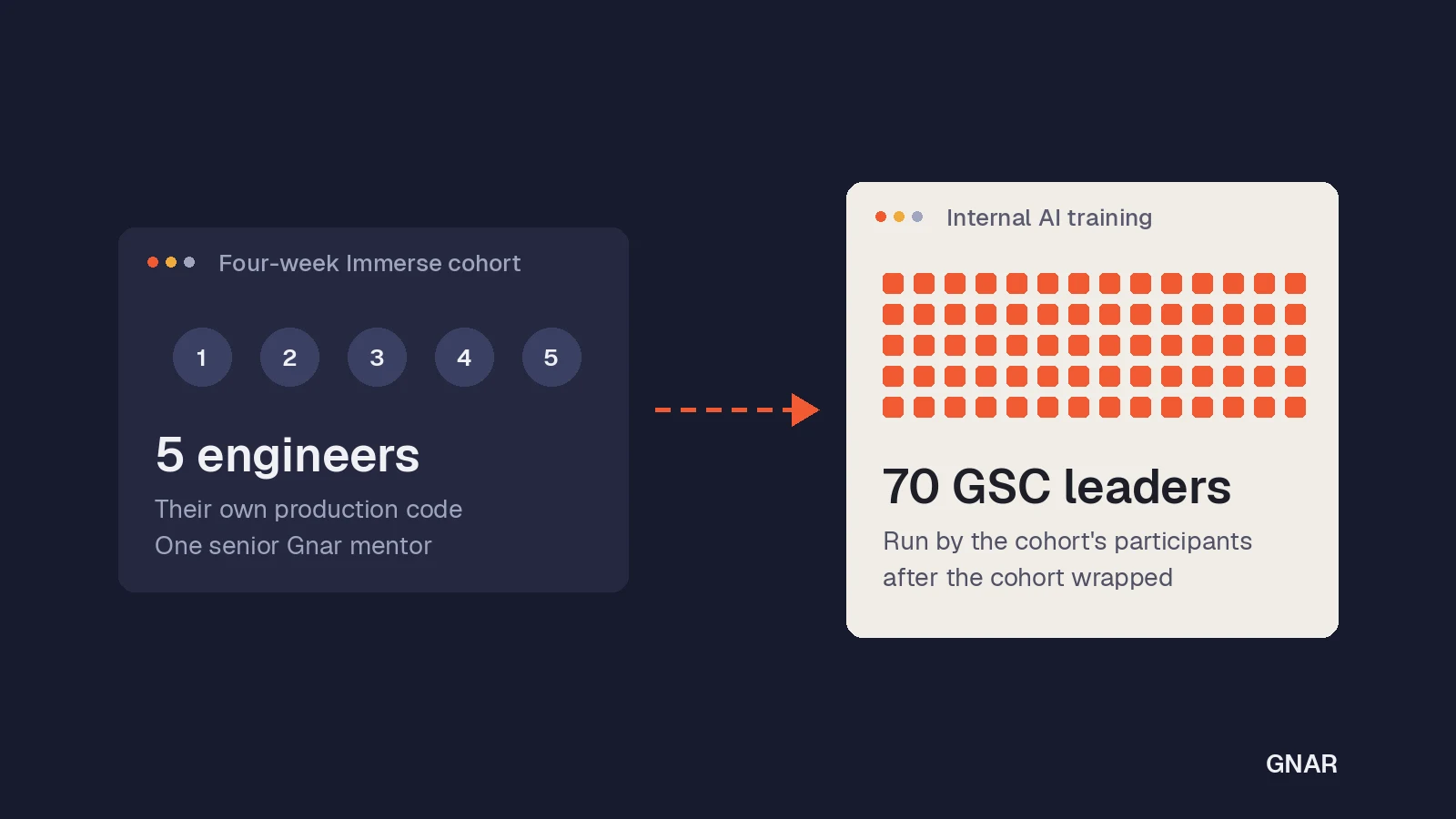
This is a Claude Code case for an engineering team. It is not a shadow AI or policy case, and it should not be read as one. It matters here for one reason: it shows what moving from individual habits to one shared practice looks like. The page reports that "5 of 5 reached Systematize or Orchestrate on all four fluency dimensions." It also says "PRs flagged by GSC's automated code reviewer fell from roughly 100% to under 10%, with no change to the tool." Those are the page's own figures, and they describe five engineers. After the cohort wrapped, the page says, "the participants ran an internal AI training for 70 GSC leaders." Our post on how five engineers trained 70 leaders on AI tells that part in full.
Your version for the wider company will look different. You measure it by use, not by attendance. After training, check whether the share of people on the approved tool went up and whether the exception requests changed from "can I use X?" to "can the tool do Y?"
Who owns each step of AI governance?#
Each step of shadow AI governance needs one owner who answers for it, and the CIO owns the whole. The table sets out a starting split for a mid-size company. IBM's report page says that "shadow AI isn't just a technical problem, it's also a cultural one." That is why HR and department heads appear next to IT and the security teams.
| Step | Owner | What they sign off |
|---|---|---|
| 1. Find the AI tools in use | IT, with HR and legal | The survey wording, the inventory sheet |
| 2. Set the data rules | Security, with legal and data owners | Each rule and its exception path |
| 3. Approve a tool and run the intake | CIO, with security | The approved tool list, the intake answers |
| 4. Train people | HR or the learning lead, with department heads | The training content by role |
| 5. Read the numbers monthly | CIO | The monthly read, the next actions |
| Ongoing: exceptions and incidents | Security | Each exception and each report of a mistake |
The CIO should name these roles in writing, with no one left as "shared." If you want more on who owns the work after launch, our post on who should own a Claude rollout covers that for a Claude program. The logic carries over to any approved tool.
Gartner's three recommendations map onto this table: policies in step 2, audits in step 1 and the monthly read, and the SaaS review in step 1 and the intake. You do not need a new committee. You need names.
What do you read every month?#
Step 5 is a short monthly read that shows whether shadow AI is moving onto the approved path, and it is how you manage shadow AI after the first month. Set your own baseline in month one. This post does not offer a benchmark, because no source we can cite gives a fair one for your size and industry.
Check these each month:
- [ ] Tools found against tools approved. Is the gap smaller?
- [ ] The share of active users on the approved tool, not on personal accounts, and how AI usage patterns change over time.
- [ ] Exception requests: how many, and how long each took to answer.
- [ ] Training completed, by role.
- [ ] Any incident or reported mistake, and what changed afterward.
- [ ] New AI tools found since last month, including new built-in AI tools in software you already use.
- [ ] Any tool whose risk rating moved.
Read the list with IT and security at the table. Track unapproved AI tools separately from approved use, so you can see whether governance is changing behavior. The question for each line is "what do we do differently next month?" If a line never leads to an action, drop it.
A falling number of exception requests can mean two things. People may be happy with the approved tool, or they may have stopped asking. Check against the share of users on the approved tool before you decide which. If you roll out Claude, how to monitor Claude usage after the rollout covers the usage side. It does not repeat here.
Do you need an outside firm?#
Often you do not need an outside firm to run shadow AI governance. The Gnar Company's own line on this is: "If your own team has the capacity and the direction, you do not need us." Steps 1, 2, 3 and 5 are work for IT, security teams, legal and HR. A competent team can run all four with the tools it has today.
To manage shadow AI day to day, you do not need Gnar. Two things Gnar does may help you with this problem.
First, it trains teams on the approved tool. Its AI strategy and fluency page describes cohorts for engineers and business teams. The training page for engineering teams says Immerse "isn't a course we wrote for clients. We built it to train our own engineering team into Context-Driven Development." The strategy and training phases are advisory and are not under the guarantee.
Second, it connects AI to the systems where your data lives, so people stop pasting it by hand. That is a build engagement, scoped on the enterprise AI integration page. For build work, Gnar's published guarantee reads: "Three commitments on every build engagement: a fixed milestone price with any overage on us, a guaranteed outcome meaning the software works as specified or we fix it, and a twelve-month bug-free warranty. It covers Discovery, Build, Forge and Maintain. It does not cover Embed. On Compass, Immerse and Integrate, ask us."
If you want a first step that costs nothing, the free AI Readiness Assessment is a 10-question check of where your organization stands. It shows the gaps in your wider AI plan and AI roadmap. A plan is what 60% of leaders in the Microsoft and LinkedIn 2024 survey said their company lacked, and enterprise AI use without one is where shadow AI grows.