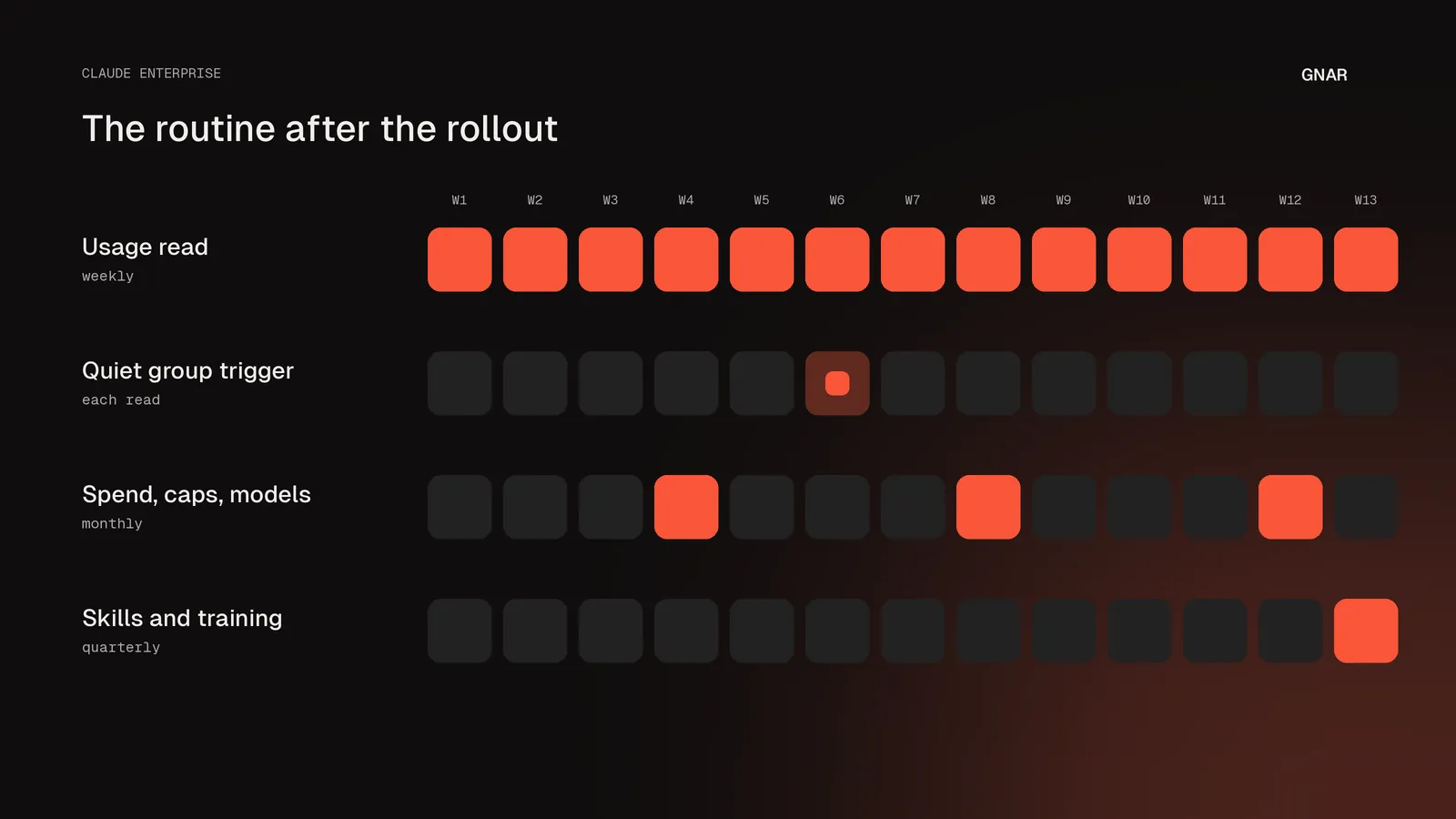
Monitoring Claude Enterprise after the rollout is a routine with four recurring jobs. A group owner in each department reads usage for their group on a set cadence. A trigger, written in advance, says what happens when a group goes flat. A monthly review covers spend, caps and models. A quarterly review removes the skills nobody runs and updates the ones still in use.
Anthropic's own material sets most of that cadence. Its Claude Enterprise consumption guide says to "Review group consumption weekly during initial rollout, monthly thereafter." Its rollout course describes the person who keeps Claude running as someone "in the admin console every week." This post turns those lines into a checklist for an IT director whose rollout has ended and whose usage numbers are drifting. Where an item is our advice and not Anthropic's, the post says so.
Part of what the routine watches is the connections between Claude and the systems a company runs. Enterprise AI integration connects an AI model to the systems a company already runs, such as its ERP or CRM. The Gnar Company builds those connections, with the limits you choose for each one. Gnar is a Claude Select Services Partner in Anthropic's Claude Partner Network.
What does monitoring Claude Enterprise after the rollout involve?#
Monitoring after the rollout involves four jobs: a usage read by group, a trigger for a quiet group, a monthly review of spend, caps and models, and a quarterly review of skills and training. Each one has a set cadence and a named person who runs it.
Two roles run the routine. The first is a group owner in each department, which Anthropic's consumption guide suggests. The second is a program owner, which Anthropic's administrator guide asks you to designate in its Scaling Adoption phase. The consumption guide says to "Review group consumption weekly during initial rollout, monthly thereafter", and the administrator guide gives quarterly for training. The split between a usage read and a monthly spend review is general advice, as is the rest of the table.
| Job | How often | Who runs it |
|---|---|---|
| Usage read, group by group | Weekly during rollout and, as general advice, while usage drifts, then monthly | Each department's group owner |
| Quiet group trigger | Written once, checked at every read | Program owner |
| Spend, caps and models | Monthly, and after each model launch | Program owner |
| Skills and training | Quarterly | Program owner |
How often should you read the usage numbers?#
Read them weekly while usage is still moving, and monthly once it settles. Anthropic's consumption guide puts it as weekly during initial rollout and monthly after that. Its rollout course starts the spend review at monthly and tightens it while the picture is still forming.
The course's lesson on managing spend says to "start monthly." Its reason is that "once the defaults are set, spend moves slowly." It then says to "Tighten to weekly or biweekly while the picture is still forming." Its examples include "the first months of a rollout, a new surface or group coming online, a budget with no headroom." When the need for changes begins to plateau, it says to stretch the cadence back out.
As general advice, a rollout whose usage is drifting is a picture still forming. Read it weekly until the numbers stop moving between reads, then go back to monthly.
Who should run the weekly read?#
A group owner in each department should run the weekly read for that department, and the program owner should read the company view. Anthropic's consumption guide suggests naming a group owner in each department to review usage and answer the team's questions.
The guide gives the reason: "This distributes the admin burden and puts someone with business context in the loop." In the rollout course's own example, a fictional company called Pluto sees its Ops group flat and "asks the Ops lead" to find the cause.
A group owner does not need to be an Owner or an Admin. The consumption guide says to create a custom role that grants the Analytics (Can view) admin permission. Billing (Can view) is optional and adds the Usage page. Two limits apply. "Admin permissions only apply to members whose role is set to Custom, and Analytics view access is organization-wide rather than limited to their group." For a view of one team alone, the guide says you can let a group owner run smart reports scoped to their groups. Anthropic's usage analytics article says usage analytics "are available to Team plan Owners and Primary Owners, and Enterprise plan Owners, Primary Owners, and Admins". It adds: "Enterprise Admins can view all analytics except Spend." Check that the custom role shows the analytics in your organization before you rely on it.
As general advice, the program owner should hold the Owner role. Anthropic's course says its five rollout decisions "are organization-wide settings that take Owner-level access." Anthropic's skills article says owners can remove organization-wide skills. The administrator guide also suggests "a lightweight Center of Excellence to curate prompts, Skills, and playbooks."
Checklist: the weekly usage read#
The weekly read is five checks for one group: active members, returning members, light users, skills and connectors in use, and the pace goal. Items 1 and 4 quote Anthropic's usage analytics article, item 2 quotes the rollout course's adoption signals lesson, item 3 quotes the consumption guide, and item 5 quotes the course's example pace goal.
- Active members against assigned seats. The analytics overview lists "Active members and assigned seats" and "Groups" under the question "Who's using Claude?"
- Members who came back. The course's adoption signals lesson lists "Members returning week over week" as a breadth signal. It tells you "Whether members come back or try Claude once and stop."
- People using very little. The consumption guide says to "watch for users consuming very little, who may not be activated yet."
- Skills and connectors in use. The overview lists skills "including cost per use and number of uses" and connectors "including the number of users, plus counts of read and write actions."
- The pace goal. Read each number against the goal agreed for that group. The course's example, which it reads monthly, is Pluto's: "every unit returning weekly by quarter's end, read monthly on active members by group."
Engineering groups have a Claude Code page in the same analytics, with pull requests and lines of code written with Claude Code, and cost per session. Pairing those with delivery work is a separate job, covered in how to measure a Claude Code rollout.
What should trigger a closer look at a quiet group?#
A closer look starts when a group's active members sit flat or fall against the goal set for it. Write that rule before the group goes quiet. As general advice, the rule names the signal, the level and the first step. Anthropic's adoption signals lesson asks admins to "Choose one group you'd most expect to lag, and decide now what a flat number there would prompt you to do first."
The course's work-along companion, the rollout plan admins fill in lesson by lesson, has a line for it. That line reads "The group you most expect to lag, and what a flat number there would prompt you to check first." Under it is a blank for the date: "Read against the goal on:"
Write the trigger down because the same low number can mean opposite things. In the course's example, Pluto's Ops group sits flat at about ten percent of members active. The cause the course gives is field staff still waiting on their team enablement session. The course adds: "Same count, and the interpretation would have been the opposite for a team that once had access and stopped coming back."
As general advice, give each group's trigger three parts:
- The signal and the level. For example, active members in the group flat or falling for three weekly reads in a row. That example is illustrative; set the level with the group's lead.
- Which kind of quiet. In the course's table, a low count of active members by group points to access and awareness. A low count of members returning week over week points to onboarding and expectations.
- The first step and who takes it. Name the person and the first check they run.
When a trigger fires, the diagnosis starts. Our post on low Claude adoption after a rollout sets out four checks in order, starting with whether the group can open Claude at all. The routine's job ends when the trigger fires and the right person starts those checks.
Checklist: the monthly spend and cap review#
The monthly review covers five things: time at limit, caps in both directions, increase requests, spend alerts, and what the spend figures cover. Items 1, 3 and 4 quote Anthropic's consumption guide. Item 2 quotes the managing spend lesson, and item 5 draws on the usage analytics article and the Claude Code costs page.
- Time at limit. The consumption guide says to "Check Time at limit on the Usage page monthly to see how often members are reaching their limits." It adds: "Rising time at limit means members are getting blocked mid-task."
- Caps in both directions. The course says to "Review the caps on a cadence, in both directions: which members and groups are reaching their caps, and which are underutilizing."
- Increase requests. When a group keeps approaching its limit, the guide says to "investigate before automatically raising it." A smart report scoped to that group shows what the spend is producing, or a short survey can ask the group directly. "If the report shows high-value work, raise the limit, because members at their limit are often your top adopters."
- Alerts. "Spend-threshold alerts notify admins at 75% and 90% of an org-level spend limit."
- What the figures cover. On a seat-based Enterprise plan, the usage analytics article says spend reports appear only if usage credits are on, and "The spend data covers overage spend only." Anthropic's Claude Code costs page says the analytics dashboards do not cover Claude Code usage on Amazon Bedrock, Google Cloud's Agent Platform or Microsoft Foundry.
The course gives one review as an example. In month two, Pluto's Platform group hit its cap and asked for more. The review "showed most of that spend was the most capable model running routine pull-request summaries." Pluto lowered the default model on the Engineering role "and left the cap where it was." The next month, Platform ran under its cap with the same volume of work.
As general advice, give month end a week before you call its figures final. The consumption guide's Analytics API section says cost data "can be revised until seven days after the end of the month it belongs to."
How do you review model choices each month?#
Compare the models people actually pick with the defaults you set, and check the default after each model launch. Anthropic's consumption guide says to "Periodically audit which models your users are actually selecting. If usage is far from your defaults, check whether your model guidance is landing."
The managing spend lesson explains why the default carries so much weight: "Most members never touch the picker." If the default is the most capable model at a high effort level, it calls that "your most expensive configuration and the one most of your usage will run on." The consumption guide says the Analytics page shows spend by model, and the spend report export breaks spend down per user and per model.
Check which default setting you chose. Anthropic's default model article gives two options. "Use Anthropic's recommended default" picks a model "that updates automatically when new models are released." "Choose a specific model" picks one "that won't change when new models are released." The same article says Claude remembers each user's last selection unless an admin turns on "Always start with the default model and effort level." It adds: "When you update the default again, the new default replaces their selection."
As general advice, put model launches on the review calendar. Anthropic's release notes list the launch of Claude Opus 5.5 on September 22, 2026, Claude Sonnet 5.5 on September 28 and Claude Haiku 5.5 on October 7. Under January 16, 2026, they say Anthropic removed Claude Opus 4 and 4.1 from the Claude model selector and Claude Code.
A launch can also change which model fits routine work. For high-volume, low-complexity workflows, the consumption guide says to "evaluate whether Haiku is a better fit." Anthropic's Claude Haiku 5.5 announcement says the model "is designed for high-volume, cost-sensitive tasks."
For connections Gnar builds to a company's own systems, Gnar's integration page says: "AI models get replaced. Your connections are not tied to one model, so the next one uses the same connectors and rules."
What do you check when a new Claude product arrives?#
Run the three questions that Anthropic's rollout course gives for each new product. Anthropic's lesson on new products says "New products arrive regularly," and asks "Who gets it?", "What does it carry?" and "Does it move risk?"
Most of your structure carries over, and the lesson calls that "the typical outcome." It also says to "Re-check those settings against anything new about the surface." Its example is Claude Tag, a way for teams to work with Claude inside Slack, in beta on the Team and Enterprise plans. The consumption guide says Claude Tag channel work "bills to the organization's usage balance rather than to individual seats, so per-user and group limits don't cap it." A new product can add a spend line that your monthly review does not yet read.
How do you retire or update skills nobody uses?#
Export the skills table, find the skills with no runs in the quarter, ask each one's group owner, then remove them or approve a new version. The Skills view in Claude's analytics shows users, cost per use and total uses for each skill, and an Owner removes a skill from the organization library on the Inventory tab.
The course's lesson on governing customizations names the risk of skipping this. Left ungoverned, it says, "your organization could end up with tens of near-duplicate skills, untested workflows spreading to teams that assume they were reviewed."
This checklist quotes the consumption guide for items 1 and 2 and Anthropic's skills article for items 3 to 5. Item 6 quotes the governing customizations lesson.
- Export the table. The guide says to "Export the skills table to CSV from the Skills view." The view filters by group, such as "what skills is my legal team using?"
- Check who actually runs it. The Analytics API breaks skill, plugin and connector use down per user. The guide gives the use: "confirming a plugin rollout actually landed with the team it was distributed to, rather than just checking that it was installed."
- Remove what nobody runs. On the Inventory tab, choose "Remove from library" from the menu at the end of the skill's row. "Once removed, the skill will no longer appear in users' skills lists."
- Update what still earns its place. "When you approve a new version, everyone who uses the item gets the update automatically." The article adds: "If the author leaves, the published item stays in the library."
- Narrow what only one team uses. The article's advice: "When a skill is only relevant to one team, bundle it into a plugin and assign it to that group instead of provisioning it to everyone."
- Recheck after a policy change. A stricter publishing setting does not remove what is already published. The lesson says to "review the skills in heavy use against the new rule and remove any that don't meet it."
As general advice for the cutoff, treat a skill with no runs in the quarter as a candidate to remove, and ask its group owner before you remove it. New skills come from the same review. The consumption guide says smart reports list "the recurring workflows you can turn into skills."
What else goes in the quarterly review?#
The quarterly review also refreshes training, rechecks governance settings and confirms that someone reads each log. Anthropic's administrator guide sets quarterly for training. Anthropic's rollout course, in its visibility lesson, gives the reason for the third: a log nobody reads does not work as a control.
| Item | What Anthropic's material says | Where it comes from |
|---|---|---|
| Training | "Refresh training materials quarterly" | Administrator guide |
| New hires | "Incorporate Claude onboarding into your standard new hire orientation" | Administrator guide |
| Governance settings | "Review data retention policies, audit log cadences, and project visibility defaults" | Administrator guide |
| Connectors | "Maintain an allowlist of approved connectors and extensions" | Administrator guide |
| Feedback | "Run periodic user surveys, champion roundtables, and usage analytics reviews" | Administrator guide |
| Logs | "a record no one reviews isn't actually a control" | Course, visibility lesson |
In the administrator guide, the governance items sit under "As usage grows, revisit your governance posture," with no set cadence. Putting every row except training in the quarterly review is general advice.
Connections Gnar builds come with their own record. Gnar's integration page says Gnar builds "the connectors with access rules and a request log built in from the first release." It describes the log as "Who asked, what the AI looked up, and what it changed. Your security team can review the log." As general advice, add that log to the list of records someone reads each quarter.
When does outside help make sense?#
As general advice, a company's own admin and department leads can run this routine, because most of it is reading numbers and changing settings. Outside help fits two cases: a connection to a system such as an ERP that has to be built and kept running, and an engineering team that has Claude Code but no shared way to use it.
For the first case, Gnar's integration page answers whether your own engineers should build it instead: "Often they should. If your own engineers have the capacity and the direction, do it internally. The Gnar Company will say so on the call." On who runs a connection after launch, the page says "Your team or ours." It goes on: "Or Gnar keeps it running on Maintain, its monthly support plan, from $1,000 a month." The page's first step reads: "Start with Gnar Discovery and Design, from two weeks and $15,000. You leave with a build plan that has a fixed price on it."
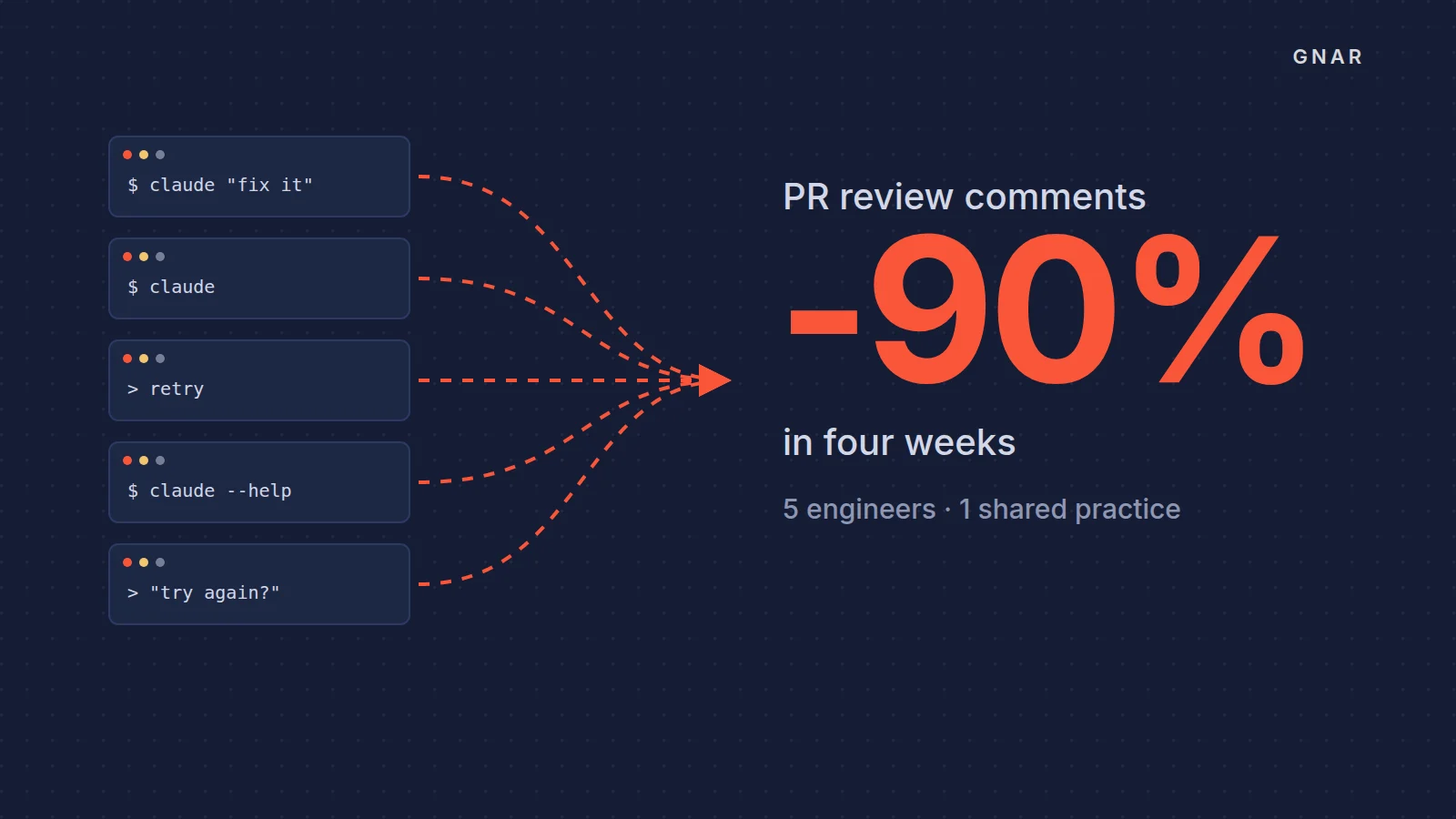
The second case is training. Gnar's AI training for engineering teams, Immerse, is "Built for a small team that already has the tools but not the practice." At GSC Enterprises, a four-week Immerse cohort of five engineers ran on their own production code, as the case study describes. After the cohort, the participants ran an internal AI training for 70 GSC leaders.