When Claude seats go quiet after launch, check four causes in this order: configuration, champion coverage, content relevance and use-case fit. Configuration asks whether a group can use Claude at all. Use-case fit asks whether the group has work that Claude helps with. The order is for checking. It says nothing about which cause is most common in your company.
Start from the usage numbers, and read them as clues. Anthropic's own rollout course treats adoption signals as diagnostics and says "a low number tells you where to look, not what you'll find." So read the numbers group by group, rule out one cause at a time, and change one thing before you read them again.
The third cause can end in an engineering job. A team may need Claude to work from orders and stock in an ERP, the system that runs orders and inventory, or from customer records in a CRM. Someone has to connect Claude to those systems. The Gnar Company, a Claude Select Services Partner in Anthropic's Claude Partner Network, builds those connections as enterprise AI integration, with the access rules set one system at a time.
What does a quiet rollout look like in Claude's analytics?#
A quiet rollout shows up as a gap between assigned seats and active members, or as members who try Claude once and do not come back. Anthropic's usage analytics for Team and Enterprise plans show both. The admin analytics dashboard shows usage by group in its Groups panel, and Enterprise companies can also pull it through the Analytics API, which the Primary Owner turns on. Read it before you guess at a cause.
Anthropic's usage analytics article lists what the admin dashboard reports. It includes weekly active members, active members and assigned seats, groups, adoption level, product stickiness, and connectors with their number of users. On the Team plan, Owners and Primary Owners can see it. On the Enterprise plan, Owners, Primary Owners and Admins can, though Enterprise Admins cannot see spend.
A group, in Claude Enterprise, is a set of members you manage together, such as Engineering or Sales. Anthropic's course pairs each adoption signal with a place to look when it is low. The first two columns below quote four of its signals. The last column is our mapping of each signal to the first of the four checks it points at.
| Signal, from Anthropic's course | When it is low, Anthropic says to look at | The check it points to first |
|---|---|---|
| Active members, by group | Access and awareness: does that group have Claude, and has it been properly enabled? | Check 1, then check 2 |
| Members returning week over week | Onboarding and expectations: what did the first session promise? | Check 2 |
| Chats per active member | Fit: do this group's surfaces and connectors match their workflows? | Check 3, then check 4 |
| Connector use | Your connector scope: does it allow connectors to create value in members' workflows? | Check 3 |
The same lesson adds a caution about reading these numbers: "A high count can be one enthusiastic team, and a low one can be a team that was never properly enabled." That is why each check below starts with one quiet group. The company total can look fine while one department has stopped.
Why check the causes in this order?#
Check configuration first because it is the quickest to rule out, and check use-case fit last because it takes the longest. The order follows how long each check takes. It does not rank the causes by how often they happen, and the answer for your company can come from any of the four.
A configuration check is a set of settings that an admin can look up. The champion check compares two lists. The content check matches a group's daily tools against what is connected. The fit check takes time with the people who do the work.
Anthropic's course shows why the order is not a ranking. In its worked example, a fictional company called Pluto finds its Ops group flat at about ten percent of members active. Most of Ops was field staff who had not yet had their team enablement session. The course says, "The fix is usually enablement, not a settings change." Configuration still goes first in this list because ruling it out is cheap, and training does nothing for a group that cannot open Claude.
Check 1: Can the quiet group use Claude at all?#
Start by proving that the quiet group can open Claude and reach what it was promised. Claude Enterprise has several layers of access, and any one of them can be closed while the rest look fine. Work through this list for one quiet group at a time.
- [ ] The surface is on, and the group's role grants it. A surface is a place members use Claude, such as chat, Claude Code or Claude for Microsoft 365. Anthropic's lesson on surfaces says the organization-wide toggle is the ceiling and the role grant decides who has access under it. Members on the built-in roles get every surface that is on. A member on a Custom role gets a surface only when you grant it.
- [ ] Developers have a seat type that includes Claude Code. Anthropic's administrator guide says Standard and Chat-only seats do not include Claude Code access. Claude Code needs a Premium seat on the legacy seat-based model, or a Chat + Code or Claude Enterprise seat on the usage-based model.
- [ ] Claude Code is turned on in the desktop app. The same guide says a Desktop setting controls whether members can use Claude Code in the desktop app. It is off by default in organizations that have HIPAA enabled, and a device policy can also turn it off.
- [ ] All three connector gates are open. A connector lets Claude reach another application, such as a drive, a wiki or a ticket tracker. Anthropic's connectors lesson names three gates: the organization, the role and the member. All three must be open. By default the member gate means each person connects their own account. Enterprise-managed authorization can grant access centrally through your identity provider, but only for connectors whose provider supports it.
- [ ] Enterprise search was set up. Enterprise search is a project that searches across a company's connected tools. Anthropic's enterprise search article says it is enabled by default for Team and Enterprise organizations, and that an Owner has to complete the initial setup before other members can use it.
- [ ] Nobody in the group is stuck at a spend cap. A spend cap limits how much a member can use in a month. When a member hits one, Anthropic's spend caps lesson says their usage is paused until the limit resets or an approved request lifts it. It adds that in-product requests "can sometimes wait days for a decision."
If any box stays unchecked, fix it and read the same group's numbers again before you move on. On the dashboard, a closed gate and a group that has lost interest produce the same low number.
Check 2: Does each quiet group have someone to ask?#
Each quiet group should have at least one named person its members can go to with a Claude question. Anthropic's administrator guide suggests two to three champions per department or team. It describes champions as "enthusiastic early adopters who can help drive adoption across their teams."
The check here is coverage. A list of champions says nothing about the groups that are missing from it. Compare the list of quiet groups with the list of named champions, one group at a time.
The guide asks you to give champions early access, advanced training, talking points and a Slack or Teams channel for peer support. It suggests weekly office hours with champions or power users. It says drop-in sessions where users bring real work are especially valuable in the first 30 to 60 days. Anthropic's consumption guide adds a related role. It suggests a "group owner" in each department who reviews usage and fields questions from their team. That person does not need to be an Owner or an Admin, but still needs a custom role with permission to view analytics.
A coverage sheet for this check needs five columns. Fill it from your own admin settings and department leads.
| Column | What goes in it |
|---|---|
| Group | The group name as it appears in Claude's admin settings |
| Active members and assigned seats | From the Groups panel of the admin analytics dashboard, or on Enterprise from the Analytics API, which the Primary Owner turns on, for the same weeks across every group |
| Named champion | A person, or "none" |
| Group owner | The person who reviews this group's usage, or "none" |
| Last session on real work | The date of the group's last office hours or team session |
A workable rule: a quiet group with "none" in the champion column gets a champion before it gets anything else. A quiet group that has a champion and still has low numbers moves on to check 3.
Check 3: Can Claude see the material the group works from?#
Check what Claude can reach for the quiet group: its files, its systems and its company context. Without that material, members have to paste their work into a chat by hand, or Claude answers in general terms.
Anthropic's connectors lesson says a connector lets members "bring their live work context into a conversation instead of pasting or uploading it in." It also describes enabling a first connector for a group as a move with a large effect in a rollout. Check four things for the quiet group:
- [ ] A shared Project. A Project is a workspace with its own chat history and knowledge base. Anthropic's Projects article says you can upload documents to it and define instructions for each project.
- [ ] Connectors for the group's main tools. List the applications the group works in every day, and confirm that each one is connected through all three gates.
- [ ] Enterprise search that reaches the group's sources. Setup alone does not settle this. Confirm that the connected tools include the ones this group searches.
- [ ] Organization instructions. Anthropic's consumption guide says admins can use them to "Point users to internal resources," such as a team wiki or a set of usage guidelines.
Anthropic also gives admins two ways to find the gap. Its consumption guide describes smart reports, which review a sample of transcripts and list the most common frictions. It describes in-product surveys as well, and suggests asking where Claude is not helping, because "Answers often point to a connector, skill, or model setting to change."
When the material lives in an ERP or CRM#
Some of a team's material does not sit in a drive or a wiki. Orders, stock and customer records live in the ERP and the CRM. When no ready-made connector reaches one of those systems, the connection has to be built.
On Gnar's integration work, most of those connections are small programs called MCP servers. The Model Context Protocol site describes MCP as "an open-source standard for connecting AI applications to external systems." Gnar's first step, from its service page, is this: "We list each system AI needs to reach, what it may see and change, and who signs off." A connector can be read only, so Claude can find an order or a customer and cannot change anything through it. When Claude does need to make changes, every change passes one checkpoint the company controls, which checks permission first.
That approach, set one system at a time, fits the pattern Anthropic's connectors lesson calls common: read access first, then write access "once a workflow has demonstrated the need and the risk owner has signed off."
Check 4: Does the group have a task Claude helps with?#
Ask the group's lead which task the group repeats every week, and who on the team can judge Claude's output on that task. Use-case fit is the last check, and the only one where the honest answer can be no.
Anthropic's administrator guide says to "Prioritize teams with strong use case fit and willing champions," and to start each new team with "a brief needs assessment to identify high-value workflows." It describes department sessions built "around each team's actual workflows," and asks admins to work with team leads to identify high-value use cases and to provide ready-to-use prompt templates. Anthropic's surfaces lesson applies the same test to access, and says to grant a surface on what the group "needs and will use."
Ask the lead a third question as well: what did the group try, and where did it stop? Anthropic's guide suggests a brief retrospective at each phase of a rollout, built on three questions: "What use cases emerged? What barriers remain? What should change for the next phase?"
Gnar's AI strategy work scores AI opportunities across five dimensions before anyone builds anything. The AI strategy page lists five dimensions: ROI, implementation cost, data readiness, reasoning risk, and behavior-change cost. The last of those belongs in a fit check. A task can suit Claude well and still cost the team more in changed habits than it returns. The same page promises "a clear view of what not to build."
If a group has no repeated task that Claude helps with, fewer seats in that group is a fair result. That is a choice about where seats do work.
What did GSC's engineers have, and what was missing?#
GSC's engineers had Claude Code and were already using it. What they were missing was a shared way to use it. GSC was not a quiet rollout, and the case is here for checks 2 to 4.
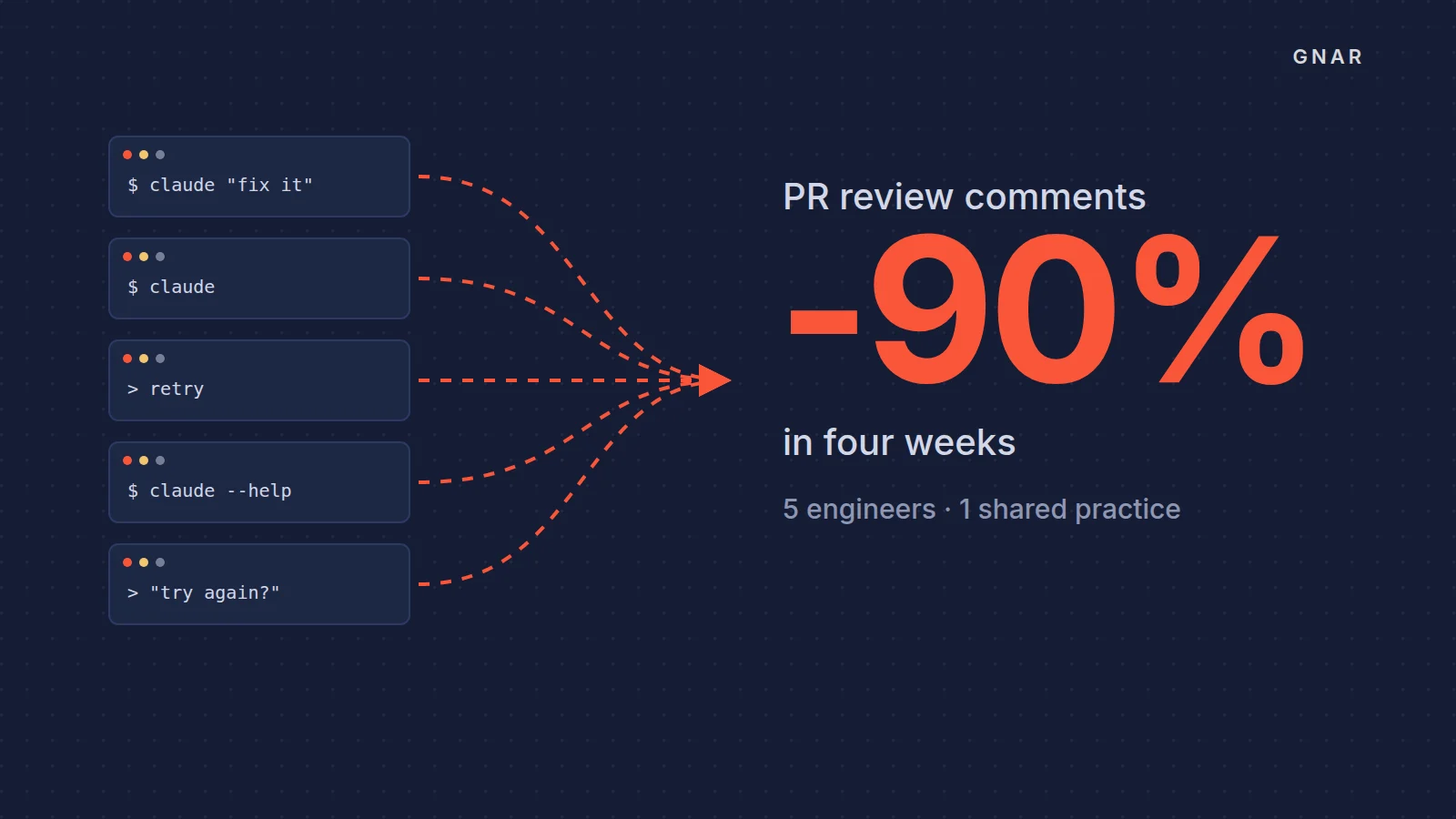
GSC Enterprises is the wholesale distributor behind Grocery Supply Company. Its five engineers support a custom ERP, integrations with an IBM i system and analytics in Snowflake. The case study states the problem plainly: "Each of them had adopted Claude Code, and each used it differently. Results were inconsistent, and nobody could say which habits produced good output and which produced rework."
Gnar ran a four-week Gnar Immerse cohort for the team, led by one senior Gnar mentor. Immerse is Gnar's mentor-led training program, run on a client's own code. The case study reports parts of that work that line up with the checks in this post:
| What the case study reports | The check it speaks to |
|---|---|
| Two 45-minute 1:1s per engineer per week, a weekly cohort check-in, office hours and a dedicated Slack channel | Check 2: someone to ask |
| MCP connectors for Snowflake, Atlassian, Microsoft 365 and GitHub brought GSC's real systems into the loop | Check 3: material Claude can see |
| The cohort ran entirely on GSC's production codebases, with no training repos | Check 4: real tasks |
The clearest external signal came from a tool nobody changed. GSC runs an independent code review agent on every pull request. Over the four weeks, "PRs with review-agent comments went from roughly 100% to less than 10%." After the cohort, the participants ran an internal AI training for 70 GSC leaders. That is people inside the company teaching others.
How do you know a fix worked?#
A fix worked when the same signal, for the same group, moves toward a pace goal you wrote down before the fix. Anthropic's adoption signals lesson asks admins to set one, such as "Every granted group returning weekly within eight weeks." Do not turn the numbers into a quota: "members optimize for the number instead of the work." Our post on why a license is not AI adoption argues for measuring what changed in the work itself.
When does outside help make sense?#
Outside help makes sense for the content and fit checks, and for champion coverage on an engineering team, when nobody inside has the time or the skills to close them. Configuration is a set of settings, and your admin owns it. Champions are your own people, though an engineering team can work with an outside mentor while its own people learn.
Three kinds of help fit those checks:
- Content, check 3. Gnar's enterprise AI integration connects Claude to the ERP, CRM and databases a company already runs, with read access and change access granted separately.
- Fit, check 4. Gnar's AI strategy work ranks use cases by ROI before anything gets built.
- Engineering teams, checks 2 and 4. Gnar's AI training for engineering teams runs Immerse, which the page says is "Built for a small team that already has the tools but not the practice."
When the fix is a build, it starts with a plan. The first step is Gnar Discovery and Design: "Two weeks, $15,000, and you walk out with a build plan that has a fixed price on it." And when a company has engineers of its own, Gnar's stated answer applies: "If your own engineers have the capacity and the direction, do it internally and we will say so on the call."