This post is for a VP of Engineering deciding how their own team should work with Claude Code. It covers the workflow The Gnar Company has written down for its own engineers. It also shows where each step can live in Claude Code. It matters because a team can own the tool and still get uneven results. At GSC Enterprises, "Each of them had adopted Claude Code, and each used it differently," according to Gnar's GSC case study.
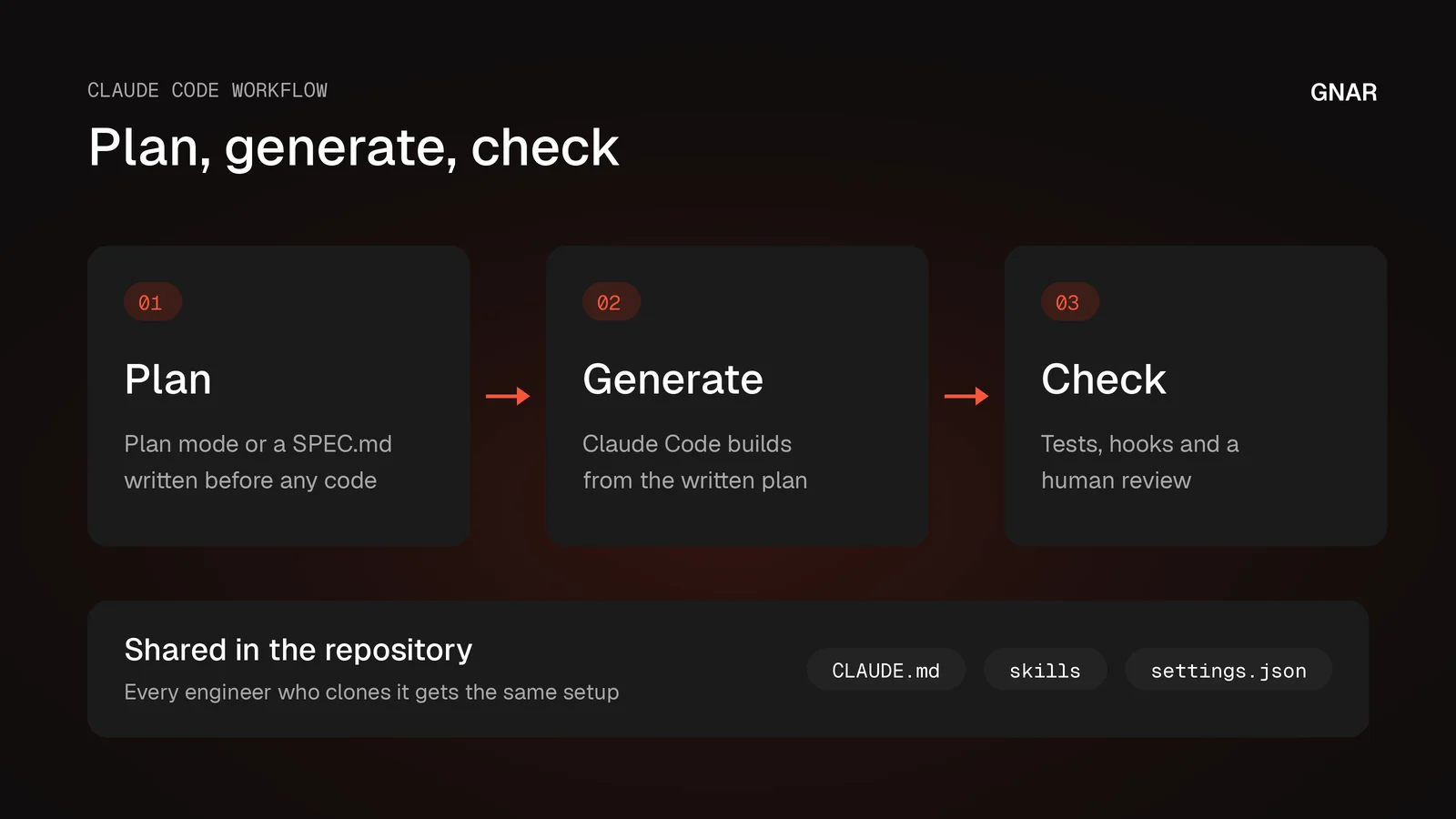
The short answer comes from Gnar's careers page. "First the engineers write down the context: a clear plan for the software. Then AI agents write code from that plan. Then the engineers check every result before it ships." The page adds, "The team calls this way of working Context-Driven Development."
Gnar's guide for technical leaders names a different primary tool. It says, "The Gnar Company uses Cursor as our primary tool for AI-assisted development, with GitHub Copilot for code reviews." Nick Maloney's Context-Driven Development post says, "The methodology is tool-agnostic." This post takes that written method and shows where each step lives in Claude Code. The Claude Code details come from Anthropic's own docs.
The Gnar Company is a Claude Select Services Partner in Anthropic's Claude Partner Network. Its AI training for engineering teams runs a cohort called Immerse. The page says, "Immerse isn't a course we wrote for clients. We built it to train our own engineering team into Context-Driven Development."
What does Gnar's workflow look like in Claude Code?#
Gnar's written workflow has three steps: plan, generate and check. In Claude Code, the plan can live in plan mode or a SPEC.md, the standing rules in CLAUDE.md, and the checks in hooks and subagent reviews. Each of those habits is written down on a Gnar page or post. Each one also has a home in Claude Code.
The table pairs each written habit with the Claude Code feature that can hold it. The middle column names where Gnar says it. The right column comes from Anthropic's Claude Code docs, read November 18, 2026.
| Gnar's written habit | Where Gnar says it | Claude Code feature |
|---|---|---|
| Write down the context first | Careers page | Plan mode and a written SPEC.md |
| Keep standing rules the agent reads | Mike Stone's post on bad agent decisions | Project CLAUDE.md |
| Check every result before it ships | Careers page and the agentic guide | Hooks, subagent review, a test suite |
| Package recurring work | Mike Stone's license post | Skills, hooks and saved workflows |
| Keep agents in a boundary | GSC case study | Sandbox mode and git worktrees |
The last two rows come from what Gnar teaches and what a client cohort used. They do not describe a Gnar engineer's own setup. The sections below say which is which.
What did Gnar find on its own team first?#
Gnar found its own engineers using the same tools in very different ways. Mike Stone's post Everyone Has a License. That's Not AI Adoption. says, "Nick noticed the same thing inside Gnar that we now see at clients: our engineers were all over the map." The fix was a shared practice. Gnar tested it on its own team before any client saw it.
The post describes the spread. "Some were running agents in loops. Some were still pasting code into a chat window and hoping. Same tools, wildly different results, no shared floor."
Gnar's answer was training, run on itself first. "So we built a four-week curriculum and ran our own team through it. Assessment going in, assessment coming out, so we could see movement instead of guessing at it." The same post says "we didn't offer it to a single client until we had our own before-and-after in hand."
GSC Enterprises started from the same place. The case study says the team "had already put Claude Code in the hands of its engineering team." It adds, "Results were inconsistent, and nobody could say which habits produced good output and which produced rework."
Gnar's AI training page names what the cohort measures. "Each engineer is assessed at kickoff on how they specify work, delegate it, check the output and handle safety and cost." The GSC case study calls these the Four Ds: "Description (how precisely work is specified), Delegation (how much latitude is granted), Discernment (how output is verified), and Diligence (safety, cost, and accountability)."
How does Gnar plan work before an AI agent writes it?#
Gnar engineers write the plan before an AI agent writes code. Nick Maloney's post on Context-Driven Development defines the method this way: "Context-Driven Development (CDD) is a software development methodology where detailed requirements serve as the primary input for AI-powered code generation." Each feature becomes a written work plan before any code exists.
The CDD post lists the cycle in three steps:
- "Define (Architect): Select a feature from the current milestone, convert it into a Workplan (Context Spec)"
- "Generate (AI Agent): Ingest the Workplan, write tests to match requirements, generate implementation"
- "Verify (Collaborative): Technical review for quality/security + product owner acceptance against original requirements"
Before that cycle starts, the post's "Foundation (Sprint 0)" list says to "Implement API specs and shared types first, creating the "rails" for AI agents". On a larger team, a "Lead Architect: Maintains Master Context integrity (shared config, schema, API)".
Mike Stone explains why the plan matters even when a prompt feels complete. In Why Your AI Coding Agent Keeps Making Bad Decisions, he writes, "Every time I've had that thought and then used structured planning anyway, I've been surprised at the assumptions still being made." He names AWS's AIDLC Workflows as the strongest solution he has found. The same post says "The AIDLC workflows run natively in Kiro IDE, Kiro CLI, Claude Code, Cursor, Codex CLI and GitHub Copilot."
He also names when to skip it. "For small, well-defined tasks, the overhead isn't worth it. Just prompt and review."
Where the plan lives in Claude Code#
Claude Code has two places for this step. Anthropic's permission modes page says, "Plan mode tells Claude to research and propose changes without making them." It adds, "Except in interactive terminal sessions with bypass permissions available, edits stay blocked until you approve the plan." You press Shift+Tab to cycle permission modes, plan mode among them.
The second place is a spec file. Anthropic's Claude Code guide gives this prompt: "Interview me until you could write the spec, then write it to SPEC.md." The page continues, "Once SPEC.md exists, start a fresh session to build from it, so the build begins with a clean context and a written definition of done." That SPEC.md plays the role CDD gives the Workplan.
Where do Gnar's coding rules live?#
Gnar keeps standing rules in files the agent reads before it works. In the post's section on Cursor's rules, Mike Stone writes, "At The Gnar, we maintain rules for:" three groups of standards. That post's own table says "Claude Code reads CLAUDE.md." As general advice, a Claude Code team keeps the same kind of rules there.
The three groups the post lists:
- "General code standards: keep things simple, SOLID principles, DRY"
- Language-specific conventions, such as "Ruby idioms" and "TypeScript patterns"
- "Project-specific patterns: how we structure services, naming conventions, testing approaches"
The post explains the point: "Rules function as a persistent voice in the LLM's ear: "Actually, we do it this way here."" It also says how rules grow. "When you fix the same mistake twice, add a line to your rules file so the next session starts with it." And it draws the line between rules and plans: "Rules hold what applies to every change. The requirements for one change go in a spec."
Anthropic's memory page says, "CLAUDE.md files are markdown files that give Claude persistent instructions for a project, your personal workflow, or your entire organization. You write these files in plain text; Claude reads them at the start of every session." The project file is listed as "Team-shared instructions for the project," shared with "Team members via source control." On size, the page says to "target under 200 lines per CLAUDE.md file. Longer files consume more context and reduce adherence."
Mike Stone's license post describes the tier it calls context engineering. "The project carries persistent context now. A CLAUDE.md file, durable plans checked into the repo, maybe a connector or two wired up. The work stops starting from zero every morning." Gnar's AI training page says each engineer leaves the cohort with "a maintained context file," among other things.
How does Gnar check what an AI agent writes?#
Gnar checks every result before it ships, with tests written first and a human review at each step. Mike Stone's guide for technical leaders names three practices. The first is test-driven development, so that "AI-generated code must pass clear acceptance criteria." The second is human review: "AI-generated code gets reviewed at each step of a build plan. No code ships without human eyes on it."
The third practice is architectural oversight: "Experienced developers make system-level decisions about structure, patterns, and technical direction." CDD's Verify step adds product owner acceptance against the original requirements.
Anthropic's docs give a team three ways to add checks. Each one is quoted from its own page:
- Hooks. The hooks guide says, "Hooks are user-defined shell commands. Claude Code runs them at specific points in its lifecycle, which gives you deterministic control: certain actions always happen rather than relying on the LLM to choose to run them." A PreToolUse hook runs "Before a tool call executes. Can block it".
- A separate reviewer. The subagents page says, "Each subagent runs in its own context window with a custom system prompt, specific tool access, and independent permissions." Anthropic's Claude Code guide gives a review prompt that begins "use a subagent to review the rate limiter diff against SPEC.md".
- Ask for evidence. The same guide says to "ask Claude for evidence: the command it ran and its output, or the screenshot." It warns that "All tests pass" on its own tells you very little.
Anthropic describes a similar habit on its own staff. Its article How Anthropic teams use Claude Code, dated July 24, 2025, says the Security Engineering team moved to "asking Claude for pseudocode, guiding it through test-driven development, and checking in periodically." When the work is ready, Anthropic's common workflows page says "You can create pull requests by asking Claude directly."
How do repeated tasks become skills and hooks?#
Recurring work gets written down once as a skill and enforced with settings and hooks. Mike Stone's license post describes the tier it calls harness engineering: "Recurring work gets packaged as reusable skills, guarded by settings and hooks, delegated to scoped agents. The process is the asset, not the prompt." Gnar's AI training page says each engineer leaves with "at least one reusable skill."
Anthropic's skills page gives the trigger. "Create a skill when you keep pasting the same instructions, checklist, or multi-step procedure into chat, or when a section of CLAUDE.md has grown into a procedure rather than a fact." It also says how to build one: "Create a SKILL.md file with instructions, and Claude adds it to its toolkit."
For a team, the location matters. The skills page lists the project location as .claude/skills/<skill-name>/SKILL.md and says, "Commit it so your team gets it too."
As general advice, the split is simple. A fact every change needs goes in CLAUDE.md. A procedure goes in a skill. A rule with no exceptions goes in a hook. A hook runs whether or not the model remembers it.
What are dynamic workflows, and when does a team need one?#
A dynamic workflow is Claude Code's way to run many agents from one script, and a team needs one when a task needs more agents than one conversation can coordinate. Anthropic's workflows page says, "A dynamic workflow is a JavaScript script that orchestrates many subagents at once. Claude writes the script for the task you describe, and a runtime executes it in the background while your session stays responsive."
Anthropic's article Introducing dynamic workflows in Claude Code, dated May 28, 2026, gives the scale. It says Claude "dynamically writes orchestration scripts that run tens to hundreds of parallel subagents in a single session."
The page says when to reach for one. "Reach for a workflow when a task needs more agents than one conversation can coordinate, or when you want the orchestration codified as a script you can read and rerun."
The article lists uses from "Early access users and teams inside Anthropic". One is "Codebase-wide bug hunts, profiler-guided optimization audits, and security audits." There, Claude "runs independent verification on every finding." The article says the same shape works for "auth checks, input validation, and unsafe patterns across an entire codebase."
The page separates workflows from skills by asking who holds the plan. These rows are copied from its comparison table:
| Question | Skills | Workflows |
|---|---|---|
| What it is | Instructions Claude follows | A script the runtime executes |
| Who decides what runs next | Claude, following the prompt | The script |
| Scale | Same as subagents | Dozens to hundreds of agents per run |
On access, the page says, "Dynamic workflows are available on all paid plans, with Anthropic API access, and on Amazon Bedrock, Google Cloud's Agent Platform, and Microsoft Foundry. On Pro, turn them on from the Dynamic workflows row in /config."
How does a dynamic workflow run?#
A dynamic workflow runs in the background as a script that starts the agents, keeps their results and returns one answer. The page says, "A workflow script holds the loop, the branching, and the intermediate results itself, so Claude's context holds only the final answer."
How the agents run in plain JavaScript#
The dynamic workflows page says the script body is plain JavaScript. In its words, "agent() spawns one subagent, pipeline() runs one per item in a list, and parallel() runs a set of agent tasks at the same time and waits for all of them." For its example prompts, the page says "you don't write the script yourself." Claude writes it from the task you describe.
To ask for one, the page says to include the keyword ultracode in your prompt, or to ask in your own words. Its sample prompt is "ultracode: audit every API endpoint under src/routes/ for missing auth checks". A workflow can also have independent agents "adversarially review each other's findings before they're reported."
Try the bundled workflow first#
The dynamic workflows page says, "The quickest way to see a workflow in action is to run /deep-research." It lists /deep-research as a bundled workflow that returns "a cited report." You run /workflows to open the progress view, which "shows each phase with its agent count." The page says it also "shows each agent's token usage as the run progresses".
How do you approve, save and reuse a workflow?#
You approve a workflow at a prompt that shows its planned phases, and you can save a run that worked as a slash command. The page says, "In the CLI, the per-run prompt shows the planned phases". Whether you see that prompt depends on your permission mode. In manual and accept edits modes, it comes "Every run, unless you've selected Yes, and don't ask again for that workflow in this project".
To save one, the page says: "Run /workflows, select the run you want to keep, and press s." A saved workflow becomes a team asset. Saved to ".claude/workflows/ in your project," it is "shared with everyone who clones the repo," and "The workflow runs as /<name> in future sessions from either location." The page adds, "A saved workflow can accept input through the args parameter."
What happens when a workflow hits usage limits or stalls?#
A run that hits your usage limit can pause and continue after the reset, and an agent that stalls starts over. The page says, "When an agent hits your claude.ai usage limit, the run pauses rather than failing that agent." The pause has conditions, and "when one doesn't, the affected agent fails instead."
On stalls, the page says, "An agent whose output stops arriving for long enough starts over from the same prompt." An agent "restarts at most five times, counting any restart you ask for with r."
Cost is the tradeoff. The page says, "A workflow spawns many agents, so a single run can use meaningfully more tokens than working through the same task in conversation. Runs count toward your plan's usage and rate limits." Its advice is to "run the workflow on a small slice first." The article recommends "starting on a scoped task to get a feel for usage in your work."
To turn workflows off for your whole organization, the page says to "set "disableWorkflows": true in managed settings, or use the toggle on the Claude Code admin settings page."
How does a team share one Claude Code setup?#
A team shares a Claude Code setup by committing it to the repository. The table lists three places that Anthropic's pages describe as shared through the repo. A workflow saved under your home directory, by contrast, is "visible only to you," according to the dynamic workflows page.
| What to share | Where it lives | What Anthropic's page says |
|---|---|---|
| Project rules | CLAUDE.md | "Team-shared instructions for the project" |
| Skills | skills in .claude | "Commit it so your team gets it too" |
| Saved workflows | workflows in .claude | "shared with everyone who clones the repo" |
The permissions page adds that "You can check permission settings into version control to share them with every developer in your organization, and each developer can customize their own." It also says "Rules are evaluated in order: deny, then ask, then allow." As general advice, set deny rules explicitly for anything an agent must never run. A deny rule wins over an allow rule.
How do you keep Claude Code's work contained?#
Keep Claude Code's work contained with the Bash sandbox, git worktrees and subagents limited to the tools they need. Gnar's Immerse assessment measures safety and cost as Diligence, one of the Four Ds. The GSC case study says the cohort used "sandbox mode, and git worktrees for agent isolation." Claude Code works with both.
Anthropic's sandboxing page says, "The Bash sandbox is a boundary that the operating system enforces around the shell commands Claude runs on your machine." It also says "The sandbox covers shell commands only." And "The sandbox is off by default."
Worktrees keep parallel work apart. Git's own git worktree documentation says, "A git repository can support multiple working trees, allowing you to check out more than one branch at a time." Anthropic's common workflows page says each git worktree "is a separate checkout on its own branch, created from an existing commit." It describes the use: "Work on a feature in one terminal while Claude fixes a bug in another, without the edits colliding."
Subagents can be fenced too. The subagents page lists the reason to "Enforce constraints by limiting which tools a subagent can use". Anthropic's built-in Explore subagent, for example, is "A fast, read-only agent optimized for searching and analyzing codebases."
Which Claude Code tools did GSC's engineers use?#
GSC's five engineers used plan mode, subagents, agent teams, hooks, skills, workflows, sandbox mode and git worktrees during their Immerse cohort. The case study says, "The cohort worked in Claude Code from the terminal and VS Code, with Claude Desktop alongside, and put the full agentic toolkit to use: plan mode, subagents and agent teams, PreToolUse hooks, skills, workflows, sandbox mode, and git worktrees for agent isolation."
The left column below is the case study's list. The right column is what Anthropic's page for each feature says it does.
| Named in the case study | What Anthropic's docs say |
|---|---|
| Plan mode | "research and propose changes without making them" |
| Subagents | Each runs "in its own context window" |
| Agent teams | "coordinate multiple Claude Code instances working together" |
| PreToolUse hooks | "Before a tool call executes. Can block it" |
| Skills | "Create a SKILL.md file with instructions" |
| Sandbox mode | A boundary around "the shell commands Claude runs" |
| Git worktrees | "a separate checkout on its own branch" |
Anthropic's agent teams page says, "Agent teams are experimental and disabled by default." The case study also says, "MCP connectors for Snowflake, Atlassian, Microsoft 365, and GitHub brought GSC's real systems into the loop." Anthropic's MCP page says "MCP servers give Claude Code access to your tools, databases, and APIs."
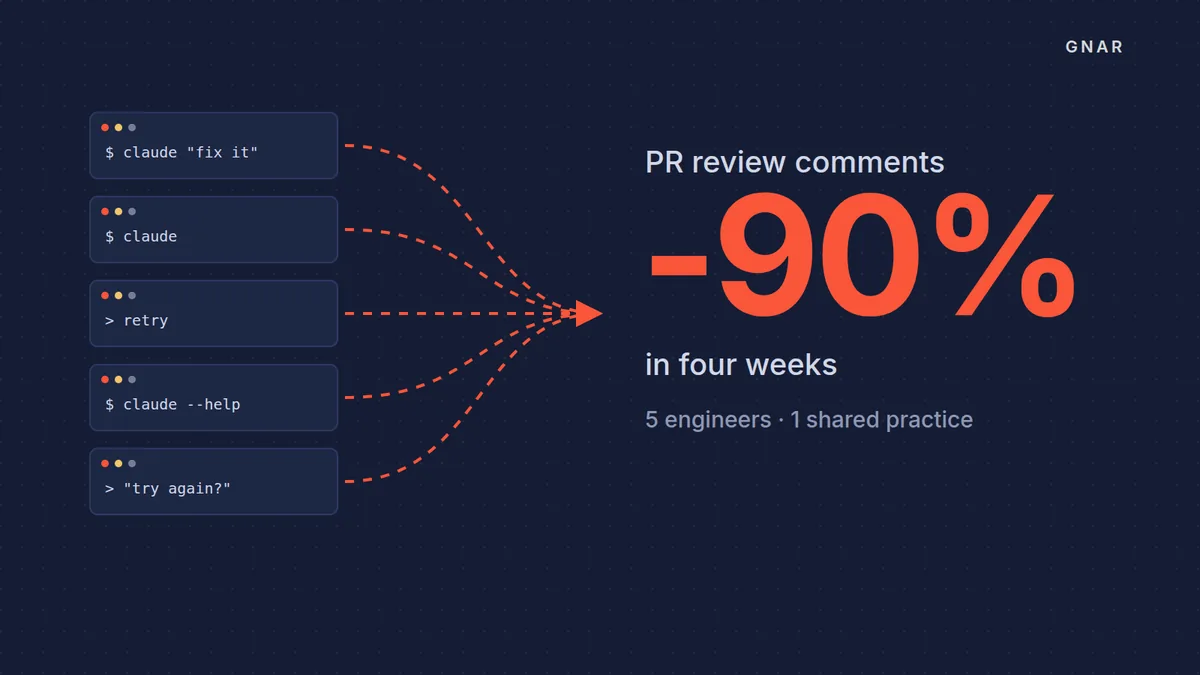
The case study's outside measure was GSC's own review agent. "The clearest external signal came from a tool nobody touched. GSC runs an independent code review agent against every pull request." Over the cohort, "PRs with review-agent comments went from roughly 100% to less than 10% over the four weeks." The case study gives its reason: "Better up-front specification and tighter context discipline raised the quality of generated code before it reached review."
What did a client's CLAUDE.md hold?#
A client's CLAUDE.md held commands, business rules, editing rules, approval gates and a review panel, according to Mike Stone's license post. "We spent a chunk of the session inside a real CLAUDE.md, anonymized from an actual client project." This file belongs to a client team.
The first four parts, in the post's words:
- Commands. "There's a commands section that tells the AI to run the full type check, lint, and test suite before anything gets committed".
- Business rules. "There's an architecture section holding the business rules that usually live in exactly one engineer's head."
- Editing rules. "Modify, don't recreate. Create the smallest possible diff. Never change the look and feel of untouched UI."
- Approval gates. On big work, the post says the AI has to stop and get "a human signature at each phase."
The fifth part is the code review section. "It dispatches three reviewers in parallel, each with one specialty, correctness, tests, and security, and requires every finding to be verified against the actual code before it's reported. Anything unconfirmable gets discarded."
Does the same Claude Code workflow work on legacy code?#
Yes, but on an old system, treat what Claude Code writes as a draft. People still check it. Gnar's post on Claude Code for legacy code modernization says, "Claude Code can read a legacy codebase and hand back a map of how it fits together, a list of code that looks unused, a plain description of what each part does, and draft tests that pin down how it behaves today." The same post says, "It cannot tell you which of the business rules buried in that code are still true for your operation, and it does not approve the plan."
That is the same check step as the rest of the workflow. The post says, "A senior engineer and the people who run the work still make those calls."
Gnar's legacy software modernization page describes the work around it. It says, "The Gnar Company modernizes that system in place or replatforms it. You can start with a code audit that has no fee." The page describes these kinds of work:
- Codebase audits. "We read your codebase, architecture and integrations, and reverse-engineer the logic where the documentation is missing."
- Code migrations and refactors. "Refactor key modules and phase out the old parts, or rebuild."
- A new layer or a rebuild. "We build a modern experience layer on top of the system you already rely on, or rebuild it on modern infrastructure" when the old stack cannot be saved.
The page also lists ERP and order management modernization.
What should a VP of Engineering copy into a Claude Code workflow first?#
Start with Nick Maloney's three questions, then fix the first one your team answers no to. The questions in items 1 to 3 are quoted from Mike Stone's license post. The fix after each is general advice tied to Anthropic's memory, skills and hooks pages. Item 4 follows Gnar's careers page and Anthropic's guide. Item 5 follows the GSC case study.
- "Do your AI tools carry persistent context about the project, or does everyone start from scratch each session?" If no, write a project CLAUDE.md. Anthropic's memory page says to target under 200 lines.
- "Does the team share reusable AI workflows, or does each person prompt their own way?" If no, turn the most pasted procedure into a committed skill.
- "Are there automated checks on AI-generated changes?" If no, add a hook or CI check that runs your tests.
- Write the plan before the code, as Gnar's careers page says. Use plan mode, or a SPEC.md built from Anthropic's interview prompt.
- Pick one number from a tool nobody changes during the rollout, like GSC's review agent. Read it before and after.
The method has limits. Nick Maloney's CDD post says it may not be ideal when a team is in "pure exploration/R&D mode" or when "The product vision is intentionally vague and discovery-driven."