Why Your AI Coding Agent Keeps Making Bad Decisions (And How to Fix It)
A 30-minute feature has ballooned into three hours. Cursor has rewritten half your codebase, added an unwanted dependency, and nothing compiles. You backtrack, try again, and watch the agent cheerfully make the same mistakes in a slightly different order.
Welcome to the doom loop.
If you've spent any time with agentic development tools, Cursor, Copilot, or the one-shot platforms like Lovable, v0, Replit, and Bolt, you've probably experienced this. The promise is magical: describe what you want, watch it appear. The reality often involves debugging AI-generated spaghetti code while muttering about how you could have just written it yourself.
But here's the thing: these tools can work. The frustration isn't random. It stems from two specific, addressable problems.
TL;DR: The Two Fixes
Why Do LLMs Make So Many Assumptions in Agentic Coding?
Large Language Models (LLMs) are statistically biased toward forcing solutions rather than stopping to ask for missing information. Research from the paper "Can Tool-Augmented Large Language Models Be Aware of Incomplete Conditions?" confirms this: when presented with scenarios where critical information is missing, LLMs rarely pause to request it. Instead, they attempt to force a solution by making assumptions or selecting irrelevant tools.
This plays out constantly in practice. Give an agent a feature request and it will make assumptions about:
- Functional requirements: what "it should work like X" actually means
- Non-functional requirements: performance, security, accessibility
- Tech stack decisions: which libraries, which patterns
- Database architecture: schema design, relationships, indexing
- Implementation approach: how to structure the code
Each assumption is a coin flip. String enough of them together and you've got a codebase that technically runs but doesn't actually do what you need, or does it in a way that's unmaintainable.
The Fix: Structured Planning Before Code Generation
You might be thinking your prompts are thorough enough. Every time I've had that thought and then used structured planning anyway, I've been surprised at the assumptions still being made.
Tools like Cursor have their own planning agents, and they help. But they still leave plenty of room for the agent to go off course.
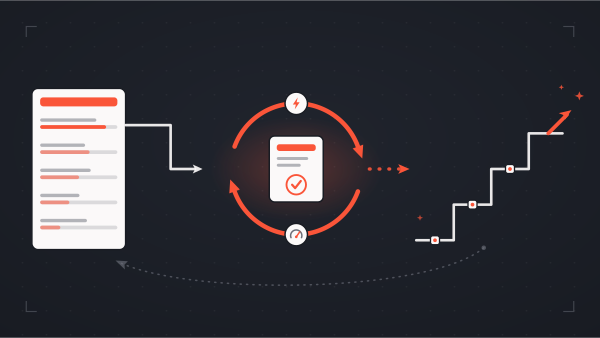
The most robust solution I've found is AWS's AIDLC Workflows: github.com/awslabs/aidlc-workflows. It's a series of markdown documents with rules and steering files that transform agentic development into a structured process:
Inception Phase:
- Verify requirements with explicit questions
- Develop execution plans broken into units of work
- Document application design and dependencies
- Surface assumptions before any code is written
Construction Phase:
- Build plans with clear scope
- Functional design documents
- Testing plans
- Code generation against verified specs
Yes, this process is slower than throwing a prompt into Cursor and letting it rip. But we have found it's still dramatically faster than writing code by hand, especially for large features, and it follows the "measure twice, cut once" principle. You end up with code you're actually happy with.
The AIDLC workflows are built for AWS's Kiro IDE but can be retrofitted for Cursor or other tools without much effort.
Why Is AI-Generated Code Quality So Inconsistent?
LLMs are trained on vast datasets that include code of wildly varying quality (IEEE: Security Vulnerabilities in AI-Generated Code). And in practice, the "average" of that training data is... not great. Reason being that it's very difficult for LLMs to ensure the quality of their training datasets (ASE'24 Practitioner Survey). When writing code, LLMs pattern-match against this training data, often producing output that:
- Contains subtle bugs
- Performs poorly under load
- Includes security vulnerabilities
- Uses outdated or insecure patterns
- Violates your team's conventions
The result is AI slop. Technically functional output that's tangled, inconsistent, and painful to maintain. It compiles. It might even pass basic tests. But extending it or debugging it six months later? Good luck.
Our experience with one-shot platforms like Lovable, v0, Replit, and Bolt has been that they're excellent for prototyping and validating ideas quickly. But building production software on them without additional guardrails typically ends in a mess. (If you do end up in that situation, hit me up - we fix these regularly. 😜)
The Fix: Rules and External Context
The good news: LLMs are getting better. OpenAI's Codex, for example, now curates high-quality repositories for training data (How Much Training Data Was Used for Codex). But you don't have to wait for models to improve, in our experience existing tools can dramatically improve output quality today.
IDE Rules
Cursor's rules provide persistent, reusable context at the prompt level. You create markdown files that guide the LLM's implementation choices. At The Gnar, we maintain rules for:
- General code standards: keep things simple, SOLID principles, DRY
- Language-specific conventions: Ruby idioms, TypeScript patterns, React best practices
- Project-specific patterns: how we structure services, naming conventions, testing approaches
Rules function as a persistent voice in the LLM's ear: "Actually, we do it this way here."
MCP (Model Context Protocol)
Most modern coding agents support MCP, which connects your agent to external tools and data sources. This is crucial for code quality because it gives the LLM access to:
- Up-to-date documentation: Context7 MCP provides version-specific docs for frameworks and libraries, so the agent uses current best practices instead of outdated patterns from training data
- Your codebase context: GitHub MCP connects to your remote repository
- Design files: Figma MCP for UI implementation
- Project management: Atlassian MCP for ticket context
- Debugging context: Sentry MCP gives your agent access to error traces, stack traces, and issue details so it can fix bugs with real production context instead of guessing
The combination of rules (your standards) plus MCP (current external knowledge) gives the LLM a much better foundation than raw training data alone.
FAQ
Can I use vibe coding tools like Lovable or Bolt for production?
For prototyping and validation, absolutely. They're fantastic for quickly testing ideas. For production software, the lack of structured planning typically leads to unmaintainable code. Use them to validate concepts, then rebuild properly with guardrails in place.
Do Cursor rules actually make a difference?
Significantly. Rules provide persistent context that steers the LLM toward your team's standards rather than defaulting to "average" training data patterns. The effect compounds over a project with consistent conventions, fewer weird one-off decisions, code that looks like your team wrote it.
How much slower is structured planning vs. just prompting?
For small, well-defined tasks, the overhead isn't worth it—just prompt and review. For features that touch multiple files, introduce new patterns, or have any ambiguity in requirements, structured planning pays for itself quickly (as evidenced by Boehm's cost curve). The time you spend up front is less than the time you'd spend untangling assumptions later.
Is this overkill for side projects?
Depends on your goals. If you're prototyping to learn or validate an idea, vibe coding is fine, speed matters more than maintainability. If you're building something you'll need to extend and maintain, even side projects benefit from some structure. The "measure twice, cut once" approach scales down as well as up.
The Bottom Line
Agentic development tools are genuinely powerful, but they're not magic. The frustration most developers experience comes from two specific failure modes:
- Assumptions: LLMs force solutions rather than asking for missing information
- Code quality: Training data averages down, not up
Address both with structured planning workflows and persistent context (rules + MCP), and you'll find these tools actually deliver on their promise: faster development of code you're happy with.
The goal isn't to fight the AI or work around it. It's to give it the constraints and context it needs to do good work. Just like you would with a junior developer except this one types really, really fast.

Mike is Co-Founder of The Gnar Company, a Boston-based software development agency where he leads project delivery for clients like Whoop, Kolide (acquired by 1Password), LevelUp (acquired by GrubHub), Qeepsake (feaured on Shark Tank), and AARP. With over a decade of experience building impactful software solutions for startups, SMBs, and enterprise clients, Mike brings an unconventional perspective having transitioned from professional lacrosse to software engineering, applying an athlete's mindset of obsessive preparation and relentless iteration to every project. As AI reshapes software development, Mike has become a leading practitioner of agentic development, leveraging the latest AI-assisted practices to deliver high-quality, production-ready code in a fraction of the time traditionally required.