To create Claude skills for a team, pick one task the team already repeats, write it as a SKILL.md file with a name, a description and the steps, then put it where every teammate's Claude loads it. It matters because Anthropic's skills page says skills give Claude details on how you want to "create documents, analyze data, and automate workflows, so you get consistent outputs." This guide is for engineering managers whose teams keep explaining the same work to Claude. It covers which skills to build first, how to write and share them, and how to test that each one works.
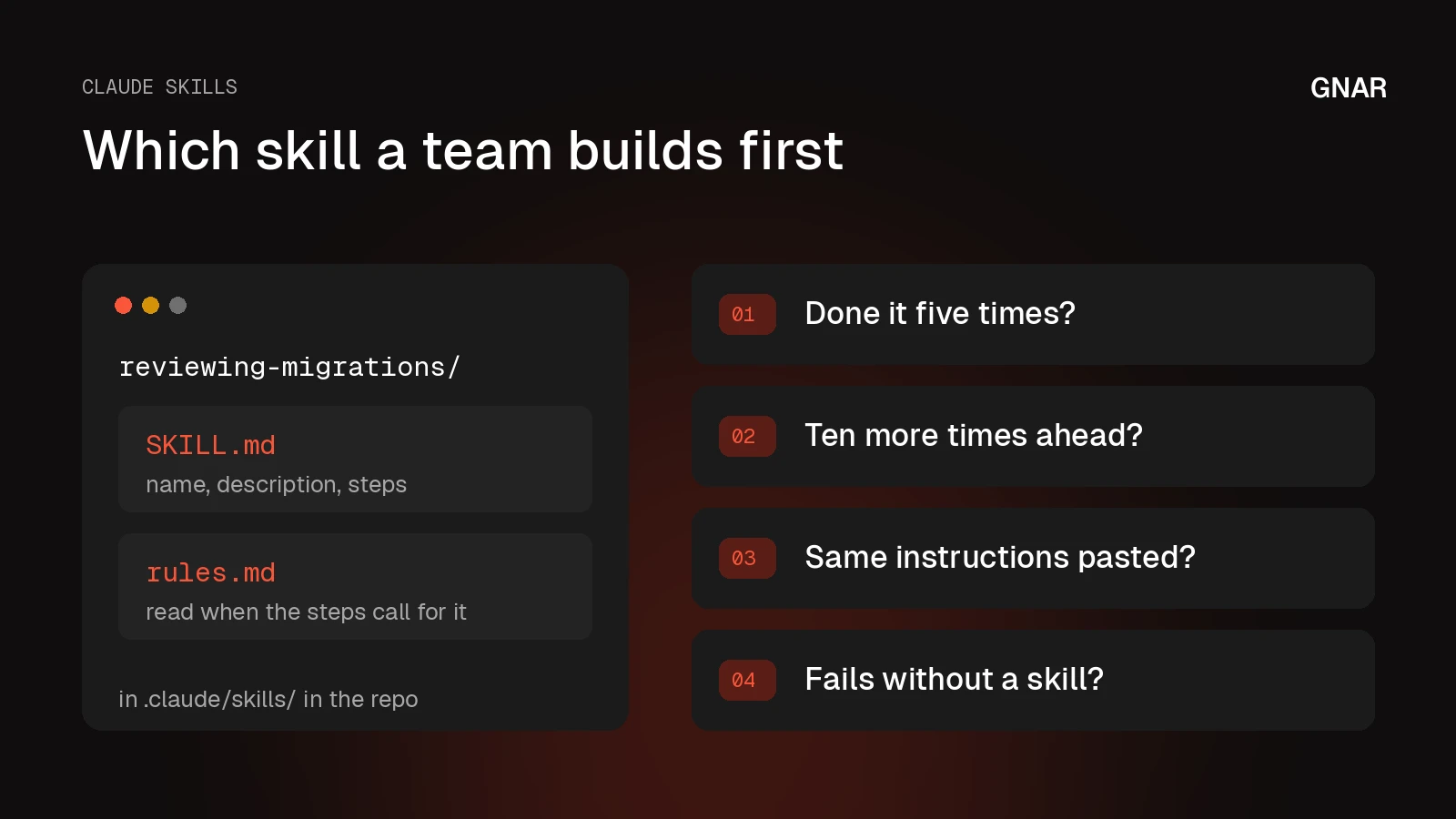
Anthropic's own test for the first pick is short. Its guide to creating skills asks: "Have I done this task at least five times? Will I do it at least ten more times? If yes, a skill makes sense."
The Gnar Company moved GSC Enterprises' five engineers from individual Claude Code use to one shared practice with a Gnar Immerse cohort, a mentor-led program that runs entirely against the client's own codebases. Each of the five left with at least one reusable skill, according to the GSC Enterprises case study. Gnar runs that program as AI training for engineering teams.
Lines credited to Anthropic or to Gnar's pages come from those pages as of November 2026. Everything else here is general engineering advice.
What is a Claude skill, and what is it not?#
A Claude skill is a folder of instructions, scripts and resources that Claude loads when a task calls for it. Anthropic's help center defines skills as "folders of instructions, scripts, and resources that Claude loads dynamically to improve performance on specialized tasks." Anthropic calls the format Agent Skills.
Anthropic's Agent Skills overview says every skill requires a SKILL.md file with YAML frontmatter. It describes skills as "directories containing instructions, executable code, and reference materials." The overview says Claude loads the name and description at startup, and that "until a Skill is triggered, only its name and description occupy context." The body of SKILL.md loads when the skill is triggered, and bundled files load only when Claude needs them. Anthropic calls this progressive disclosure.
Each line in this table is quoted from the same help center article.
| Part of Claude | What Anthropic's help center says |
|---|---|
| Skills | "specialized procedures that activate dynamically when needed and work everywhere across Claude" |
| Projects | "static background knowledge that's always loaded when you start chats within them" |
| MCP | "connects Claude to external services and data sources" |
| Custom instructions | "apply broadly to all your conversations" |
The same article says MCP and skills work together: "MCP connections give Claude access to tools, while skills teach Claude how to use those tools effectively."
In Claude Code, the closest comparison is CLAUDE.md. Anthropic's Claude Code skills page says "Unlike CLAUDE.md content, a skill's body loads only when it's used, so long reference material costs almost nothing until you need it." A skill is one of the shared files that team training should leave in the repository, next to a project CLAUDE.md, as our post on Claude Code training for teams sets out.
Which Claude skills should a team build first?#
Build first the skill for a task your team already repeats and explains the same way each time. Anthropic's Claude Code skills page says to create a skill "when you keep pasting the same instructions, checklist, or multi-step procedure into chat, or when a section of CLAUDE.md has grown into a procedure rather than a fact."
Anthropic's tutorial on teaching Claude your way of working adds a third case. It says to create a skill "when you've figured out how you want a task done and want Claude to follow that approach consistently." Anthropic's skills guide also warns against building ahead of need: "Don't write skills speculatively. Build them when you have real, repeated tasks."
As general advice, rank your candidate tasks with four questions. The first two come from Anthropic's skills guide. The third comes from the Claude Code skills page. The fourth comes from Anthropic's skill authoring guide, which tells you to "Run Claude on representative tasks without a Skill" and to "Document specific failures or missing context."
- Has someone on the team done this task at least five times?
- Will the team do it at least ten more times?
- Does someone keep pasting the same instructions, checklist or procedure into chat for it?
- When Claude runs the task without a skill, does it fail in a way you can write down?
Build the skill first for the task that gets a yes to all four. If Claude already does the task well without a skill, the team may not need one.
Five Claude Code skills an engineering team can copy first#
Anthropic's Claude Code skills page shows five example skills an engineering team can copy: a run recipe, a summary of uncommitted changes, API conventions, a deploy procedure and a briefing on an old system. The middle column of each row is quoted from that page.
| Example skill | What the page says it does | How it runs |
|---|---|---|
| Run recipe | "captures what worked (the install commands, the env vars, the launch script)" | /run and /verify follow it |
| summarize-changes | "summarizes the uncommitted changes in your git repository and flags anything risky" | Claude or a teammate |
| api-conventions | "API design patterns for this codebase" | Claude or a teammate |
| deploy | "Deploy the application to production" | A teammate only |
| legacy-system-context | "explains how an old system works" | Claude only |
The run recipe comes from a bundled skill called /run-skill-generator, which the page says "commits it as a per-project skill." Other agents in the repo then follow the recorded recipe instead of rediscovering it.
The deploy row matters for any skill with side effects. The page says to add disable-model-invocation: true for workflows like deploys, because "You don't want Claude deciding to deploy because your code looks ready." The legacy row is the opposite case. The page uses user-invocable: false for "background knowledge users shouldn't invoke directly."
Which pre built skills does Anthropic provide?#
Anthropic's pre-built Agent Skills cover four document tasks: PowerPoint, Excel, Word and PDF. The Agent Skills overview says they are available "on claude.ai, the Claude API, and some cloud platforms."
Claude Code has its own bundled skills. The skills page names "/doctor, /code-review, /batch, /debug, /loop, and /claude-api" as examples.
Anthropic also publishes example skills in its skills repository on GitHub. The folders we saw there include skill-creator, mcp-builder, webapp-testing, brand-guidelines and internal-comms. The repository says "These skills are provided for demonstration and educational purposes only."
As general advice, confirm which systems and data the team's task needs, then check whether a ready-made skill covers it before you write your own. The overview says to "Use Skills only from trusted sources: those you created yourself or obtained from Anthropic." It also says to "Treat like installing software."
How to create Claude skills, step by step#
Creating a Claude skill takes five steps: run the task once without a skill, write SKILL.md with a name and a description, keep the body short, decide who can start the skill, then test it. The steps below follow Anthropic's Claude Code skills page and its skill authoring guide.
- Run the task without a skill. The authoring guide says to "Complete a task without a Skill" with Claude first, and to "Notice what information you repeatedly provide."
- Write the name and description. Anthropic's overview and its help article on custom skills both cap the name at 64 characters. The overview says the description "must include both what the Skill does and when Claude should use it." The authoring guide adds "Always write in third person."
- Keep the body short. The Claude Code page says "Keep SKILL.md under 500 lines. Move detailed reference material to separate files." The authoring guide puts it this way: "Only add context Claude doesn't already have."
- Decide who starts it. In Claude Code, the skills page says "both you and Claude can invoke any skill" by default. Use the two settings from the deploy and legacy rows above when that should change.
- Test it. The Claude Code page warns that "Seeing a skill trigger tells you Claude found it, not that it did what you intended."
In Claude Code, put the folder under .claude/skills in the project. The overview says Claude Code skills are filesystem based and "don't require API uploads." In the Claude apps, Anthropic's guide to using skills says to package the folder as a ZIP file and upload it in Customize > Skills.
Here is an illustrative SKILL.md for a task an engineering team might repeat. It uses a gerund name and a third person description, as the authoring guide suggests.
---
name: reviewing-migrations
description: Reviews database migration files against this team's rules. Use when the user adds or edits a migration, or asks whether a migration is safe to run.
---

## Steps
1. Read the migration and the table it changes.
2. Check it against the rules in rules.md.
3. List each problem with the file and line it is on.
The rules.md file sits in the same folder. Claude reads it only when the steps call for it, which is the progressive disclosure the overview describes.
How do you add a new skill in Claude Code and get Claude to use it?#
Save the new skill's folder under .claude/skills in the project, or under ~/.claude/skills for a personal skill, and Claude uses it when your request matches its description or when you type /skill-name. The Claude Code skills page says personal skills work in "All your projects on this machine, but not Cowork or cloud sessions." Except in bare mode, it says Claude Code picks up a new or edited skill "within the current session, without a restart." The page adds "If you create a top-level skills directory that didn't exist when the session started, run /reload-skills to pick up the skills you put there."
The page says "Claude uses skills when relevant, or you can invoke one directly with /skill-name." The overview says the description "is what Claude matches your request against when determining whether to trigger the Skill."
How do you use the skill creator?#
To use the skill creator, ask Claude in a chat to make a skill, or install it as a plugin in Claude Code. It is Anthropic's skill for building other skills. Anthropic's skills guide says it "asks clarifying questions, suggests description improvements, and helps format instructions properly," and that it is available in the skills repository on GitHub and in Claude.ai.
You can also ask Claude for a skill in a chat. Anthropic's tutorial on creating a skill through conversation says "You describe your process naturally, and Claude handles the formatting and structure." It says that if you open the steps Claude took, you will see it "load a skill-creator skill" to build a properly structured skill.
In Claude Code, skill-creator is a plugin. In a terminal, the Claude Code skills page says to start Claude Code and enter /plugin install skill-creator@claude-plugins-official at its prompt, then ask Claude to evaluate an existing skill. The Claude Code skills page says it "automates the comparison loop inside Claude Code." It also offers description tuning, which "generates should-trigger and should-not-trigger prompts, measures the hit rate, and proposes description edits."
How do you share Claude skills with a team?#
How a team shares a skill depends on where the skill runs. In Claude Code, the team commits it to the repository. In the Claude apps, Team and Enterprise plans can share it, publish it or provision it. On the Claude API, an uploaded skill reaches the whole workspace.
| Where the skill runs | How the team gets it | Plan or scope |
|---|---|---|
| Claude Code | Commit .claude/skills/ to version control, add it to a plugin, or deploy it through managed settings | Project, plugin or managed |
| Claude apps | Share with colleagues, publish to the organization, or an Owner provisions it | Team and Enterprise plans |
| Claude API | Upload through the Skills API | "Workspace-wide" |
In the Claude apps, the guide to using skills describes three routes:
- Share. Team and Enterprise members can share a skill with specific colleagues. Sharing with groups is for Enterprise plans only. "Shared skills are view-only."
- Publish. "Sharing gives a skill to specific people or groups, and you keep control of it. Publishing hands it to your organization."
- Provision. Anthropic's article on provisioning skills says "Owner-provisioned skills are enabled by default for everyone, but users can toggle individual skills off if they choose."
Check the settings before the team starts. The guide says skills need code execution enabled. It says skills are enabled by default at the organization level on Team plans. On Enterprise plans, Owners "must check that both Code execution and file creation and Skills are enabled in Organization settings > Plugins & skills." For organizations with HIPAA readiness or other regulated configurations, the guide says "skills and skill sharing are off by default and an admin can enable them." The guide and the provisioning article both say "The Skill sharing toggle is on by default for Team plans and for Enterprise plans that haven't set a skills preference." The guide adds "The Share with organization and Share with groups toggles are also off by default," while the provisioning article says "The Share with groups toggle is also off by default and can be enabled by an admin."
Skills enabled in the Claude apps also sync to Claude Code when you sign in with the same Claude account. The guide says this needs Claude Code v2.1.273 or later, and does not work with an API key or a cloud provider such as Amazon Bedrock. Skills "sync when a Claude Code session starts, then check for changes about every 10 minutes." To stop it, set syncClaudeAiSkills to false in your Claude Code settings.
In Customize > Skills, the guide says you can download a custom skill from the "..." button next to its toggle. Custom skills "don't move when you migrate a personal account to a Team or Enterprise organization."
Who should own and review a team's skills?#
Give each skill one owner, and send skills meant for the whole organization through review. Anthropic's skills guide tells teams of every size to "Assign clear ownership for maintenance and updates." For medium to large teams, it suggests they "Version your skills and document changes in a changelog" and "Schedule quarterly reviews to update or retire outdated skills."
In the Claude apps, an Owner sets how skills reach the organization library. The provisioning article says Team plans start with Publishing set to "Open" (or "Off" if Share with organization was already turned off), so an Owner who wants review must select Requires review. It lists three settings:
- Requires review. An owner must approve each submission before it is published.
- Open. Submitted skills and plugins are published to the organization library without review.
- Off. Users don't see the "Publish to org" button.
Updates reach people differently on each surface:
- Shared skills, Claude apps. The guide to using skills says "If you update the skill later, recipients automatically get the updated version at next use."
- Published skills under review, Claude apps. The provisioning article says "When you approve a new version, everyone who uses the item gets the update automatically."
- Claude API. Anthropic's Skills API guide says "For production: pin a specific version, so Skill updates never change your deployed behavior."
As general advice, review a change to a skill in Claude Code the way the team reviews a code change, with the engineer who wrote the skill as its owner.
Retire skills nobody uses. The Claude Code page says "Every skill in the skill listing adds to your context on every turn, whether or not Claude ever uses it." It adds that /skill-doctor shows "what each of your skills costs and how often it gets used."
How do you know a Claude skill is working?#
You check whether a skill works against a baseline, which is the same set of prompts run without the skill. The Claude Code skills page says to collect a few realistic prompts and "run each one in a fresh session with the skill available and again with it turned off, and compare the results." It also says to check two things on their own: whether Claude invokes the skill on the prompts it should, and whether the output matches what you expect.
The page explains why the session has to be fresh: "leftover context from authoring the skill will mask gaps in the written instructions."
Anthropic's skills guide adds a test matrix with three kinds of request:
- Normal operations. Typical requests the skill should handle.
- Edge cases. Incomplete or unusual inputs.
- Out-of-scope requests. Tasks that seem related but should not trigger the skill.
When a test fails, the Claude Code page gives a fix for each symptom:
- The skill does not trigger. "Check the description includes keywords users would naturally say."
- The skill triggers too often. "Make the description more specific," or add disable-model-invocation: true if you only want to start the skill by hand.
- Claude skips a rule that must hold every time. "move the rule into a hook."
What GSC Enterprises' engineers kept from their cohort#
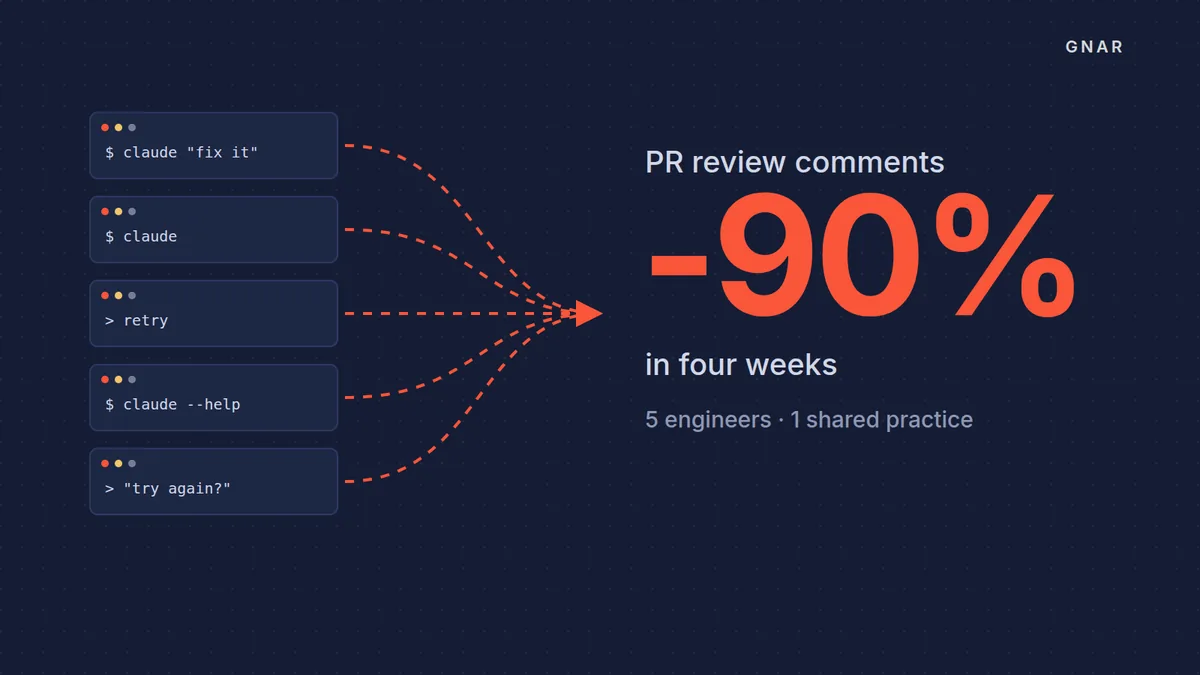
Each of GSC Enterprises' five engineers left a four-week Gnar Immerse cohort with at least one reusable skill. The GSC Enterprises case study says "Every participant left with a merged change in their own codebase, a maintained context file, at least one reusable skill, and a workflow they can describe."
GSC is the wholesale distributor behind Grocery Supply Company. The case study says it "had already put Claude Code in the hands of its engineering team. What it did not have was a shared way of working with it."
The cohort worked on the code the team was already shipping. The case study lists the toolkit as "plan mode, subagents and agent teams, PreToolUse hooks, skills, workflows, sandbox mode, and git worktrees for agent isolation."
One result the case study reports is a code review measure. "The clearest external signal came from a tool nobody touched." Over the four weeks, the share of pull requests GSC's code review agent commented on went from roughly 100% to less than 10%. The case study credits the drop to "Better up-front specification and tighter context discipline."
The case covers one team of five engineers over four weeks. The case study says Gnar Immerse is built for "a small team that already has the tools but not the practice."