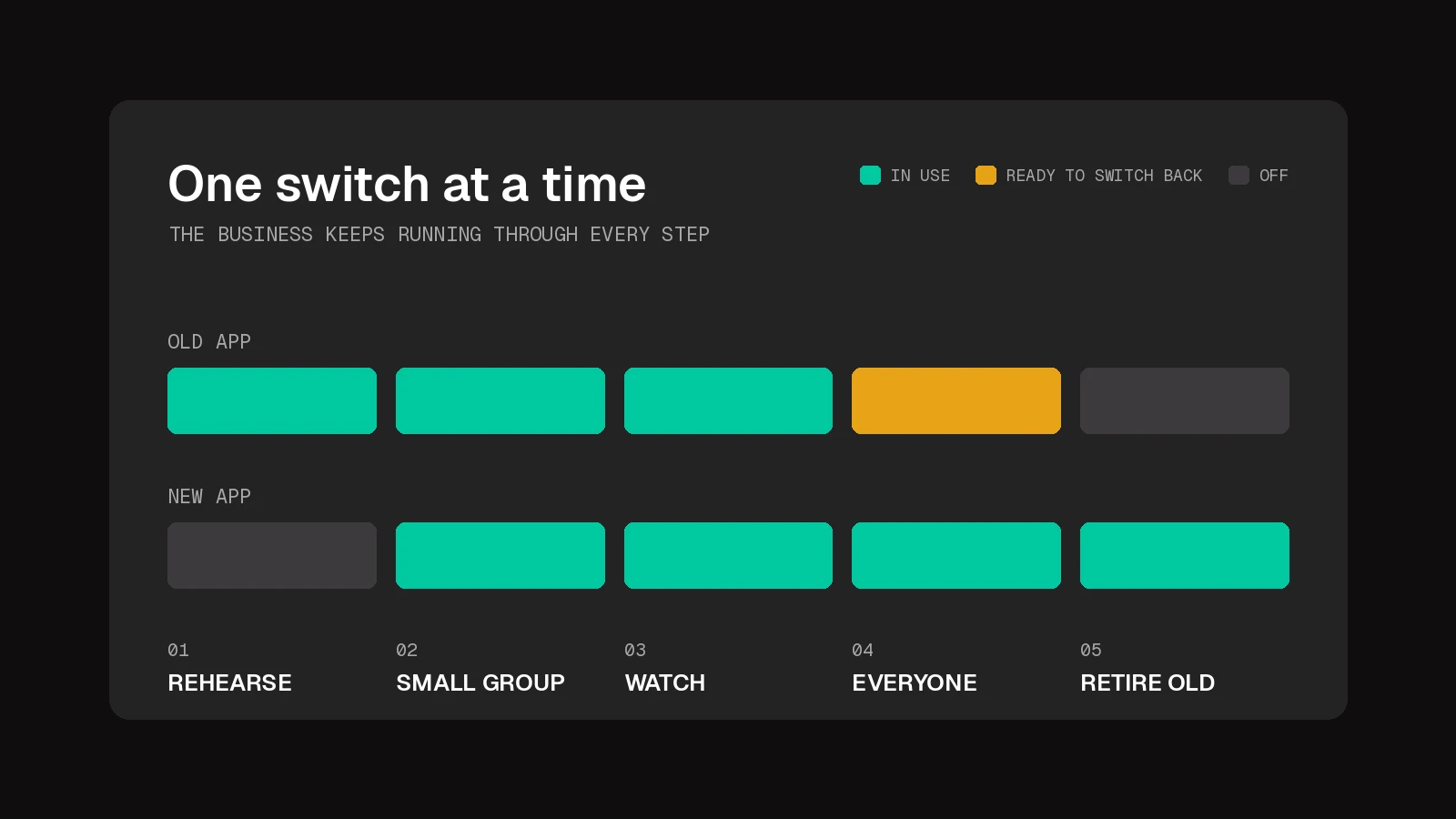
To modernize a legacy application without stopping the business, build the new system on modern technology next to the legacy system. Then move the work over one piece at a time. Run each switch in the migration process as its own small operation. It needs a way back, a rehearsal, a good date, people who know it is coming and numbers that say stop. This guide is for the COO at a logistics company whose dispatch runs on one legacy system, a single old app. That app has to keep working through the whole legacy system modernization. As general advice, business continuity during a legacy system migration depends on how each switch is run, as much as on the new system's code.
The Gnar Company describes its legacy application modernization work this way: "We fix or replace the old software your business runs on, one piece at a time. Your business keeps running the whole time".
Some companies keep their ERP while the legacy software around it changes. Gnar puts it this way for them: "We build alongside the ERP you are keeping, not on top of its grave".
How do you modernize a legacy application without stopping the business?#
You modernize a legacy application without stopping the business by splitting the migration from legacy systems into many small switches and running each one with a plan. Each switch moves one piece of work from the current system to the new system, while everything else keeps running on the legacy system.
Ian Cartwright, Rob Horn and James Lewis put the business side of it in Patterns of Legacy Displacement, dated 05 March 2024: "In short organizations need to be able to continue to deliver business needs while at the same time replacing outdated technology".
As general advice, a phased migration from legacy systems to modern systems spreads the risk across many small switches. Each switch then needs five things. They are a way back, a rehearsal, a good date, people who know it is coming, and numbers that say whether it worked. The sections below take each one in turn, along with migration strategy, data migration and retiring legacy systems.
What is meant by a legacy system?#
A legacy system is older software that a business still runs on, even though it has become hard and risky to change. Martin Fowler's strangler fig page describes how such systems get that way: "They were built over the course of decades, often with little investment and care to keeping them healthy". As business needs change, he writes, "these changes are often done by building patch upon patch, each patch making it harder to adapt to future changes". In the dispatch example, the aging app is a legacy system in this sense: it still assigns every load, and each change to it is slow and risky.
Microsoft's page on selecting cloud migration strategies, covered below, names some of the signs that push a system toward modernization: "Legacy technologies, unsupported SDKs, or the need to adopt SaaS solutions might require modernization". In the dispatch example, that could be an app that runs on outdated infrastructure its vendor no longer supports. Modernizing a legacy system does not always mean rebuilding it. Gnar's code audit page gives two results: "For First Line Technology, Gnar’s review said to keep the existing system. Gnar built a new app on top of it, which cost less than fixing the old app". For the AARP Foundation, "a new platform would cost less than building on the old code".
What is the strangler fig pattern?#
The strangler fig pattern is Martin Fowler's name for replacing a legacy system gradually, piece by piece, instead of all at once. The same page, dated 22 August 2024, says the term "is now often used to describe a gradual approach to legacy modernization".
Gnar's post on ERP modernization without a big bang cutover discusses Fowler's essay in more depth. In this post, the dispatch example below follows the pattern: one job moves to new code while the rest of the work stays on the legacy system. As general advice, that incremental migration lowers the risk of each step.
What does one switch look like in a dispatch operation?#
In a dispatch operation, one switch moves a single job from the legacy system to new screens. Assigning loads to drivers is one such job, and every other job stays where it is. The example below is illustrative and is not a Gnar client.
Picture a regional carrier with three terminals. Dispatchers at all three assign loads, track drivers and close out deliveries in one aging app, one of the company's mission critical systems. The legacy system migration plan moves load assignment onto modern software first, so dispatchers get modern tools for one job while the rest stays put.
A switch for load assignment could run like this:
- The new load assignment screen reads and writes the same records the current system uses.
- The team rehearses the switch in a test copy, with real data and the same people.
- Dispatchers at one terminal use the new system's screen. For the other two terminals, the legacy system continues as before.
- The team watches failed changes, the time to recover from any problem, and the terminal's own dispatch numbers.
- If the numbers hold, the other two terminals move. The legacy system's screen stays available as a fallback.
- Once the modernized system's screen has been validated, the legacy screen is turned off and the next system migration step begins.
Which part should move first?#
As general advice, move first a part that matters to the business, and keep the first switch small enough to undo safely. Microsoft's migration wave planning page says to "Start with simpler workloads to reduce risk". It is written for moving workloads to Azure, and it describes the idea behind a phased migration project: "By migrating in controlled batches rather than attempting to move everything at once, you gain valuable experience with each wave that improves subsequent migrations". It also says to "Set wave durations based on workload complexity and team capacity". In other words, system complexity and team capacity set the pace of each wave. As general advice, a first wave with a smaller, simpler system can serve as a pilot for the rest.
Gnar's legacy application modernization page says it rebuilds "one piece at a time, starting with the part that will make the biggest difference". The two set different priorities. Microsoft's line, written for moving workloads to Azure, favors simple, low-risk workloads first so a team learns. Gnar's favors the part that will make the biggest difference. In the dispatch example, load assignment is the job every dispatcher does all day, so it is where better screens would make the biggest difference. The example moves it first and keeps the risk down by cutting the first switch to one terminal.
Which migration strategy fits each part of a legacy system?#
Pick each part's route by comparing what it costs to fix with what it costs to replace. That is the rule on Gnar's code migrations page: "For each part, we compare what it costs to fix with what it costs to replace". As general advice, the question for each part is also what keeps the business running while it moves through the migration process. In the dispatch example, load assignment might be rebuilt with new screens on a modern architecture, while a stable report that still meets the business's needs is kept as it is. Gnar's page defines refactoring as "cleaning up code without changing what it does", so a refactor adds no new functionality, and says "We do it when a part still does its job".
Teams that are also moving workloads to a cloud use a longer list. Microsoft's page on selecting cloud migration strategies makes the same choice part by part, for teams moving to its Azure cloud. In its words, a migration strategy "defines how each workload transitions to Azure based on its business driver", where a workload, in plain terms, is an application and what it runs on. It defines the main routes in a line each: "A rehost is a like-for-like migration", a replatform moves workloads "to a modern hosting environment with minimal code changes", and a rearchitect redesigns "the workload's architecture to improve scalability, agility, and service orientation". It points to rehosting when you "Need minimal business disruption and no modernization in near future", and to refactoring when you "Need code changes to reduce technical debt or optimize code for cloud". It also warns: "Rehosting doesn't resolve existing performance, reliability, or architectural issues. Migrating such workloads without modernization can carry forward technical debt and require rework later".
As general advice, this is where business continuity and technical debt pull against each other. A move that changes little keeps the switch small and the disruption low, but it carries the old problems forward. Because each part can take a different route, the parts of legacy systems can reach modern systems at different speeds inside one migration project. The choice for each part comes down to its business value, the budget and how much risk the workload can take.
Should each step deploy in place or in parallel?#
As general advice, run a switch like the dispatch one in parallel: build the new screen on modern technology next to the existing systems, and move work over to it. Keep in-place changes for small fixes that are easy to undo. Microsoft's modernization planning page says to "Use in-place deployment only when changes are small, isolated, and easily reversible". It also says to "Choose the strategy that fits the level of change and risk tolerance for each phase or workload". The page is written for modernizing workloads on Azure.
It defines both: "In an in-place deployment, you upgrade the existing setup (updating the existing environment directly). In a parallel deployment, you build a new setup alongside (building a new environment, then switching over)". The same page says "Thoughtful planning reduces the chance of budget overruns, scope creep, or service disruptions during execution".
Gnar's legacy software modernization page describes its code migrations work the same way: "Old and new run in parallel, and every cutover is validated and reversible". As general advice, keep that parallel running going until the new screen has been validated.
Which release techniques give each change to legacy systems a way back?#
During a legacy system modernization, three release techniques give the team a route back to the legacy system's behavior: feature toggles, blue green deployment and canary release. A canary release moves a small subset of users first, while blue green deployment switches all traffic in one step and keeps the old environment ready. Each is described on martinfowler.com, and each lets modern software reach production with a way back.
| Technique | What it does | The way back |
|---|---|---|
| Feature toggle | Lets a team modify system behavior without changing code. | Turn the toggle off, or redeploy if the flag's setting only changes that way. |
| Blue green deployment | Keeps two production environments and switches the router between them. | Switch the router back to the old environment, once it has every transaction taken while the new one was live. |
| Canary release | Rolls a change out to a small subset of users first. | Reroute users back to the old version. |
What is a feature flag?#
A feature flag is a switch in the software that turns new behavior on or off, so a team can give new code to some users and not others. In the dispatch example, a flag could send one terminal's dispatchers to the new load assignment screen while the other two keep the old one. A flag is one way to run the canary release described below. Pete Hodgson's article on feature toggles, dated 09 October 2017, describes them as a technique "allowing teams to modify system behavior without changing code". He also notes that some flags can be changed while the software runs, and others have a configuration "perhaps only changeable via re-deployment".
What is blue green deployment?#
Blue green deployment runs two copies of production and moves all traffic from one to the other in a single step. Martin Fowler's page on blue green deployment, dated 1 March 2010, says the approach works "by ensuring you have two production environments, as identical as possible". As general advice, blue green fits a change every terminal gets at the same moment, such as moving the dispatch app to new servers, where moving one terminal at a time does not apply.
The way back is the same switch in reverse: "if anything goes wrong you switch the router back to your blue environment". He adds a caveat: "There's still the issue of dealing with missed transactions while the green environment was live". In the dispatch example, those would be loads entered while the new servers were live, and the old environment would need them before work could go back.
What is a canary release?#
A canary release sends a new version to a small subset of users before everyone else gets it. Danilo Sato wrote the page on canary release on 25 June 2014. He defines it as "a technique to reduce the risk of introducing a new software version in production by slowly rolling out the change to a small subset of users" first.
One way to choose that first group is by location: "if you have geographically distributed users, you can rollout the new version to a region or a specific location first". The dispatch example above works this way. Load assignment moves at one terminal first, and the other two stay on the legacy screen until the numbers hold. Gnar's code migrations page describes the same way back for its own work: "If something is off, your team goes back to the old one while we fix the new one".
How do you plan the way back before each legacy system migration step?#
Plan the way back by writing three things down before each switch away from legacy systems. They are what counts as a failed switch, who can call a rollback, and the steps that return work to the legacy system. Microsoft's Cloud Adoption Framework says to "Always establish rollback criteria and procedures before initiating any migration or deployment".
Its migration planning page, written for migrating workloads to Azure, brings the business into the first step: "Define failed deployment. Collaborate with business stakeholders, workload owners, and operations teams to decide what counts as a failed deployment".
The same page asks for proof that the way back works: "Test rollback procedures. Simulate deployment failures in a staging environment to confirm your rollback works". It also asks you to "Define decision-making authority and establish emergency communication channels", and to "Automate rollback steps in CI/CD pipelines", the deployment pipelines that ship the code. It adds: "Stakeholder approval validates that your migration plan meets business requirements and risk tolerance".
Why is legacy data the hardest part to undo?#
As general advice, data migration is the hardest part of a legacy system migration to undo. Every record the new system writes has to be available to the legacy system if work goes back, so old and new systems must agree on the data.
Gnar's code migrations page answers that problem for Gnar's work: "Where possible, your data stays where it is. With Gnar, your old database can stay the one place your records live. The new code reads and writes that same data. That way, switching a part back does not mean moving records back".
Sometimes you do have to migrate data out of a legacy database. For that kind of data migration, Microsoft's migration execution page calls for a pause in writes during the final data transfer: "Schedule this pause during a low-traffic period and communicate the timeline to all stakeholders. If you don't pause write operations, you increase the risk of data loss".
What are the main risks, including data loss, when migrating legacy systems?#
As general advice, the main risks when you replace outdated systems are hidden dependencies, downtime, data loss, data integrity errors and weak testing. Microsoft's Azure migration pages address each of them below, and the data sections cover data loss.
On dependencies, the Cloud Adoption Framework's planning page says "Discover all dependencies first. Dependencies between workloads cause service disruptions if not migrated together". On rollback plans, it says "A well-defined plan minimizes downtime, limits business impact, and maintains system reliability".
In the dispatch example, a hidden dependency could be a billing report or a customer's tracking feed that reads the same load records. If load assignment moves and those records change shape, billing or tracking breaks, and business operations outside dispatch stop even though dispatch works. List every reader of those records before the switch, and before any data migration.
For data integrity, the migration execution page says to "Validate data integrity after migration". For testing, it says to "Verify critical workload functionality including authentication and core transactions". The workload preparation page calls thorough testing essential "to confirm that all components, configurations, and integrations meet business and technical requirements". Gnar's code migrations page sets the same rule for its own work: "A part goes live only after it is tested. Until the new part has passed its tests, the old one stays in place, so you can switch back".
As general advice, plan each legacy database migration and its thorough testing together. Finish both before any of the critical systems, such as dispatch, switch over. Then testing can catch a failed step before it causes operational disruption for the team that runs on the current system.
How do you protect data integrity during a legacy database migration?#
Protect data integrity by treating the data migration as its own plan inside the legacy system migration: map the legacy data structures and clean the legacy data before you migrate data to the new system, find what depends on it, and check it after it lands. Microsoft's Dynamics 365 implementation guide covers this on its page on configuration and migration data, written for moving a legacy system into Dynamics 365. Gnar's code migrations page, quoted above, says "Where possible, your data stays where it is". When records do have to move, as in a full replacement of the dispatch app, Microsoft's guide gives the steps. It calls that plan a migration strategy: "a plan that outlines how you'll migrate your data from your legacy system to your Dynamics 365 solution".
Its planning list includes "Mapping and transforming the data fields and values between the source and target systems" and "Verifying and validating the data quality and accuracy in your Dynamics 365 solution". It also budgets for the databases "needed to migrate and cleanse the data", and asks you to "test and verify your data migration at least once" in the integration and user acceptance testing environments. As general advice, moving every record without cleaning it first carries inconsistent legacy data straight into the new system.
Who holds the legacy knowledge about the data?#
The people who use the data every day hold the legacy knowledge about it. The guide's data management page says "The users who are most familiar with their data should be the gatekeepers for cleansing".
After the data migration, Microsoft's migration execution page says "Database row counts can be compared for a quick check but for deeper validation, checksums and hash functions are preferred". As general advice, if a dispatch switch did require moving records, the dispatchers who use them each day, and hold the institutional knowledge and business rules behind them, would sign off on the cleaned load and driver data before it moves.
Should you rehearse a legacy system migration before the real cutover?#
Yes, you should rehearse each cutover from legacy systems to a new system, and Microsoft's Dynamics 365 implementation guide tells teams to practice the cutover plan in a test environment first. It calls this a mock cutover or a dress rehearsal. Its cutover guidance says: "You should use the same data, tools, and people. You should follow the same steps and timing".
The guide is written for teams moving to Dynamics 365. As general advice, the same rehearsal fits each legacy system migration step, such as a switch of one dispatch screen, at a smaller size. In the dispatch example, that means running load assignment for one terminal in the test copy with a day of real loads and the dispatchers who will use it, then timing how long the switch back to the legacy screen takes.
The guide says the cutover plan should list each task's order, timing, owner, backup owner and sign-off step, plus "A rollback plan in case something goes wrong".
It names one decision to make in advance: "You should also decide who will make the final decision about whether your solution is ready for production. This is called the go/no-go decision. You should have some criteria for making this decision".
Microsoft's workload preparation page also says to "Conduct user acceptance testing (UAT), integration testing, and regression testing to confirm that the application meets business and technical requirements". As general advice, involve end users from the team that owns the job.
When should each switch in a phased migration happen?#
Each move off legacy systems should happen when the business is less busy, away from financial close, reporting dates and holidays. Microsoft's Dynamics 365 guide says: "Try to pick a time when your business is less busy". It goes on: "Don't do the cutover when you have to close your books or report your results. Consider holidays and vacations, too. You need everyone to be available during the cutover".
Microsoft's Cloud Adoption Framework says the same for migrations to Azure: "Avoid scheduling migrations during critical business periods such as financial close, product launches, or holiday seasons".
Timing also covers the gap between groups. The Azure Well-Architected Framework's safe deployment practices call it bake time, "time between rollout groups", and say: "Bake times should be measured in hours and days rather than minutes".
As general advice, a logistics company replacing outdated systems can mark its own calendar the same way to limit disruption. Peak shipping weeks, month end billing, holiday weekends and a large customer's busiest days are poor days for a switch.
Who needs to know before each switch away from legacy systems, and who needs training?#
As general advice, before each switch from legacy systems to modern systems, tell three groups: the people who use the job being switched, the teams that depend on its data and any outside partner connected to it. Train the people who will use the new system before it goes live. That telling and training is the change management side of each switch. Microsoft's Dynamics 365 guide says: "You should have a communication plan that shows who the stakeholders are, when and how they'll get or send messages, and who they can contact if they have questions or issues".
Its entrance criteria for a cutover include this line: "Your user training is scheduled to finish by go-live".
Google's SRE book adds the outside view in the launch checklist questions of its chapter on reliable product launches: "Do any partners depend on your service? If so, do they need to be notified of your launch?"
In the dispatch example, that means the dispatchers at the first terminal, the billing team that reads the load records, and any customer whose tracking feed comes from the app. Gnar's service page describes what the new screens are meant to give each team: "Each team gets screens made for the work it does. New hires learn the job, not the workarounds".
What should a COO measure during a legacy system migration?#
During the migration from legacy systems, a COO should watch two delivery numbers from DORA: change fail rate and failed deployment recovery time. Read them as a trend across the switches of the migration process, next to the business numbers each switched job affects. DORA, a program run by Google Cloud, lists five software delivery performance metrics in its metrics guide.
DORA defines change fail rate as "The ratio of deployments that require immediate intervention following a deployment. Likely resulting in a rollback of the changes or a 'hotfix' to quickly remediate any issues". It defines failed deployment recovery time as "The time it takes to recover from a deployment that fails and requires immediate intervention".
| Measure | What it tells you | Source |
|---|---|---|
| Change fail rate | The share of deployments that needed immediate intervention. | DORA |
| Failed deployment recovery time | How long recovery took when a deployment failed. | DORA |
| Health alerts tied to end users | When the rollout should halt. | Azure Well-Architected Framework |
| System performance, error rates and user access | Problems in the first 24 to 48 hours after cutover. | Microsoft Cloud Adoption Framework |
The Azure Well-Architected Framework sets the stop rule: "During a rollout, if you receive an alert about a health change relating to an end user, the rollout should immediately halt".
As general advice, watch the business operations numbers for the job that moved from legacy systems to the new system, and have the monitoring tools for all of these numbers working before the first switch. In the dispatch example, those might be loads assigned per dispatcher, late pickups and calls from drivers asking where to go.
How do you retire legacy systems without breaking a hidden dependency?#
Retire legacy systems, aging systems and other outdated systems with care: validate that each part is inactive, preserve its state, disable it before deleting it, watch it, and clean up what points to it. The Azure Well-Architected Framework gives those steps as examples of "a deliberate, safety-first approach" and warns that "Removing or deprecating a component is one of the highest risk changes you can make".
Its reason is hidden dependencies: "Even something that appears idle or insignificant may still support a critical hidden dependency". For the first step it says to "Define clear indicators of inactivity across a full user or business cycle". In the dispatch example, a legacy screen can look idle for weeks and still be read once a month when billing runs, so watch it through at least one month end.
Microsoft's Cloud Adoption Framework says to "Retain the source environment as a fallback option," because "This fallback option provides business continuity insurance during the stabilization period". It also says to "Announce migration success only after thorough validation".
Gnar's code migrations page gives its own rule for retiring legacy systems one part at a time: "Once a new part has passed its tests, the old one is switched off". As general advice, that switch-off is the last step, after the fallback period and the checks above.
A cutover checklist for each legacy migration step#
Items 1 to 7 below must be true before a switch starts, and items 8 to 10 must hold while it runs and after it. Using the same list for every switch helps a team successfully migrate one job at a time. These ten items are general advice for legacy system modernization projects, built on quoted lines above: items 1, 2 and 10 from Microsoft's Cloud Adoption Framework, 3 to 5 from Microsoft's Dynamics 365 guide, 6 from Google's SRE book, 7 from DORA, and 8 and 9 from the Azure Well-Architected Framework, which also gives the disable-before-delete step in item 10.
- Rollback criteria and procedures are written down before the switch starts.
- Business stakeholders, workload owners and operations have agreed what counts as a failed switch, and the rollback has been tested in a staging environment, a copy of production used for tests.
- The cutover plan lists the order and timing of each task, its owner and backup owner, its sign-off step, and a rollback plan.
- The team has run a mock cutover with the same data, tools and people, until it is confident.
- A named person makes the go/no-go decision against criteria agreed in advance, and the date avoids closing the books, reporting results and holidays.
- Every team and partner that depends on the legacy system has been told, or checked and found not to need notice.
- Change fail rate and failed deployment recovery time are tracked for this application.
- The rollout halts on a health alert relating to an end user.
- Bake time between groups is measured in hours and days.
- The old system stays as a fallback until thorough validation, then it is disabled before it is deleted.
How did Fitbit keep its clients served while its platform was replaced?#
Fitbit kept its Fitbit Plus clients served by having Gnar maintain and improve the legacy health coaching platform. Fitbit's own engineers built the replacement. The Fitbit case study describes the problem: "While building the new software, the team needed to ensure that existing, legacy clients did not experience disruption of service".
The result, as the case study states it: "By working with Gnar, Fitbit was able to successfully transition hundreds of thousands of existing Fitbit Plus clients to the new platform while continuing to meet and maintain all client commitments and service‑level agreements". The case study does not describe how the clients were moved. It shows that the legacy app kept being maintained for its users while the new platform was built.
How does Gnar protect business continuity during legacy system modernization?#
Gnar's legacy application modernization page says: "The Gnar Company does it two ways. We build new screens on top of the system you keep. Or we build a new system next to the old one and switch over piece by piece". Gnar's code migrations page says: "Each new part is tested before your team starts using it. If something is off, your team goes back to the old one while we fix the new one".
The legacy application modernization page describes the order: "We rebuild it one piece at a time, starting with the part that will make the biggest difference".
Gnar's post on ERP modernization without a big bang cutover puts the rule in one sentence: "Run the old and new screens side by side for each workflow, and switch over only when the new one is proven".
As general advice, assess the existing environment before the first switch, so the plan rests on what the code actually does. If you can give Gnar access to your code, you can start with a free code audit. In Gnar's words: "Ask for the code audit. No fee, and it can come back saying your codebase is in reasonable shape". The paid step is Gnar Discovery and Design, which the service page calls "our fixed-price review" and prices at "$20,000 for four weeks, up to $30,000 for six weeks".
Gnar also states the limit of the offer: "If your own team has the capacity and the direction, you do not need us".