To scope an MVP so it does not blow the budget, write down who will use it, what it must do and what it must connect to, cut everything that can wait or be done by hand, and get one price for that written list. Then price every later addition on its own. This post is for the CEO of an established company launching a new software product on a budget the board has already approved. It shows how to scope an MVP in five steps, the two questions that cut a feature list, a keep-or-later table, and a checklist for spotting a scope that has grown too big. It matters because the price you approve is only as firm as the list behind it.
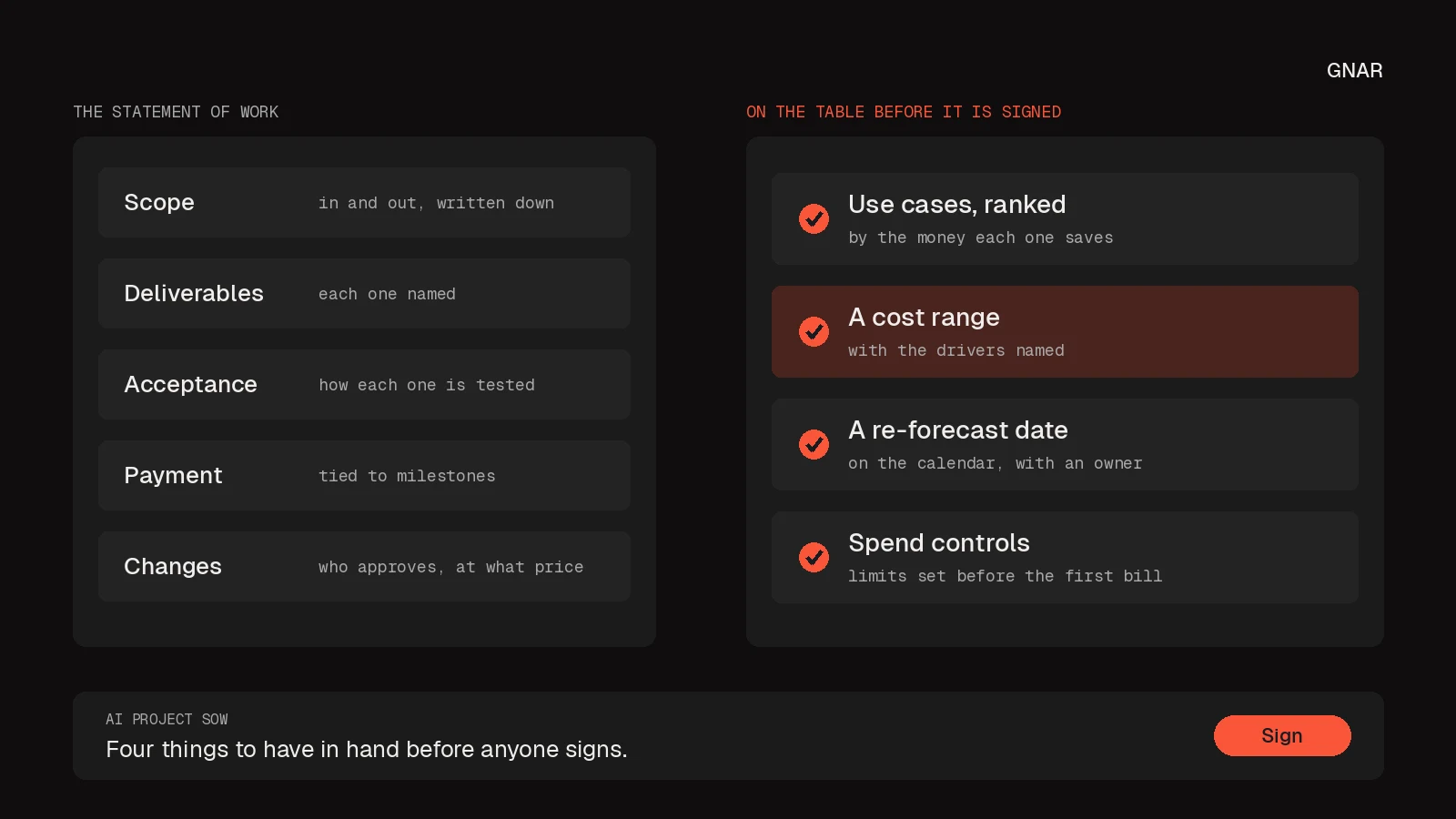
The Gnar Company describes its work this way: "Custom software built around how your operation actually works, from a firm that will tell you when not to build it." Its MVP and prototype development service starts with the same three questions the steps below start with: who will use it, what must it do, and what must it connect to.
What is an MVP for an established company?#
A minimum viable product, or MVP, is the smallest version of a new product that real customers can use, built so you can learn from how they use it. The term is older than most software budgets. In 2009 Eric Ries wrote that "the minimum viable product is that version of a new product which allows a team to collect the maximum amount of validated learning about customers with the least effort". Validated learning means you watch what real users do, and you do not rely on what people say they will do.
Ries adds a warning in the same post: "MVP, despite the name, is not about creating minimal products." He is saying an MVP exists to learn from real customers, and its size follows from what that takes. The main goal is a version that tests the idea, and judgment decides what that takes. A product with no way to log in or pay may teach you nothing, because nobody can finish the job it exists for.
An MVP in an established company differs from a startup MVP in several ways.
First, you already have customers. A startup MVP asks whether anyone wants the thing. Yours asks whether your current customers will use it in place of what they do today. You can answer much of that through market research that costs some phone calls to your best accounts. A short survey sent through a low-cost tool such as Google Forms or SurveyMonkey can rank their pain points. Ask about those pain points before you write a single line of the plan, and make the goals specific and measurable so they guide development and define success.
Second, you already have systems. The new product has to read from and write to your billing tool, your inventory system or your customer records. That is a question of technical feasibility, and it is often where the hidden development costs sit.
Third, you already have a board. The budget has a number on it, and the number was approved on a slide. Version one has to hit the number, so scope management matters more here than it does for a founder spending their own money.
Why do MVP development budgets blow up?#
MVP budgets blow up because the work gets priced as a wish list. Nobody has agreed on what version one is, so the price covers a guess, and the guess grows. The same few causes show up again and again.
- The feature list is a wish list. Every department adds its favorite item. Nothing leaves the list, because nobody owns the cutting.
- The connections are hidden. The list says "show the customer's orders." It does not say that orders live in a system with its own rules, and that reading from it takes real work.
- The scope grows during the build. A good idea arrives mid-build. It sounds small. It gets built without a new price.
- The work is billed by the hour against an open list. The vendor has no reason to close the list, and you have no number to hold anyone to.
- The schedule is long. More time means more room for the business to change its mind.
On that last point there is data. A 2012 study by McKinsey and the University of Oxford found that each additional year spent on an IT project adds 15 percent to its cost overruns. It also found that software projects carry the highest risk of cost and schedule overruns. The study looked at large IT projects, so treat the 15 percent as a direction. It still tells you that a smaller first version, finished sooner, is cheaper to get wrong, which is crucial when time and resources are tight.
Waste on the wish list is also real. Andrew Askins, who ran a software agency, wrote about scoping an MVP and described what his own team got wrong. His agency spent a year building a messaging service. Six months after launch, the appointment feature the team had built had been used twice. The iPad and Android tablet apps had 0 downloads. The money went into items that nobody used, because nobody had asked whether they were needed yet.
That story is the cost of an unscoped list in one picture. The budget did not blow up because the engineers were slow. It blew up because the list was long and nobody tested it.
How to scope an MVP in five steps#
You can scope an MVP in five steps: name the users, list what the product must do, list what it must connect to, cut the list, and price the cut list. Run them in order. Each step produces a short written page, and the five pages together are your scope.
- Name who will use it. Write down the target audience in plain words, such as "dispatchers at our largest customers." Add what each group wants to get done and what annoys them today. Map the path a user takes through the product, so the team can see the essential user interactions version one must support. These user needs drive everything after this step. If you cannot name a real person who will use version one, stop here and find one.
- List what it must do. Write the feature list as verbs: "see open orders," "reorder a past order," "pay an invoice." For each line, ask what job it finishes for the user. This is where you find the core value of the product, the one thing that, if it works, makes the product worth using. This step keeps the team on the few items that matter most.
- List what it must connect to. Name every system the product reads from or writes to, and the person who owns each one. Ask which connections are simple and which are not. A connection to an old system with no clean way in can cost more than all the screens put together.
- Cut. Mark each line from step 2 as "version one" or "later." The next two sections show how. Expect to cut more than half. If you cut less, the list is probably still a wish list. Set a firm timeline for product development, so the cut list stays the cut list.
- Price the cut list. Take the written scope to a vendor, or to your own team, and ask for one price for exactly that. Then ask what happens to the price when something is added. The section on pricing covers the answers to look for. Good MVP scoping also gets version one in front of users sooner.
One way to run steps 1 through 4 is a single working session. Phillip Wood, a product manager writing for Toptal, describes condensing the scoping of an MVP into one intensive three-hour session with product specialists, designers and engineers. The mix of people is the useful part. The product person knows what users need. The designer knows what the screens will take. The engineer knows what the connections will cost. Cuts made with all three in the room hold up better than cuts made by one of them alone.
Keep the output of the session short. One page for users, one for what it must do, one for what it connects to, and one marked list of what stays and what waits. Write it where the budget owner can read it. That page is the document you hold every later change against.
How do you cut a feature list?#
Two questions cut most of a feature list: how long can we hold off on this, and can we do it by hand for now? Askins calls these the two most important questions of scoping, and they are written as "1) How long can we hold off on this feature? 2) Can we do this manually for now?" Ask both about every line on the list.
The first question asks about time. If users can finish the core job without an item, it can wait for a later version. The second asks about effort. If a person on your staff can do the task by hand while you learn whether anyone wants it, you do not need software for it yet. Software for a task a staff member can handle is an expensive way to avoid learning anything.
A worked example#
Here is an illustration. The company is made up, and nothing about it describes a real client. Call it Northline Supply, a regional distributor of building materials with contractors as customers. The CEO wants a customer ordering portal. The business sends over this feature list of 12 items:
- Customer login
- A list of open orders with their status
- Reorder a past order
- A live check of stock on hand
- Pay an invoice online
- A mobile app
- Loyalty points
- A quote builder
- Chat support
- A report builder for customers
- Approval chains for companies with several buyers
- Product recommendations
Run the two questions on each line.
Login is needed, because nothing else works without it. Open orders and their status answer the call that fills the sales desk every morning, so they stay. Reorder is how contractors actually buy, so it stays. A live stock check stays, because a contractor deciding whether to order needs to know if the item exists. Paying an invoice online stays, because it closes the loop on an order.
Now the cuts. A mobile app can wait, because a contractor can use the portal in a phone browser while you learn how people use it. Loyalty points can wait for a long time. The quote builder can be done by hand: the sales desk sends a quote by email and a person enters it. Chat support can be done by hand, since a phone number on the page does the same job. A report builder can wait, and a staff member can send a monthly summary by hand. Approval chains matter only to larger accounts, so they wait for the version after the first. Product recommendations need data that version one will not have yet. A team could also use the RICE framework to compare borderline items by Reach, Impact, Confidence and Effort.
The list drops from 12 items to five. Each cut item gets a place on a "later" list, so nobody feels ignored, and each will be priced when its turn comes. The next section puts the whole decision in one table.
What belongs in version one?#
Version one holds only the items a real user needs to finish the one job the product exists for. Everything else goes on a later list with a reason written next to it. A table makes the decision visible to the people who have to approve it.
| Feature | Version one or later | Why |
|---|---|---|
| Customer login | Version one | Nothing else works without a known user |
| Open orders and status | Version one | Answers the most common customer question |
| Reorder a past order | Version one | Matches how contractors already buy |
| Live stock check | Version one | Needed before a customer can decide to order |
| Pay an invoice online | Version one | Finishes the order loop |
| Mobile app | Later | A phone browser covers the need while you learn |
| Loyalty points | Later | Adds nothing to the core job |
| Quote builder | Later | Sales staff can send quotes by hand for now |
| Chat support | Later | A phone number does the same job |
| Report builder | Later | Staff can send a summary by hand |
| Approval chains | Later | Only larger accounts need them |
| Product recommendations | Later | Needs usage data that does not exist yet |
The "Why" column matters most. The most important thing is that each version-one item earns its place by serving the core job. A later item with no reason written beside it comes back as an argument mid-build. A reason gives the person who owns that item something to answer.
Sort the list with the MoSCoW method#
If your team wants a named method for this, use the MoSCoW method. It sorts each item into one of these groups: must have, should have, could have and won't have this time. Must-have items are the ones the product cannot work without. Should-have items matter but have a workaround. Could-have items are nice to have. Won't-have items are agreed to be left out of this version, and writing that group down is the point of the method.
For version one, only the must-have group goes in. In the Northline example the five kept items are the must haves. The quote builder and the mobile app are should haves, and the rest sit in could have or won't have. The names are only labels. What matters is that feature prioritization happens out loud, with the budget owner present, before a price is set.
Why a smaller version one is a better test#
A smaller first version also gives you better data. When version one holds five things, user feedback is easy to read: if contractors do not reorder, you know why. When it holds twelve, you cannot tell which item helped or hurt. A successful MVP is the one that teaches you something clear about real users, and a clear lesson needs a small surface. Putting it in front of first users sooner means you learn from what they actually do.
Each later version is one of your iteration cycles. You release, watch what real users do, decide what to add next, and price that addition. Run it that way and the budget moves in steps you can see. Run it as one giant build and the budget moves in a single large step that you only see at the end.
How do you price an MVP so it holds?#
You price an MVP so it holds by getting one fixed price for a written scope and agreeing that every addition gets its own price. Billing by the hour against an open list gives you no ceiling. A fixed price on a vague list gives you a ceiling that breaks the first time someone asks for a change.
Here are the two common models side by side.
| Question | Hours against an open list | One price for a written scope |
|---|---|---|
| When do you know the total? | At the end | Before the build starts |
| Who pays if the work costs more? | You | Set by the contract |
| What happens when you add an item? | The hours grow quietly | It gets its own price |
| What must you bring? | A cap and review points | A scope people have agreed to |
Either model can work. What breaks budgets is a price that no longer matches the list behind it. For a longer look at who carries an overrun, see how to keep a software project from going over budget. On why a bid made before planning tends to fail, see why fixed bids fail without planning.
The Gnar Company runs it in two steps. Step one is Gnar Discovery and Design. It costs $20,000 for four weeks or $30,000 for six. It ends with a clickable prototype of the key screens, a plan and one fixed build price. You keep the plan and the prototype even if you build elsewhere.
When Discovery ends, the build has one fixed price, paid in stages. The fixed price covers everything in the plan. Anything you add beyond the plan, during or after the build, gets its own price. Most builds fall in the $150,000 to $300,000 range, and larger products cost more. If the planned work costs more than the fixed price, Gnar pays the difference.
Whatever vendor you use, ask these questions before you sign.
- What exactly does the price cover? Ask to see the written list.
- Who pays if the listed work costs more than the price?
- What happens, in writing, when I ask for something that is not on the list?
- Who wrote the estimate, and will that person be on the project?
A vendor who answers all of them plainly has done the scoping. A vendor who cannot has priced a guess. For what a good planning phase includes, read what a software discovery phase should include.
Common pitfalls in MVP scoping#
The common pitfalls in MVP scoping are easy to spot once you name them, and most of them come from treating version one as the whole product. Startups hit them, and established companies hit them more often, because more people get a say in the list. Getting to market sooner is an advantage in its own right, and a short list is how you get there.
- Building for every kind of user at once. Version one should serve one group well. A second group gets the next version.
- Skipping the connections. A scope that lists screens and leaves out the systems behind them will be priced too low.
- Treating the MVP launch as the finish line. The launch is the start of learning. Plan the second version's budget before the first one ships.
- Not watching user behavior. If version one cannot show you what first users click, finish and abandon, you will be guessing about version two.
- Building what a landing page could test. When the open question is whether anyone wants the product at all, a simple landing page, built with a no-code tool, that describes it and collects sign ups can answer that before product development starts.
- Letting scope management lapse after the price is set. The written scope only protects the budget if someone checks every new request against it.
Is your MVP scope too big?#
Your MVP scope is too big if you cannot say in one sentence what job version one finishes for the user. Other signs show up in the list itself, in the room, and in the numbers. Use the checklist below at your next scoping meeting.
- Version one has more items than the people in the room can recall from memory.
- You cannot name a real user who needs each item on the list.
- Several items exist because one executive asked for them.
- An item is on the list "in case" customers ask for it.
- A task a staff member could do by hand is listed as software.
- No one can say which system an item connects to, or who owns that system.
- The word "also" appears often when the list is read out loud.
- The cut list is nearly as long as the first list.
- The vendor's price comes without a written scope behind it.
- The plan has no later list, so every idea has to go into version one or be lost.
- Version one has no clear end, only "when it feels done."
- The list is still growing after the budget was approved.
If several of those describe your project, go back to step 4 and cut again. A scope that is too big rarely fails in one dramatic moment. It fails by being hard to price, then hard to build, then hard to test. A shorter list is the cheapest repair you will make.
How does Gnar scope an MVP?#
Gnar scopes an MVP in Discovery and Design, where it answers three questions before anyone writes code: who will use the product, what must it do, and what must it connect to. Discovery picks what the first version must do and what can wait. That is settled before the build starts. It is the same cut the steps above describe, done with a team and a prototype.
The clickable prototype is a practical tool for scope management. You can test it with customers, or show it to your team and investors. A person who clicks through the key screens will tell you which ones they would never use. That user feedback is cheaper before the build than after it.
These projects show how this works from different starting points.
Gridly, from zero. Gnar designed and built Gridly's home electrification platform from zero. A homeowner enters an address and gets a plan of projects, each with a cost estimate and vendors who can do the work. The platform launched in March 2023. Elephant Energy acquired Gridly in 2024, about 18 months after launch. That outcome belongs to Gridly. Daniel Barrett, COO of Gridly, said, "We were pleased with all aspects of the relationship with The Gnar Company." The full Gridly case study has the details.
Qeepsake, from a prototype. Qeepsake is an app that grew to 700,000+ users. Gnar planned version 1.0 from a prototype the team had already built. That is the second way into the same process: if you already have an early version that proved people want the product, the planning step decides what 1.0 needs for real customers.
The code itself lives in your company's own repository, with docs, and it ships with automated tests. You can build the next version with Gnar, with your own team, or with another firm.
One more point in the spirit of the one-liner above. If your own engineers have the time and direction to build the first version, Gnar will say so on the call. Discovery then gives them a plan and a clickable prototype to build from. A scope you can hold in your hand is useful whoever writes the code.
If you want to talk through your own list, the MVP and prototype development page has a link to book a free scoping call.