When your ERP vendor ends support, first confirm what stops and on which date. Then pick one of four paths. You can move to the vendor's successor, move to another ERP, stay for a set time, or keep an ERP for the books and build software for the daily work. This guide is for the COO of a distributor still running Microsoft Dynamics GP (Great Plains) and planning the transition. It covers the key dates and the four options. It also covers what Microsoft's migration tool moves in a transition to Business Central, and what to ask your partner. It matters because Microsoft ends GP product enhancements, regulatory (tax) updates and technical support on December 31, 2029.
The Gnar Company's ERP modernization page describes the work in one line. "We build web apps around the workflows your team runs every day and keep the data in sync with your ERP, so your teams are more efficient and more profitable." The same page says: "Every engagement starts with a fixed-price diagnosis, from four weeks and $20,000."
Every Microsoft Dynamics date in this guide comes from Microsoft's own pages, read as of November 2026. Where a line is our general advice, it says so.
What are the key dates for Dynamics GP end of life?#
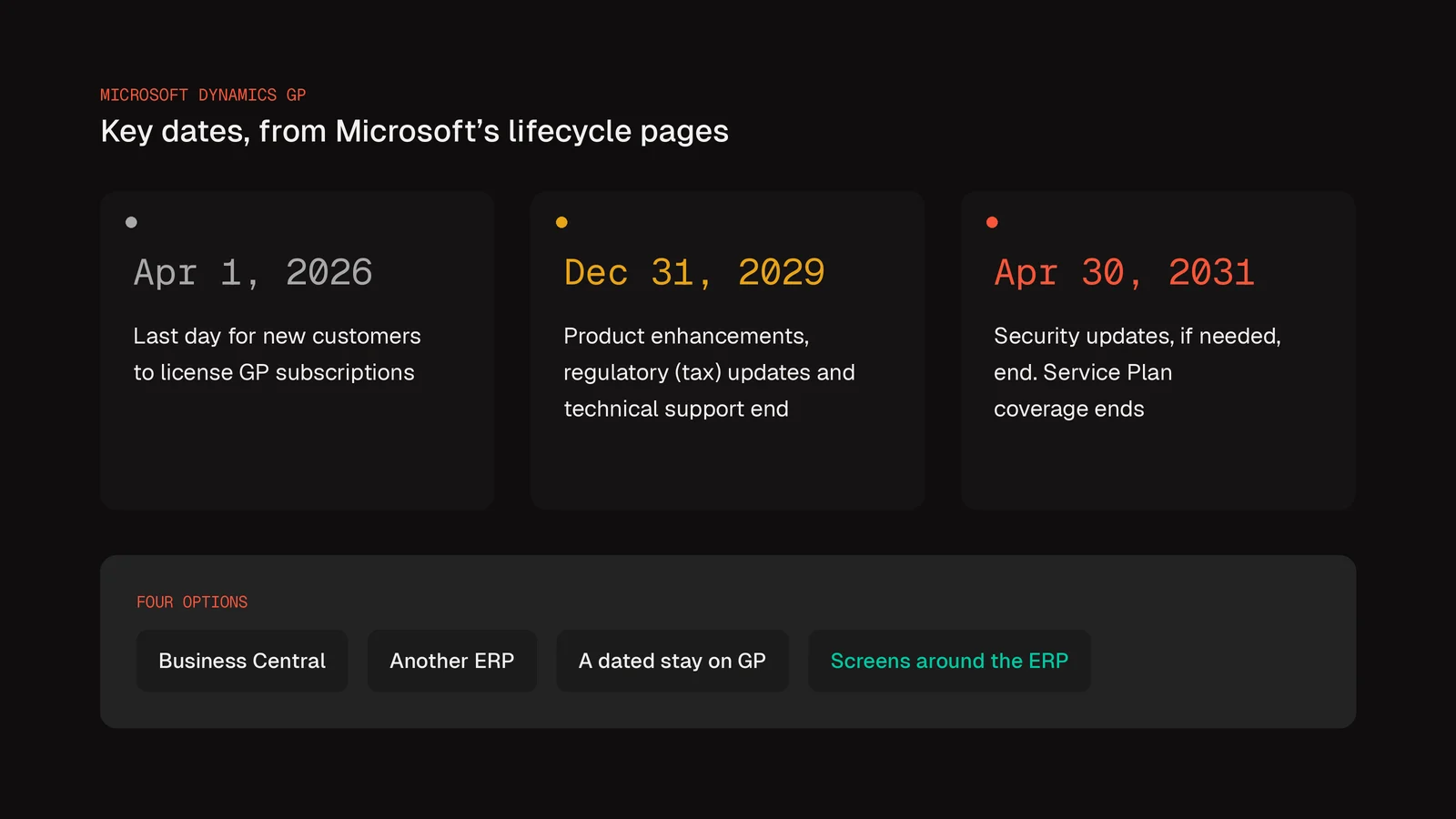
The two support dates for Dynamics GP end of life are December 31, 2029 and April 30, 2031. The first ends product enhancements, regulatory (tax) updates and technical support. The second is the last date for security updates, if needed. Microsoft's Dynamics GP lifecycle page states the first date this way. Microsoft will "end Dynamics GP support on December 31, 2029 (previously announced end date was September 30, 2029), for product enhancements, regulatory (tax) updates, and technical support." It adds: "Security updates/patches, if needed, will be made available until April 30, 2031."
A third date has passed already. It applies to new customers licensing GP subscriptions. Microsoft's June 5, 2025 post on migration options for GP and SL customers gives it. It says "the final day for new customers to license Dynamics GP subscriptions is April 1, 2026." That date does not end support for a company that already runs GP.
| Date | What Microsoft says happens | Microsoft page |
|---|---|---|
| April 1, 2026 | Final day for new customers to license GP subscriptions | June 2025 blog post |
| December 31, 2029 | Support ends for product enhancements, regulatory (tax) updates and technical support | GP lifecycle page |
| April 30, 2031 | Last date for security updates or patches, if needed | GP lifecycle page |
| April 30, 2031 | Service Plan coverage ends for GP products, with three license changes | June 2025 blog post |
Until support ends on December 31, 2029, GP has a regular update schedule. The lifecycle page says customers "stay current by taking at least one of the three all-inclusive Dynamics GP updates, typically released in June, October, and December each year." It also says "The updates will typically consist of hotfixes, tax updates, and any relevant regulatory updates."
Why did Microsoft move the end date to December 31, 2029?#
Microsoft moved the date so GP customers could meet their payroll and tax obligations for the full year. It moved the end of GP support from September 30, 2029 to December 31, 2029, in an update dated January 15, 2025. Its end of support announcement says "This update will allow GP customers to meet their payroll and taxes obligations for the full year." The security patch date did not move. "The end date for security patches remains unchanged and will still be April 30, 2031."
For a distributor that runs payroll in GP, Microsoft set the date to cover the full 2029 year. As general advice, decide which system will run your 2030 payroll before 2029 closes. Put that system's go-live on the leadership calendar next to December 31, 2029.
Is your GP version already past its support dates?#
As of November 2026, GP 2013, GP 2015 and GP 2016 are past the extended support dates Microsoft lists. Older GP releases follow Microsoft's Fixed Lifecycle Policy. Each release has a mainstream support date and an extended support date. Microsoft lists July 14, 2026 as the end of extended support for GP 2016. For GP 2018, the date is January 11, 2028. The current version follows a different policy. "The current version of Dynamics GP, version 18.x, is governed by the Modern Lifecycle Policy."
| GP version | End date, per Microsoft | Lifecycle policy |
|---|---|---|
| GP 2013 and GP 2013 R2 | Extended support, April 11, 2023 | Fixed |
| GP 2015 and GP 2015 R2 | Extended support, April 8, 2025 | Fixed |
| GP 2016 and GP 2016 R2 | Extended support, July 14, 2026 | Fixed |
| GP 2018 and GP 2018 R2 | Extended support, January 11, 2028 | Fixed |
| Version 18.x | Support ends December 31, 2029 | Modern |
A company on GP 2018 has a route onto the Modern policy. Any compatible tax release or hotfix moves it there. The lifecycle page says "Installing any compatible Dynamics GP tax release or hotfix on Dynamics GP 2018 or Dynamics GP 2018 R2 will bring you to version 18.5 or later, which enacts the Modern Lifecycle Policy."
What does the Modern Lifecycle Policy require?#
Under the Modern policy, GP stays in support only while you stay current, stay licensed, and Microsoft still offers support for it. Microsoft's Modern Lifecycle Policy lists them. A product "remains in support if the following criteria are met".
- "Customers must stay current as per the servicing and system requirements published for the product or service."
- "Customers must be licensed to use the product or service."
- "Microsoft must currently offer support for the product or service."
As general advice, ask your partner or IT lead for two facts. One is the exact GP version number. The other is the date of the last update you installed. Every other choice in this guide depends on them.
What changes for GP licenses on April 30, 2031?#
On April 30, 2031, Service Plan coverage ends for GP and three license changes take effect. Microsoft's June 2025 post lists all four. Here they are in Microsoft's words:
- "Service Plan coverage ends for Dynamics GP products."
- "Subscription licenses for Dynamics GP (via Solution Provider Agreement (SPA)/Dynamics Price List (DPL)) are no longer renewable."
- "Additional perpetual users on existing Dynamics GP systems can no longer be added."
- "Subscription use of Dynamics GP via Services Provider License Agreement (SPLA) licensing (not to be confused with SPA program) is expected to end."
SPA is the Solution Provider Agreement. DPL is the Dynamics Price List. SPLA is the Services Provider License Agreement, which Microsoft's post keeps apart from the SPA program. As general advice, the change on adding perpetual users matters for hiring. If new hires will need GP seats, plan for them before that date.
Why is an unsupported ERP a security risk?#
Once a vendor stops shipping patches, NIST warns that adversaries can exploit the weaknesses left behind. NIST's catalog of security controls, SP 800-53 Rev. 5, has a control for it. The control is SA-22, "Unsupported System Components". It gives two answers. The first is to "Replace system components when support for the components is no longer available from the developer, vendor, or manufacturer". The second is to provide "alternative sources for continued support". NIST lists those as "in-house support" and "support from external providers".
NIST's discussion of SA-22 explains the risk with one example. "An example of unsupported components includes when vendors no longer provide critical software patches or product updates, which can result in an opportunity for adversaries to exploit weaknesses in the installed components."
NIST also says the risk "can be mitigated, for example, by prohibiting the connection of such components to public or uncontrolled networks". As general advice, ask your IT lead whether GP can be kept off public and uncontrolled networks after support ends. Ask what else would still connect to it.
Microsoft's lifecycle page gives April 30, 2031 as the last date for GP security updates. Its Modern Lifecycle Policy says "Microsoft recommends customers adopt security updates immediately." As general advice, treat April 30, 2031 as a hard limit. Treat December 31, 2029 as the date you plan around.
What are your options when your ERP vendor ends support?#
You have four main options when an ERP vendor ends support. You can move to the vendor's successor or to a different ERP. You can stay on the current system for a set time. Or you can keep an ERP for the books and build software for the daily work. For GP, the successor is Dynamics 365 Business Central. Microsoft's lifecycle page says "We are encouraging customers to transition to Dynamics 365 Business Central".
The table is general advice, except where a cell gives a Microsoft date.
| Option | When it tends to fit | What to check first |
|---|---|---|
| Move to Dynamics 365 Business Central | Your team's work fits Business Central's standard processes | What Microsoft's migration tool moves, and what your partner rebuilds by hand |
| Move to a different ERP | Business Central does not fit how the company runs | The same data and history questions, with that vendor's tools |
| Stay on GP for a set time | Another project has to finish first | Regulatory (tax) updates end December 31, 2029; security updates end April 30, 2031 |
| Keep an ERP for the books and build screens for the daily work | Accounting works, but order entry and the warehouse fight the screens | Which records the new screens read, and which they write back |
As general advice, the fourth option can be combined with any of the other three, so it fits a future transition too. It sits on top of whichever ERP holds the books, GP for now or its successor later.
Move to Dynamics 365 Business Central#
Microsoft's announcement calls Business Central "Microsoft’s flagship SMB ERP product". Microsoft also publishes a cloud migration tool for GP data, covered in the next section. Its June 2025 post names the first step. "The first step in a migration process is to consult with your partner on the scope of migration and implementation timeline." The lifecycle page points questions the same way. "We recommend that Dynamics GP customers reach out to their Dynamics GP reselling partner with any questions or concerns."
Move to a different ERP#
As general advice, evaluate a different ERP with the same questions this guide asks of Business Central. Ask what data moves and what history stays reachable. Ask which daily work the new ERP should hold at all. The answers come from that vendor's own documents, so get them in writing before you compare prices.
Stay on GP for a set time#
Staying is a real option while the dates allow it. The lifecycle page says "Microsoft remains committed to provide updates as described earlier." The same page ends that support on December 31, 2029. As general advice, a stay needs an end date the company sets. If payroll runs in GP, that date should come on or before December 31, 2029.
What does Microsoft's migration tool move in a transition from GP to Business Central?#
Microsoft's migration tool moves setup, master data, transactional data and a chosen amount of history. Microsoft's end-to-end overview lists the data. "In general, the cloud migration tool migrates the following data". The list covers system and company setup, master data for accounts, customers, vendors and items, and transactional data. It also covers classes for customers, vendors and items, Vendor 1099, and historical data. You choose the company data that moves during setup.
Microsoft's page on GP data migrated to Business Central online adds the details a distributor should check:
- Open purchase orders. "You can also bring over open purchase orders." This needs the General Ledger, Payables and Inventory modules.
- Open receivables. Outstanding receivables come over "with the amount remaining in Dynamics GP."
- Cash receipts. "Any posted cash receipt should also be deposited in GP before migrating, because undeposited receipts aren't migrated."
- Customers. "You can choose to migrate all customers from Dynamics GP or only active customers."
- Inventory. "Inventory is imported with the cost valuation method that is set in GP at the time the migration is run." Serial and lot details on tracked items move too.
- Units of measure. "In Business Central, there isn't a direct equivalent to the Unit of Measure Schedules table (IV40201) found in Dynamics GP."
- Chart of accounts. The new account number "is mapped from the main account segment from Dynamics GP". The other segments become dimensions.
The source system has limits too. Microsoft's prerequisites page lists "Dynamics GP 2015 or later". The database "Uses SQL Server 2016 SP1 or later", with "Compatibility level set to 130 or higher." The page also limits the assisted setup guide for GP migration to four markets. It "is currently only supported for the following markets": the United States, Canada, the United Kingdom and Australia.
What happens to historical data and historical transactions?#
You decide how much history moves. "In the GP Company Migration Configuration page, you can select the oldest historical year you want migrated to Business Central." A separate GP historical snapshot can bring more detail. "You can indicate if you want to migrate GL detail, receivables, payables, purchase order receipts, and inventory transactions. The AR Transactions option also includes Sales Order Processing history."
The snapshot lands in its own tables. "The data is stored in extension tables in Business Central." Microsoft says that data "can be used in Power BI reports, Power Apps, or other non-Microsoft reporting tools." Microsoft adds that "The GP historical snapshot runs as a background process after the migration is complete."
Does GP keep running during the transition?#
Yes, GP stays the system your team works in until the cloud migration is complete. Microsoft's overview says so. "The on-premises solution remains the operative environment until you complete the cloud migration." Its planning page adds that "Most migrations can run from the on-premises production database with minimal downtime for end users." For especially large migrations, it says a run from a backup of the database might be better. Its steps for that backup approach stop data entry near the end. "Stop users from entering data in the on-premises environment before taking the final backups."
The overview lays out the general process in this order:
- Migration assessment. The migration assessment tool "detects potential migration issues based on your Dynamics GP system structure."
- Preparation. "Develop a migration plan that includes a detailed timeline, resource requirements, and migration approach." Check the prerequisites, and clean the data before it moves.
- Cloud migration setup. Connect the GP databases to the online tenant and choose the companies.
- Configure Dynamics GP company migration. Choose the modules, records and years that move.
- Data replication. Copy GP data into migration tables online, check the results and rerun if needed.
- Data upgrade. Turn the copied GP data into Business Central data, company by company.
- Data validation. "Validation compares replicated GP source data with migrated data in Business Central to identify discrepancies."
- Completion and follow-up. Set up the environment and user access, then go live.
Microsoft's pages make three points about testing and go-live. First, "Typically, you first run the migration as a test in a sandbox environment." Second, "Don't set up cloud migration for a production environment that's already in use for business." Third, plan the switch "so that production use doesn't start until migration is complete."
Microsoft also lists work after the data moves. It says the follow-up "might include setting up security, customizing forms and reports, and integrating with other systems." Going live "involves decommissioning the on-premises deployment and ensuring that all users are using the new system."
Which work should stay in the ERP, and which belongs in software built for the job?#
As general advice, keep accounting and the records auditors need in the ERP. Then evaluate the daily operations your team runs around it. The Gnar Company's ERP page says what moving that work out does. "When the daily work moves out of the ERP, fewer people need an ERP seat, which lowers your licence costs. Accounting still gets every record, in the same system as before."
The same page names the pressure a GP customer is under. "Vendors keep ending support for on-prem systems and forcing a migration decision." In Gnar's words: "We build alongside the ERP you are keeping, not on top of its grave."
Gnar's page describes two paths. The choice is made in Gnar Discovery and Design, its fixed-price diagnosis. "The path gets decided during Discovery, based on the system’s architecture, how reachable its data is, the vendor’s lifecycle, and where the business is headed."
- Overlay. "When the underlying stack still runs the business reliably but the interface is killing your team, we build modern, role-based screens on top of it. The system of record stays."
- Replatform. "When the legacy stack can’t be salvaged, or the vendor is forcing the move, we rebuild on modern infrastructure with the same milestone pricing and guarantee as a custom build."
The same page says what happens to the records. "Every change your team makes in the new apps writes back to the ERP, so accounting and every other team work from the same records." The page describes those screens as "shaped around how each team works, from the sales desk entering an order to the warehouse picking it".
Gnar's OnePak case study shows the overlay idea on a different kind of system. "The Gnar Company built a new React front end for OnePak, a reverse-logistics company, on top of a back end that already worked." The tool "let OnePak's clients, equipment makers and warehouse partners see how equipment was moving, each with the access their role allowed." That case is a front end on an existing back end. It was not an ERP migration.
Two of our earlier guides go deeper on this path. The first walks through ERP modernization one workflow at a time: "You can modernize an ERP without a big bang cutover." The second compares a custom order system with a packaged one. Its pricing section says "Do not accept a build price from anyone, including us, before the steps your orders take have been mapped."
When should a distributor on GP start planning?#
Start planning now, while the December 31, 2029 end of support is still more than three years away. Microsoft's June 2025 post makes the same point. "These dates may seem far off, but full cloud migration is not something that can be accomplished overnight, and forward-thinking organizations should begin the conversation today."
Microsoft's overview ties the time for the data move to your own setup. It says the time "can vary depending on factors such as the amount of data to migrate, your SQL Server configuration, and your connection speeds." Its planning page warns that "the migration process can be complex, and issues might arise that require more troubleshooting."
As general advice, the next steps work backward from December 31, 2029. Pick the date your payroll and tax work must run in the new system. Then set the test runs and the data cleanup ahead of it. Decide which daily work leaves the ERP before that too. Leave room for one more test run than the plan expects.
What should you ask your GP partner before you sign a transition plan?#
Ask your GP partner about four subjects before you sign a transition plan. They are your GP version and updates, what the migration tool will move, how the test runs will work, and which daily work leaves the ERP. The eleven questions below are your next steps for the conversation. Questions 1 and 2 come from Microsoft's lifecycle pages. Questions 3 to 9 come from Microsoft's Business Central migration pages for GP. Questions 10 and 11 are general advice.
- Which GP version do we run, and which lifecycle policy covers it?
- Are we installing at least one of the three yearly GP updates (June, October or December), as the GP lifecycle page asks?
- Have you run Microsoft's migration assessment tool on our system, and what did it find?
- Does our database meet the prerequisites: SQL Server 2016 SP1 or later, at compatibility level 130 or higher?
- Which companies, modules and inactive records will move, and which will stay behind?
- Which oldest historical year and which snapshot history will we bring over?
- How will our GP unit of measure schedules be set up in Business Central?
- Will every posted cash receipt be deposited in GP before the final migration?
- How many test migrations will run in a sandbox, and who signs off on validation?
- How will open sales orders, add-ons, custom reports and integrations cross over, and who rebuilds each one?
- Which daily work should leave the ERP before the move, and what will it read and write back?
As general advice, keep the written answers with the signed plan. If an answer is "we will find out during the project," ask when, and who decides.
How does The Gnar Company help when an ERP vendor ends support?#
The Gnar Company builds role-based screens around the ERP you keep, writing back to it, or rebuilds on modern infrastructure when the vendor is forcing the move. It starts with Gnar Discovery and Design, a fixed-price diagnosis, before any build is priced.
For build work, Gnar makes three commitments, in its own words: "Three commitments on every build engagement: a fixed milestone price with any overage on us, a guaranteed outcome meaning the software works as specified or we fix it, and a twelve-month bug-free warranty. It covers Discovery, Build, Forge and Maintain. It does not cover Embed. On Compass, Immerse and Integrate, ask us."
Gnar's legacy software modernization page lists the wider practice as "Codebase audits, rebuilds, migrations and ERP or order-management replacements". If your partner's plan moves GP to Business Central, a separate question remains. Which daily work should run in screens built for your team, writing back to whichever ERP keeps the books?