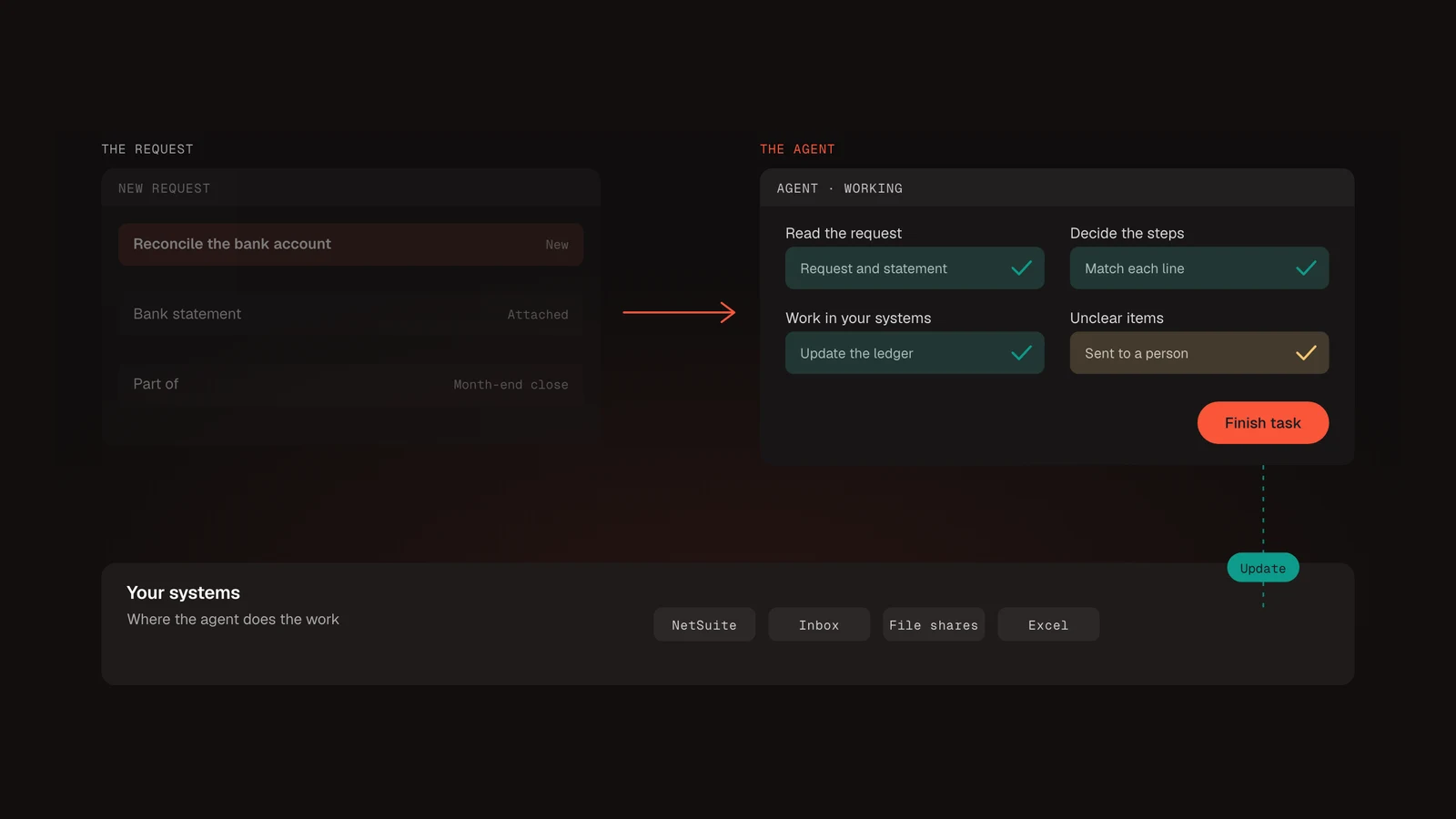
Buy software when a product does the whole job, use a no-code tool when it does most of it, and build a custom internal tool when the job depends on your own rules and a live link to your ERP or CRM. AI has made it cheaper to start building, but it has not made the tool cheaper to run, fix or hand to the next person. This post is for a COO or CEO who pays for SaaS tools that half fit and has no engineering team to spare. It covers how to decide, what changed with AI, what ownership costs, and what to ask a firm before you hire it. The decision matters because a wrong build leaves you with a tool nobody can maintain, and a wrong buy leaves you paying for software your team works around.
The Gnar Company makes custom software built around how your operation actually works, from a firm that will tell you when not to build it. If your approvals, orders and reports live in spreadsheets and email, the page on enterprise software and internal tools shows what one tool replacing them looks like.
When should you build instead of buy?#
Build only when the job depends on rules that are yours alone and the tool must stay linked to your ERP or CRM. When teams build vs buy software, the right answer depends on fit, the cost to own it, and how the tool must work with existing systems. If a product already does the whole job, buy it. If a no-code tool does most of it, start there. A custom build earns its cost when you have already tried those two paths and your team still works around them.
Work through these five questions in order. Stop at the first one you can answer yes.
- Does a product on the market do the whole job? Buy it. Software that a vendor's team maintains for thousands of customers is cheaper to own than anything you build, and buying commercial software usually wins on speed to market when the fit is already there.
- Does a no-code or low-code tool do most of the job? Try it first. Tools like Retool and Power Apps let a person on your team build screens and approvals without writing code.
- Do your own rules decide the outcome? Pricing exceptions, approval chains by customer or region, or a calculation only your company uses are rules a general product forces you to bend. That kind of business logic, especially when it reflects proprietary workflows and competitive differentiation, is the strongest case for building software in house. A custom tool can follow them as written.
- Does the tool have to read from and write to your ERP or CRM? An order should be entered once. If the tool cannot connect to the system that holds your orders and customers, people will type the same record twice.
- Who owns it after launch? Someone must host it, watch it and fix it. Tools that handle sensitive data or compliance-heavy workflows can still justify the higher ownership burden. If the answer is nobody, do not build yet.
QA Wolf, a software testing company, gives a short rule for the whole question: "Build narrow, buy broad." Its example is that simple workflows and Slack integrations can be worth building, while replacing a full system that a vendor's entire team maintains almost never is.
That rule fits the five questions. A narrow tool for one approval chain or one report is a reasonable build. A new ERP is not. The more of your company a tool tries to cover, the more people you need to keep it alive.
What changed when AI began writing code?#
AI lowered the cost of the first version of a tool. It did not lower the cost of keeping that tool correct, secure and connected for years. More companies are asking this question because AI coding tools make a first version easy to start. The bill arrives later, in maintenance and in the hours of whoever has to fix it. AI generated code can speed up the first pass. It does not remove testing, review or long-term ownership.
Retool, a company that sells an internal tools platform, frames the choice as three options. It writes that "it's now also a question of build vs buy vs build with AI." That third option is the new one, and it is the one most executives are being pitched.
Retool is also direct about the risk. It calls out "vibe-coded apps, which are notorious for adding tech debt and including insecure code." Technical debt means shortcuts in the code that make every later change slower and riskier. Insecure code means a tool holding your customer or payment data may have holes nobody checked for. Every internal tool that holds customer or payment data needs a security review before launch.
QA Wolf describes where this ends up. In its June 2026 post, The Graveyard of AI-Built Internal Tools Keeps Growing, author Michael Price writes that "AI made building cheap to start, not cheap to own. The maintenance, debugging, and opportunity costs haven't changed." The same post says internal tools "are often launched loudly and deprecated quietly." A tool that was built over a weekend gets used by the team that asked for it, then the builder moves on, and one day it stops working and nobody knows why. Retool also notes that internal tools often don't have dedicated product owners, so they may not come with complete specs. That adds maintenance burden and makes ongoing cost harder to control.
Here is the plain version for an executive:
- The first version of a tool is no longer the expensive part.
- The expensive parts are the ones that start after launch: hosting, security patches, changes to the systems the tool connects to, incident response, onboarding, and the ongoing cost of keeping the tool useful over the same time horizon as a vendor contract.
- A tool without an owner decays. A tool with a named owner and a maintenance plan does not.
This is also where the question of who builds it changes. If your company has engineers with spare time, building with AI can be a sound choice, and the people closest to the work often know the rules best. If it does not, the AI tool does not remove the need for an engineer. It only moves the engineer's work from typing code to deciding what to build, checking what the AI produced and keeping it running. This routine work is where engineering leaders often see the real cost show up months later. Gnar puts it this way: "Producing code is close to free now. Understanding your operation is not."
How do buy, no-code and custom compare?#
Buying, no-code and custom each fit a different job, and they differ most in who maintains the tool and how closely it follows your rules. Buying costs the least to run and usually gives you more predictable subscription expenses, while custom has more variable ongoing cost. A no-code tool sits in the middle. A custom build follows your rules and your systems most closely, and it asks the most of whoever owns it afterward.
| Question | Buy a SaaS product | Use a no-code tool | Build custom |
|---|---|---|---|
| Who maintains it | The vendor | Your team, on the platform's terms | You, or a firm under a maintenance agreement |
| Fit to your own rules | You adapt to the product | Good for common cases, limited for unusual ones | Follows your rules as written |
| Live link to ERP or CRM | Only if the vendor offers a connector | Depends on the connectors the platform has | Built to your systems |
| Shape of the cost | Predictable subscription spending, often per seat | Platform subscription plus your team's time | The total cost over time, including the build and what it takes to run and change it |
| Who owns the code | The vendor | The platform holds the app | You, if the contract says so |
Read the table from the bottom row up if you have been burned before. Ownership of the code decides whether you can ever leave. A no-code app lives on the platform that built it, so moving off the platform means rebuilding. A custom tool is only yours if the contract says the code goes in your repository. If you buy, check for vendor lock in before you sign. Weak data export, hard migrations and products with no way to extend them all deepen vendor lock in. They raise long-term cost and limit flexibility as your systems change.
The second row from the top matters most to a COO. Software from a vendor fits the average customer, and updates usually arrive automatically from the vendor. Your operation is not the average customer in at least one place, and that place is usually where the spreadsheet came from.
Signs your SaaS tools have stopped fitting#
Your SaaS tools have stopped fitting when people routinely work around them. The clearest sign is a spreadsheet or email thread that carries a step the software cannot. If that step touches money, customers or compliance, the workaround is a risk. One workaround is normal. A pattern of them is a signal.
Check how many of these are true for your company today:
- A spreadsheet holds a decision that a system should record, such as who approved a price change.
- The same order or customer record is typed into two or more systems.
- A report for leadership is built by hand each month by exporting from several tools.
- One person has to be there for a process to work, because only they know the workaround.
- Approvals move through email, and nobody can say where a request is right now.
- You pay for a tool where most of your team uses a small part of it, so audit licenses. Zylo's build vs buy software guide reports that organizations use just 54.4% of the licenses they pay for, leaving roughly 46% idle.
- You have asked a vendor for a change three or more times and been told it is not on the roadmap.
- A customer or partner emails your staff for status that a portal could show them.
If three or more apply, you have a build or no-code candidate. Regularly review purchased tools and internal tools so stale systems do not persist just because the tool exists. If one applies and it is minor, keep buying.
The scale of SaaS spending explains why this comes up. Zylo's 2026 SaaS Management Index, published January 29, 2026, reports that organizations spend an average of $55.7M a year on SaaS, up 8% year over year. The average portfolio holds 305 applications. The median is 240 applications and $20.6M in spend.
Those are Zylo's figures for the organizations it studied. The point holds at any size. Every one of those applications is a place where your process meets someone else's design. Some will fit and some will not. The ones that do not are your candidates, and you can find them by asking who keeps a spreadsheet next to each tool, especially when teams adopt their own tools that overlap or go underused.
Do not replace the whole stack. QA Wolf's rule, build narrow and buy broad, applies here too. Pick the one or two gaps where the workaround costs you most and leave the rest.
What does a tool built with AI cost to own?#
Owning a custom tool costs hosting, monitoring, updates and a person who can fix it, and those costs begin on launch day. A build price covers making the tool. It does not cover keeping it running. At The Gnar Company, maintenance starts at $1,000 a month. Whatever the builder charges, get the monthly number before you approve the build, because the maintenance cost and the opportunity cost usually sit outside the initial build estimate as a hidden cost.
Retool lists the questions that come after launch. It asks where the app is going to live, and who is going to take responsibility for updating libraries or maintaining test cases. It also describes the usual way internal tools fail: the person who built the app leaves, and nobody knows how to change it.
Turn those into a cost list you can price:
- Hosting. The tool has to run somewhere, on a server someone pays for and watches.
- Monitoring. Someone has to know when it breaks before your team calls to say so.
- Updates. The libraries the tool is built on release fixes, including security patches. Skip them and the tool becomes a risk.
- Changes in connected systems. When your ERP or CRM changes how it works, the tool that reads from it has to change as well.
- New requests. Once the tool works, your team will ask what else it can do. Each answer is more work.
- The builder leaving. An internally built tool with no clear owner can end up with nobody able to support or change it.
The same Zylo guide says maintenance consumes more than half of a system's lifecycle cost, and often several times the original build cost over its operational life.
Two choices keep these costs under control. The first is a named owner. This can be an engineer you hire later or a firm under a maintenance agreement, but it cannot be nobody. The second is ownership of the code and docs. Gnar's rule is that the code lives in your repository, with the docs. That way an engineer you hire later can take the tool over without asking permission.
Price the tool over its life. The one time cost to build is only part of the number. The built tool's cost usually keeps showing up in cloud invoices and headcount, which is why total ownership is easier to miss than a software subscription. A high lifetime cost is fine if you compare it with the real cost of what the tool replaces. That includes the hours of people retyping records, the errors, and the monthly report someone rebuilds by hand.
A tool is also worth less if it cannot be changed. When you compare builders, ask what a change request costs and how a small update gets handled once the tool is live.
Where is a no-code tool enough?#
A no-code tool is enough when it does the whole job, your team can maintain it, and you do not need custom rules or a live connection to your ERP or CRM. If it clears all three, use it. Gnar's own advice on its internal tools page is the same: if a no-code or low-code tool like Retool or Power Apps does the whole job, use it. In practice, low code platforms and no code platforms sit in the middle between buying rigid SaaS and full custom development.
Good fits for no-code include:
- A form that collects requests and routes them to one approver.
- A dashboard built on a data source that already exists and is clean.
- A small tracker for one team, where the data does not feed any other system. Simple business processes like this are good internal software candidates for no-code.
- A prototype you use to learn what the real tool should do.
Poor fits for no-code show up when the job grows:
- The rules vary by customer, product or region, and the tool needs logic the platform cannot express.
- Records must stay in sync with your ERP or CRM in both directions.
- Customers or partners will log in, which raises questions about permissions and security.
- The tool is becoming something other teams depend on.
Gnar describes the edge this way on its internal tools page: "No-code gets you to eighty percent. The stretch to ninety-five is why Gnar gets called." That last stretch is your own business rules and a live connection to your ERP or CRM.
A sensible path is to try no-code first, with a clear list of what the tool must do. These tools reduce initial development effort, but you still own maintenance and possible vendor lock-in. If it cannot do the last part, you have a written specification for what a custom build needs to cover. That list saves money in a build, because the scope is already known.
One more point about no-code: someone on your team becomes its owner. If that person is you, or a manager who built the first version, plan for the day they change roles.
What should you ask a firm building with AI?#
Ask eight questions before you hire anyone to build an internal tool with AI. They cover price, ownership, maintenance, access management, risk, and who makes the decisions in a clear decision framework. A good builder answers each one in writing and without hedging. A builder who cannot say who owns the code or what happens after launch has not thought about it.
Use this checklist in the first meeting:
- What is the price, and is it fixed before work starts? Ask what happens if the work costs more than planned, and who pays.
- Who makes the decisions about what to build and how? AI tools produce code, but a person has to decide what the tool should do and check what comes back. Ask for that person by role.
- Who owns the code? The answer should be you, and the code should live in a repository you control.
- Where does the code live, and are there docs? Without documentation, the next engineer starts from zero.
- Who maintains the tool after launch, and what does it cost each month? Get a number, and ask what it includes: hosting, monitoring, fixes and updates, because documentation and testing reduce the maintenance burden later.
- How does the tool connect to our ERP and CRM? Ask about the required data flow between the tool, your ERP, and your CRM: what it reads, what it writes back, what is controlled, and what happens when those systems change.
- What happens if the tool does not work as specified? Look for a written outcome standard and a warranty in the contract.
- Can we stop after the plan and take it elsewhere? A builder confident in its plan lets you walk away with it.
Governance should match the tool's blast radius, especially if it will touch sensitive data or admin actions.
Some of these have answers you can compare. A fixed price with any overage on the builder shifts the risk to the party that controls the work. A warranty tells you how long the builder stands behind the code. A written plan with a price lets you compare two firms line by line.
Be careful with one answer: "AI makes it cheap, so the price is low." The part of an internal tool that surprises you later is ownership.
Also ask how the firm treats a project that should not be built. A firm that never says no is selling, and a firm that tells you to use an existing product when one fits is giving advice you can trust. Gnar's one-liner says it directly: it is a firm that will tell you when not to build it.
If you have two or three firms in front of you, send each the same one-page description of the tool and the same eight questions. Compare the written answers side by side. That is where the differences show up.
How does The Gnar Company build with AI?#
The Gnar Company builds internal tools with AI through Gnar Forge. One senior engineer plans one focused tool with you and builds it with AI tools at a fixed price. The engineer makes every call on what to build and how. The first month of maintenance is included, and maintenance after that starts at $1,000 a month.
Gnar Forge fits one clear job, such as an approval system, a reporting dashboard or a client portal. A tool built with AI still needs access control and a named owner like any other software, and customer facing systems need them most. Bigger systems that touch several teams start differently, with Gnar Discovery and Design, a paid sprint that maps how work and data move between your teams. It costs $20,000 for four weeks or $30,000 for six, and it ends in a build plan with a fixed price. You do not have to build with Gnar after it. Builds are typically $150K to $300K+. You can read how that works on the Discovery page and the Gnar Forge page.
Gnar publishes its guarantee in these words: "Three commitments on every build engagement: a fixed milestone price with any overage on us, a guaranteed outcome meaning the software works as specified or we fix it, and a twelve-month bug-free warranty. It covers Discovery, Build, Forge and Maintain. It does not cover Embed."
Gnar is also a Claude Select Services Partner with Anthropic, the company that makes Claude. That describes the relationship with the AI tool. It does not replace the senior engineer who decides what the tool should do.
Gnar's published work gives three examples of internal tools with the client's name on them:
- OnePak. Gnar built order tracking for OnePak's clients and partners, with live updates from OnePak's own systems. Dell gave OnePak a Supplier Award as a result of Gnar's work. The tool is hooked into OnePak's own systems. See the case study on building a transparent, user-friendly front end.
- Massachusetts DPU. Gnar built the driver background check system for the Massachusetts DPU. It flagged 8,000+ Uber and Lyft drivers who did not meet state rules, and it is still running. Two systems work together: one runs the background checks and one reviews them.
- AARP Foundation. Gnar rebuilt 14 property tax tools for the AARP Foundation, and the average application takes 40% fewer clicks to complete. The case study on building tools to help seniors save on real estate taxes has the detail.
Gnar's page says it is built for companies with no engineering capacity of their own to point at this work. It also says: "If your own team has the capacity and the direction, you do not need us." If you have engineers with room and a clear spec, build it yourselves. If you do not, the questions in the checklist above apply to Gnar as they do to anyone else.
If the problem is a spreadsheet that has become the system, the post on turning the spreadsheet nobody trusts into real software walks through that path. If someone on your team has already built something with AI and it now has users, read your vibe-coded app has users, now what. For a related decision about one specific system, see custom order management system: build or buy.
Whichever path you pick, start with one spreadsheet or approval chain, write down what it must do, and decide the owner before you decide the tool.