Build vs buy software comes down to this: buy when a product already covers the job and your process is standard, build when the system carries how your operation is different and has to work with the systems you keep, and for most companies the answer is a mix of both. This guide is for a COO choosing between a SaaS product and a custom build for a system the operation runs on, such as order handling, quoting, scheduling or a customer portal. It covers the three paths, a decision rule for each, a worksheet that puts both options side by side over five years, where each path goes wrong, and who should run the comparison. The decision matters because the wrong choice stays in the budget for years and in your people's daily routine even longer.
The Gnar Company describes itself in one line: custom software built around how your operation actually works, from a firm that will tell you when not to build it. Its software architecture consulting plans the product you could buy and the software you could build on the same terms, and the worksheet in this post follows the same idea.
You likely have a vendor demo on one side and a developer's estimate on the other. Each was made by someone who sells one of the answers. That is a normal part of buying, and it is the reason the comparison below is written so that you can fill it in yourself and put it in front of your CEO and CFO.
What does build vs buy software mean today?#
Build vs buy software is the choice between paying a vendor for a finished product and paying engineers to write software for you. Today it is rarely a two way choice. Zylo's build vs buy guide says most enterprise software decisions come down to three paths: build a custom tool, buy an off the shelf software product, or buy a platform and extend it with APIs and low-code.
The bought option also goes by commercial off the shelf software, or pre built software solutions. The built option is custom development, done by your own team or a firm.
Here is what each path means in plain words.
Buy. You pay a vendor a subscription for a product that already exists. The vendor writes the code, hosts it, fixes it and updates it. You configure it, load your data and train your people. You adapt your process to the product, within the settings the vendor gives you. Buying software is the right call for any job where the product already does what you need.
Build. You pay a development team to write custom software around your business requirements. It does what you specify, connects to what you name, and runs where you decide. You own the code if the contract says so. You also own the work of keeping it running after the custom software development ends. Building custom software puts the whole job of making it correct, secure and current on you or the firm you hire.
Buy and extend. You buy a platform for the standard part of the job and write custom code around it for the part that is yours. This is the hybrid approach, and it is where many companies end up. It gets its own section below, because it fails in a specific way.
A fourth case sits underneath all three: the systems you already run. Your ERP, your accounting package and your older legacy systems do not go away because you picked a path. Every option you consider must work with the systems you keep, and the connections between them are where most of the surprise cost lives.
Zylo also reminds buyers that buying is not instant. It says enterprise SaaS still takes 6 to 18 months to roll out. Time to market for a purchased product depends on configuration, data loading and training, and it is easy to forget those steps when the demo takes an hour.
When is buying software the right call?#
Buy when a product already covers the job, your process is standard, and nobody wins a customer because of how you do this task. Buying software usually costs less to own than anything you build for a standard job, because the vendor spreads the cost of building and fixing it across many customers. Payroll, email and basic accounting are the clear cases. Buying also needs a smaller upfront investment, while building software is a significant upfront investment, paid before the system earns anything.
Use this checklist. If most lines are true, buy.
- A product on the market does the whole job, and you can name two or three of them.
- Your process is close to the way most companies in your industry work.
- Nobody outside your company would notice or care how you do this task. It is not a source of competitive advantage.
- The product connects to your existing systems with connectors the vendor already supports.
- You can pass the vendor's security and data questions without special arrangements.
- Your team can run the system with the settings the vendor offers, with no code.
- You can export your data in a usable form if you leave.
- The vendor has a clear price for the whole term, with the charges after signing written down.
Purchased software has a failure mode that rarely gets discussed in the sales meeting. Zylo says it plainly: "Bought software rarely gets canceled. It gets ignored." Its data shows how much of that happens. Organizations use just 54.4% of the licenses they pay for, which leaves roughly 46% idle. The average company wastes $19.8 million a year on those unused licenses.
That tells you something for the checklist. Before you sign, ask who in your company will use the product every day and what they do today that the product will replace. If you cannot name the people, the product will probably become shelfware, and you will pay for it anyway.
Watch for vendor lock in. Lock in means leaving costs more than staying. It shows up as data you cannot export, a proprietary format your other tools cannot read, or customizations that only work on that vendor's platform. Ask for a sample export during the sales process. A vendor that is confident in its product has no reason to refuse.
When is building custom software right?#
Build when the system carries how your operation is different, when no product fits without heavy workarounds, and when the system must work with the systems you keep. A custom solution makes sense when the process is part of why customers choose you, because you get complete control over how it works and how it changes.
Use this checklist. If most lines are true, building deserves a serious look.
- The process is a source of competitive advantage. Your quoting rules, your scheduling logic or your service levels are why customers pick you.
- You have tried products and your people work around them with spreadsheets, copied records and email.
- The system must read from and write to your ERP, your warehouse tools or your customer systems, and no product offers custom integrations that fit.
- Your rules change by customer, by region or by contract, and a product forces you to bend them.
- You want complete control over the roadmap, so a vendor's priorities cannot hold up your changes.
- You can name an owner for the software after launch, whether that is your own engineer or a firm under a maintenance agreement.
- You have written down the business needs in enough detail that two different firms could price them.
Notice that the last two lines are about ownership and clarity. They are the lines that sink most attempts at building software. A custom build needs a person who decides what the software does and a plan for who fixes it later. Without them, you have paid development costs for a system that will drift.
Two more points for a COO. First, building does not mean replacing what you have. Custom software often sits beside an ERP you are keeping and handles the part of the work the ERP cannot. Second, AI has changed the arithmetic. The consulting page at The Gnar Company puts it this way: "AI has made custom code cheaper, so it is a closer call than it used to be." Cheaper code makes a custom solution easier to justify. It does not remove hosting, updates, security patches or the person who answers the phone when something breaks.
If the system you would replace is old and the risk is the part nobody dares touch, the page on legacy software modernization covers that path. For a worked example of the same question on one system, read custom order management system: build or buy.
How do you compare both on the same terms?#
Put the product you would buy and the software you would build into one worksheet and fill in the same rows for both. Do not compare a vendor's price with a developer's price alone. Compare what each must do, what each connects to, where each runs, what each costs over five years, who owns what, and what it costs to leave.
Here is the worksheet. Copy it into a spreadsheet and fill in both columns before you meet the CEO and CFO.
| Row | Buy | Build |
|---|---|---|
| What it must do | The tasks the product covers out of the box, and the gaps you would fill by changing your process | The tasks written down as business requirements, with what is off the table |
| What it connects to | The connectors the vendor supports, and the custom integrations you would still need | The existing systems it must read from and write to, each one named |
| Where it runs | The vendor's cloud, with its uptime terms and data location | Your cloud or the builder's hosting, with who watches it |
| Year one cost | Licenses, setup, data loading, training, connections | The build, setup, data loading, training, connections |
| Years two to five cost | Renewals, price increases, extra seats, usage charges | Ongoing maintenance, hosting, security updates, changes |
| Cost of a change | The vendor's roadmap, or paid services, or a workaround | The price of a change request on your own plan |
| Who owns the code | The vendor | You, if the contract says so |
| Who owns the data | You, with export terms to confirm | You, in your own database |
| What leaving costs | Export, migration, retraining, lock in | Handing the code and docs to another team |
| Who fixes it | The vendor, on the vendor's schedule | You, or a firm under a maintenance agreement |
| How it grows | The vendor's limits on seats, data and usage | Designed for the load you expect, and changed when it grows |
A few notes on how to fill it in.
What it must do. Write the list before you look at either option, with the business owner of the process in the room. Business requirements written after a demo bend toward the demo. Mark each line as required, wanted or off the table. Then score both options against the same list.
What it connects to. Name every system on both sides of the connection. Integration challenges are the line most often left blank, and they are often the line that decides the total cost. A product that looks cheap but needs several custom integrations is not cheap.
Where it runs. Ask where the data sits, who watches the system and what happens when it goes down. For a build, include hosting and monitoring in the plan. For a purchase, read the uptime terms.
The five-year cost lines. Price both options over the same five years. Zylo's guide says five-year total cost is often underestimated 2 to 3x for both paths. That is a warning for you, since neither path is safe from it. Add a line for surprises in both columns. On the buy side, hidden costs often show up after signing: Zylo's survey of IT leaders found that 76.6% incurred unexpected costs after signing, and 77.5% incurred charges tied to consumption or AI functions. On the build side, they show up as maintenance, hosting and each change request after launch.
Who owns what. A purchased product means the vendor owns the code and you own your data, with export terms to confirm. A custom build means you can own both, and only if the contract says the code goes into a repository you control.
What leaving costs. Fill this in even if you do not plan to leave. If the vendor raises its price in year three or the builder disappears, this line is your exit.
How it grows. Ask what happens when your volume doubles. A purchased product scales on the vendor's terms and price list, and some products struggle when a business grows past the plan it bought. Custom software can be designed for the scalability your business needs, and it needs work each time that need changes.
When both columns are full, the answer is often clear without a model. If it is close, the tie breaker is the row that carries your operation's own rules. If you can live with the product's version of that row, buy. If you cannot, the price of the build is the price of getting that row right.
Where do both paths go wrong?#
Both paths fail the same way: someone priced the easy part and left the hard part out. Buying fails when software gets bought and ignored, and when charges after signing grow. Building fails when a large project runs over its budget and delivers less than predicted. Each failure is visible early if you look for it.
Start with the data on large IT projects. McKinsey and the University of Oxford studied more than 5,400 IT projects, and McKinsey published the results in 2012. On average, large IT projects, the ones with initial price tags over $15 million, ran 45% over budget and 7% over time. They delivered 56% less value than predicted. The report also found that 17% of IT projects go so badly that they can threaten the existence of the company, and that software projects run the highest risk of cost and schedule overruns.
Read those numbers with care. They describe large projects, far bigger than most operators will approve for one system, and they give no figure for a smaller build. They also describe projects of every kind, whether the team built or bought. The lesson is about direction. The bigger and longer the project, the more room for the plan and the result to drift apart.
Now the buy side. Zylo's figures on licenses (54.4% used) and on unexpected charges (76.6% and 77.5%) say the same thing from the other direction. The signed price is the start of the cost.
| Where it goes wrong | On the buy path | On the build path |
|---|---|---|
| The plan is vague | You buy a product for a job you never wrote down | You approve a build for a job nobody wrote down |
| The cost grows | Charges after signing, usage fees, extra seats | Change requests, ongoing maintenance, hosting |
| The people drift | The product gets ignored | The builder leaves and nobody can change it |
| The connections surprise you | Custom integrations the vendor does not offer | Existing systems that behave differently than planned |
| Leaving is hard | Vendor lock in | Code nobody else can read |
Use this as a warning list at every review. Ask whether the scope is written down, whether the cost line has grown, whether people still use the system, and whether the connections work the way the plan said. If you are approving a build, the post on keeping a software project from going over budget has a contract checklist for the risks above.
What about a hybrid approach?#
A hybrid approach means you buy a product for the standard part of the job and build custom code around it for the part that is yours. Zylo calls it buying a platform and extending it with APIs and low-code. Of the software solutions on the table, it often gives the best fit for the money, but it fails when the custom share keeps growing past what the platform can carry.
Zylo names the failure: extension creep. In its words, "What starts as 20% custom becomes 60% custom, and you've built around the vendor while still paying for it." Each extension seems small. Together they become a second system that depends on the first. You pay the license and you carry the development costs and the ongoing maintenance of the custom part.
Done well, a hybrid approach gives you more flexibility than either pure path, and it keeps technical debt inside the small custom part. Three habits keep a hybrid approach healthy. They are general engineering practice, and they are not a report on any one project.
- Draw the line in writing. Decide which jobs the product does and which jobs the custom code does. Review the line each year. If the custom side keeps growing, ask whether you are building a second product.
- Extend only through the vendor's published interfaces. Code that reaches into the product's internals will break when the vendor updates it. Code that uses documented interfaces has a better chance of surviving.
- Keep your data in a place you control. If the custom layer holds your data in its own database, a later change of product costs less.
A hybrid approach is also the most natural way to work with existing systems. You keep the ERP or the product that holds your records, and you add the one piece of custom software that carries your rules. It is a good fit when the product covers most business needs and one process, such as a quoting rule or a scheduling rule, is the part that makes you different.
What about security and compliance?#
Security and compliance stay your company's responsibility on both paths, whichever you choose. Buying moves the patching and hosting to the vendor, but your company still answers for how customer data is handled. Building gives you full control over customer data and access, and puts security patches, reviews and audits on you or the firm you hire.
Check these before you decide:
- Where the data lives. For a purchase, read where the vendor stores customer data and who at the vendor can see it. For a build, decide where it runs and who holds the keys.
- What the vendor can prove. Ask the vendor for its most recent independent security report, and read which parts of the product it covers.
- Who reviews the code. For a build, plan a security review before launch, and name who applies security patches after it.
- How access is controlled. On both paths, list who can see what, and how a person's access ends when they leave.
- How it fits your existing infrastructure. Every connection to your business operations systems is a door. Count the doors on each path.
Who should run the build vs buy analysis?#
The build vs buy analysis should be run by someone who earns the same money whichever answer wins. Vendors sell the product and development shops sell the build, so each has a reason to lean toward its own answer. That is not a charge of bad faith. It is how incentives work. Your best protection in the decision making process is a written comparison of both options on the same terms.
You have three ways to get it.
- Your own team. If your engineers have the time and a clear direction, they can fill in the worksheet above. The risk is that the people closest to the system argue for the one they already know.
- A neutral advisor who does not sell either answer. A consultant paid for the analysis alone has no stake in the result. Ask how the advisor earns money if you buy and if you build.
- A firm that plans both options and will say buy. Some firms that sell custom software development will plan the purchase as carefully as the build. Ask to see how they would tell you to buy.
Whoever runs it, ask these questions in the first meeting.
- Will you plan the product we could buy with the same care as the build, including where it runs and what it connects to?
- If buying wins, will you say so in writing?
- Will you show the five-year cost for both options on one page?
- Who owns the plan when you finish? Can we take it to our own engineers or another firm?
- What happens to the systems we are keeping? Are they planned around, or planned to be replaced?
- If you recommend building, is the price fixed for each milestone, and who pays when the work costs more?
- What would make you recommend we do nothing?
A firm that answers these in writing is giving you something you can compare. A firm that hedges is telling you how the rest of the engagement will go.
How does The Gnar Company decide?#
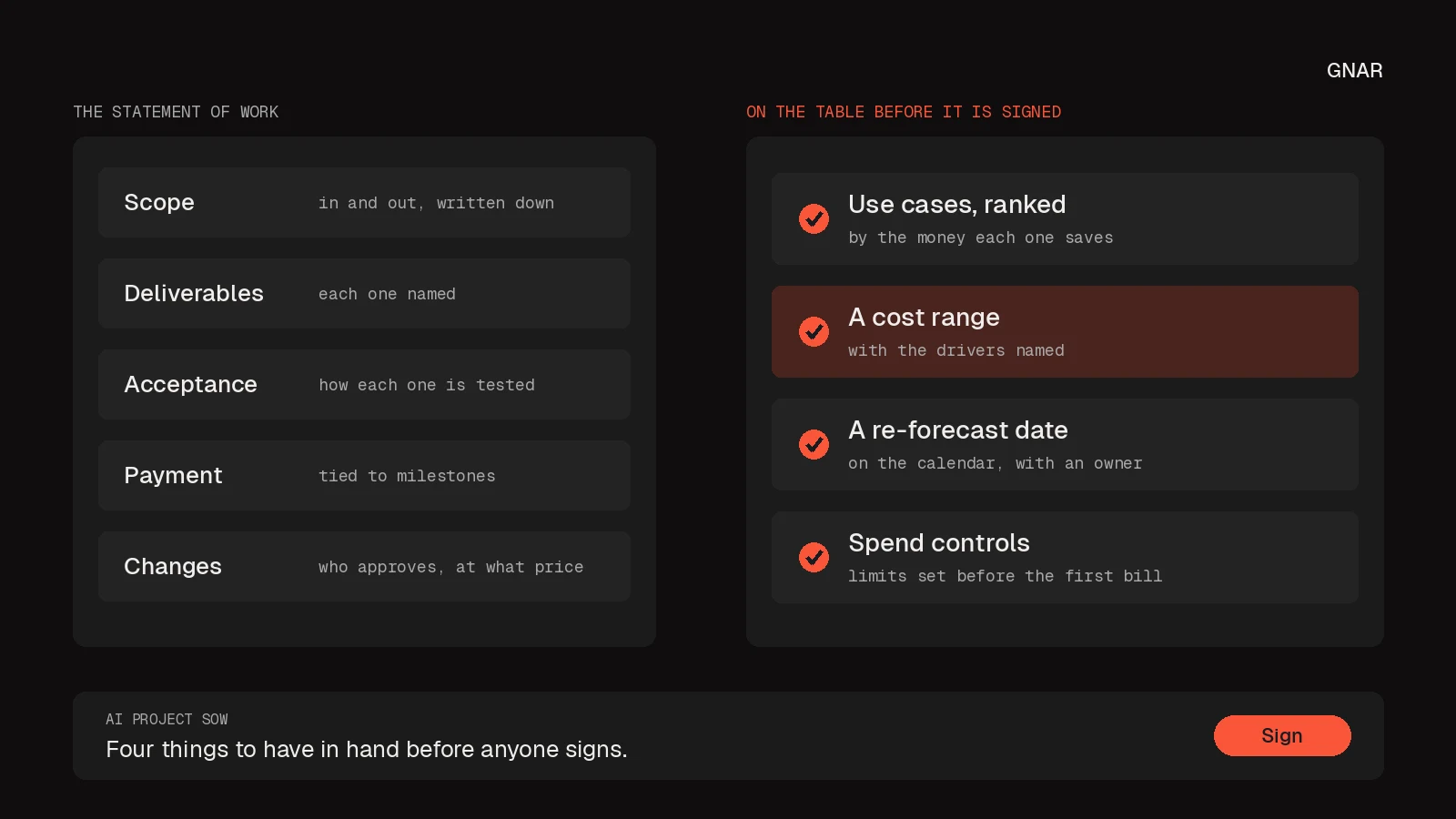
The Gnar Company's senior engineers plan both options in Gnar Discovery and Design, then say which one wins, even when the answer is to buy. If building wins, you get a build plan with a fixed price for each milestone. If you should not build it, Gnar says so. The plan is yours.
Here is how that works, in the words of Gnar's own consulting page.
- Buying can win. Gnar plans the product you could buy the same way it plans a build: where it runs and what it connects to.
- Cost and fit are compared. Gnar puts the product you could buy next to the software you could build and compares cost and fit.
- The plan is yours. You can take it to your own engineers or another firm. You do not have to build with Gnar.
- Systems you are keeping are planned around. The plan treats them as fixed, and does not assume replacing them.
- A free first call, and a free code audit for software you already run. The audit tells you what shape your current system is in and which parts are worth keeping. It has no fee and no obligation.
Discovery costs $20,000 for four weeks or $30,000 for six. When building wins, the plan breaks the build into milestones, each with a fixed price. Builds typically run $150K to $300K+, and maintenance starts at $1,000 a month. You can read how the engagement works on the Discovery page, and the custom software development page describes what Gnar builds.
On a build, Gnar's guarantee reads: "Three commitments on every build engagement: a fixed milestone price with any overage on us, a guaranteed outcome meaning the software works as specified or we fix it, and a twelve-month bug-free warranty. It covers Discovery, Build, Forge and Maintain. It does not cover Embed."
Gnar also says plainly that if your own team has the capacity and the direction, you do not need the firm. That is the right test for any outside help. Use the worksheet, ask the questions above, and pick the answer that holds up across all five years. If you want a second opinion on the worksheet, talk to Gnar about your decision.