You upload a document to an AI, type "look at this and tell me what you think," and watch it produce something that sounds brilliant. Strategic. Confident. Then you try to actually use it, and you can't. You can't hand it to anyone on your team. You can't make a decision from it.
It's a strange moment, because it's a wow moment and a quitting moment at the same time. The output is impressive enough to prove the technology is real, and useless enough to convince you it's not for you. This is where most people quietly file AI under "overhyped" and go back to doing everything by hand.
They're in good company. Most mid-=market companies that have invested in AI report little or unclear value from it. Tools got bought, seats got assigned, and the ROI never showed up.
We opened our first AI for Operators session last week with that problem, because we think the diagnosis is usually wrong. The gap between "this is a toy" and "this just saved me half a day" almost never comes down to the AI. It comes down to how you ask.
The colleague who can't read your mind
Think of Claude (or whatever model you use) as an extremely well-read colleague who never gets tired, never forgets what you said five minutes ago, and can read a 100-page document in seconds. Remarkable coworker. Still can't read your mind.
Now imagine it's a new hire's first day and you say, "Write me a report."You'd get something mediocre, and it would be your fault. Tell that same person, "Write me a one-page summary of Q1 performance for the board, focusing on revenue growth and customer retention, in the same format as last quarter's report, and here's the data," and you'd get something you could use. Same person. Same skills. Different instructions.
AI works the same way. A vague prompt forces it to guess, and every guess isa chance to be wrong.
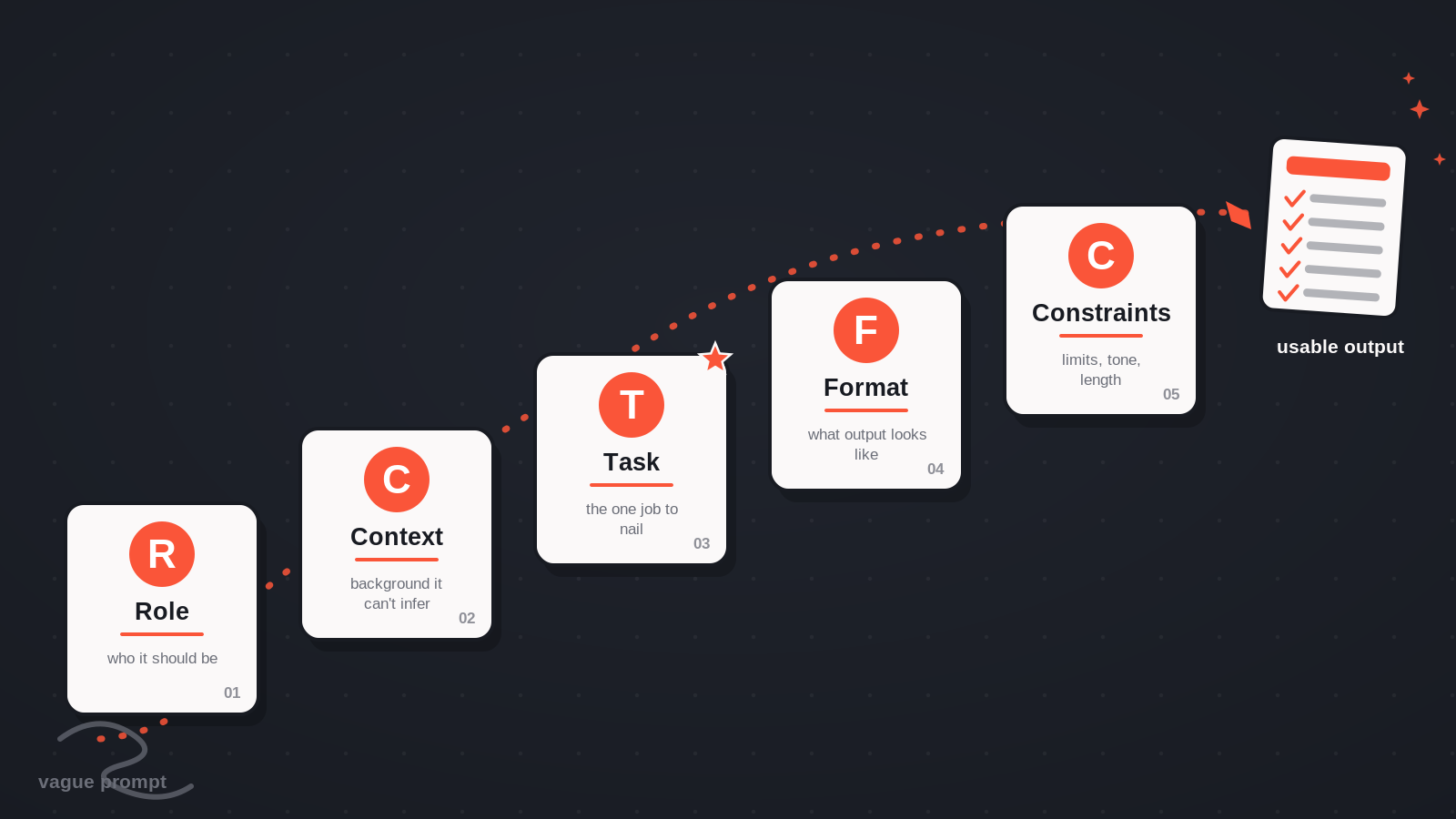
The framework: RCTFC
At the session we taught a prompting framework we use every day. We call itRCTFC, which I admit rolls right off the tongue.
Role. Tell it who to be. "You are a proposal manager at a professional services firm." This sets the lens for everything that follows.
Context. The background it can't infer. What's the situation? What happened before this?
Task. Your single biggest quality lever. Not "help me with this" but "give me a table of every requirement, organized by category" or "identify the top five risks."
Format. What should the output look like? A table, an email, a slide outline? If you don't say, it guesses.
Constraints. Word counts, tone, things to leave out, assumptions not to make.
You don't need all five every time. But when the output is off, check which one is missing. That's usually the fix, and the fix is usually one sentence.
The proof: one RFP, two prompts
Talking about prompting frameworks is cheap, so we ran the experiment live.
The document was a real RFP we responded to: 50 pages for a large web & mobile application. Our old process for an RFP like this was half a day, minimum. Read it, highlight it, figure outwhat we can and can't do, decide whether it's worth the significant time a response takes.
Round one, we gave Claude the prompt most people would type: "Look at this RFP and tell me what you think."
What came back was a smart strategic read. It called the bid winnable and flagged how the scoring rubric favored certain vendors. And yet it was exactly the problem I described at the top. Interesting, not usable.Nothing I could hand off, nothing I could decide from.
Round two, same document, new chat, RCTFC prompt: a role (proposal manager), context, an explicit task (every requirement they're asking for), a format (markdown table, organized by category), and constraints (flag anything buried in appendices or footnotes).
This time we got a requirements matrix spanning 19 categories, each requirement with notes and a source, including items tucked into appendices.From there the work compounded. We asked it to assess our fit against each requirement, strong fit, partial fit, or gap, and gave it a few sentences about our company. It flagged the gaps honestly, including ones where we'd need a subcontractor, like a year of seasonal photo and video production.Then we had it draft a response outline: what to emphasize in each section, how to address the gaps candidly, under 800 words. It came in at 770.
Total elapsed time, about 20 minutes. The outline was better than what most of us would produce in three or four hours. Not perfect. I'd still review every line and bring my own judgment on tone and positioning. But it got me80% of the way there, and the difference between round one and round two wasn't the AI. It was the prompt.
What this means if you run a company
You may never touch an RFP. Doesn't matter. Your version might be a vendor security questionnaire, a compliance audit, a supplier contract, or a200-page data room you'd otherwise lose a weekend to. The bottleneck is the same everywhere: too much information, not enough senior time to turn it into a decision.
AI doesn't replace that judgment. It hands you back the hours so you can spend them on judgment instead of paperwork.
Everyone who registered for the series got the follow-up kit: the RCTFC cheat sheet plus reusable prompt templates you fill in once and keep.
Session 2: stop repeating yourself
If you try RCTFC this week, you'll notice a new annoyance fast. Every chat starts cold. You re-explain your company, your role, and your preferences, over and over.
That's what we're fixing next. Session 2 of AI for Operators, Projects + Workflows, runs Tuesday, July 14, 2026 at 2:30pm ET. We'll build a Claude Project live, so the context about your business gets written once and applies to every conversation after. Then we'll cash the fix in: a weekly operations report that takes a real COO three hours every Monday, compiled in minutes, run twice on screen to prove the reuse. We'll cover the three levels of automation, from repeatable prompts to scheduled tasks to Research Mode, and do the ROI math in actual dollars, the kind you can take to your board or your CFO.
It's free, and one registration covers the full series, including the Session1 recording and materials. Register here.
The tool was never the problem. Come see what it does when you stop treating it like one.

Mike is Co-Founder of The Gnar Company, a Boston-based software development agency where he leads project delivery for clients like Whoop, Kolide (acquired by 1Password), LevelUp (acquired by GrubHub), Qeepsake (feaured on Shark Tank), and AARP. With over a decade of experience building impactful software solutions for startups, SMBs, and enterprise clients, Mike brings an unconventional perspective having transitioned from professional lacrosse to software engineering, applying an athlete's mindset of obsessive preparation and relentless iteration to every project. As AI reshapes software development, Mike has become a leading practitioner of agentic development, leveraging the latest AI-assisted practices to deliver high-quality, production-ready code in a fraction of the time traditionally required.