AI workflow automation for an operations team means software that reads the orders, requests and data your people receive, puts the details into the right fields, checks them, and sends them into the systems you already use. The best first workflow is one your team retypes many times a day, that ends in one system and that one person owns, such as orders that arrive by email and get keyed into the ERP.
This post follows a single workflow from the inbox to the ERP, step by step, and then covers when a no-code tool is enough and when the work needs a custom build. The Gnar Company builds AI automation of this kind: in its own words, "We replace manual reading and keying with agents that read, extract and route orders, requests and data into your existing systems."
What is AI workflow automation for an operations team?#
AI workflow automation is software that handles the reading and retyping in a workflow. Rules-based automation usually expects the data in a set layout. An AI step can read an email, a PDF or a spreadsheet, pull out the details, and pass them on in a fixed format your systems accept.
The output format matters because the entry has to land in fields your ERP understands. A rules-based automation can break when a customer changes the layout of a purchase order.
Anthropic's documentation for structured outputs describes a mode that makes Claude's responses follow a set schema, with listed exceptions such as a response that runs out of room. In plain terms, you can ask for a customer name, an item number and a quantity, and get back those fields in the set format. The values can still be wrong or empty, which is why the checks below exist.
Which workflows should you automate first?#
Start with a workflow your team handles many times a day, that arrives in mixed formats, and that ends with someone typing the details into one system. Emailed orders, purchase orders sent as PDFs and service requests from web forms are common examples. Pick one where you can count the minutes it takes today.
Use this list to check a candidate:
- It happens often. Many times a day, so small savings per item add up.
- It arrives in mixed formats. Emails, PDFs, spreadsheets and web forms, including customers who send them their own way.
- It ends in one system. The details get typed into the ERP, the CRM or a shared spreadsheet.
- The result can be checked. A person can look at the entry and say right or wrong.
- Someone owns it. One manager can agree to change how the work gets done.
- You can measure it. You know, or can find out, how long each item takes and how often it goes wrong.
At Counter Culture, every opportunity was scored on financial ROI, operational efficiency gains, implementation complexity, data readiness and cultural readiness, and weak data readiness capped an opportunity's score regardless of its upside. Gnar's AI automation page starts in the same place: identify the orders, requests or data someone reads and keys in today, and start with that workflow.
A worked example: one emailed order, before and after#
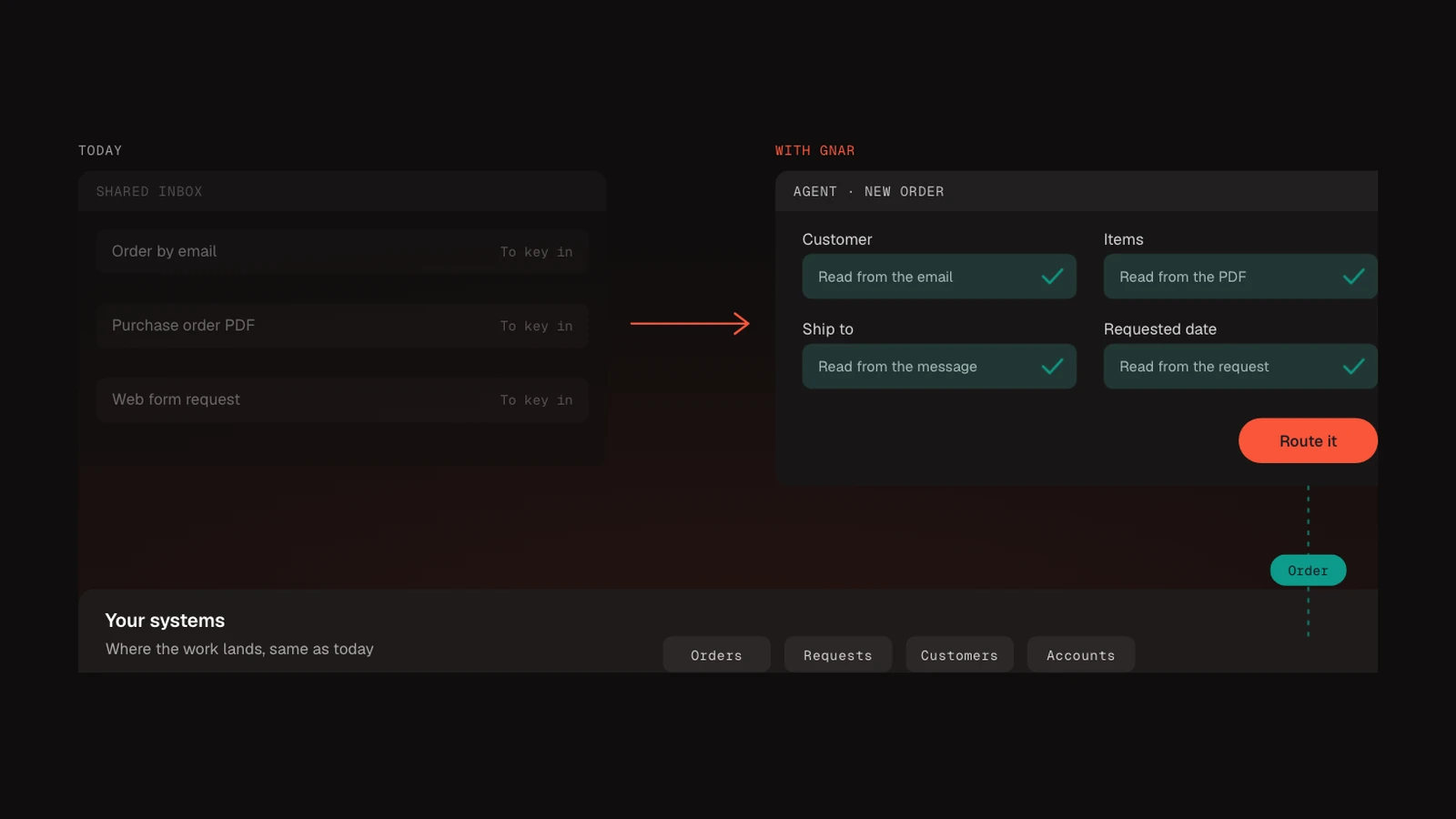
For one emailed order, the AI takes over the reading, the lookups and the typing, and a person still approves the entries where a mistake would be costly. The order is a purchase order attached as a PDF to an email from an existing customer, for three items, to ship to a job site.
| Step | Today | With automation |
|---|---|---|
| Arrival | Lands in a shared inbox and waits for someone to open it | Picked up by the automation when it arrives |
| Reading | A person opens the PDF and reads each line | The AI reads the email and the PDF |
| Customer | The person searches the ERP for the customer | The AI reads the customer from the email or the PDF and matches it to the customer record in the ERP |
| Items | The person looks up each of the three item numbers | The AI reads each item and quantity and matches each item to an ERP item |
| Ship-to | The person types the job site address | The AI reads the job site address into the ship-to field |
| Checking | Depends on who is working that day | Required fields (customer, items, quantities and ship-to address) are checked, and anything missing or unmatched is flagged, before anything is saved |
| Approval | None, or a manager spot checks later | A person reviews and approves the entries where a mistake would be costly |
| Entry | Typed into the ERP by hand | Written to the ERP, after a person approves it where one is needed |
| Routing | Forwarded by email to whoever ships it | Sent to the team that handles that order type |
A person stays in the loop for those entries. What changes is where their time goes: they review an entry the AI has already drafted, and they spend their attention on the orders the checks flag.
What does the AI do at each step?#
The AI does four jobs in this workflow: it reads the incoming item, puts the details into named fields, checks the required fields, and routes the result. A person approves the entries where a mistake would be costly before they reach the ERP. Each job is small on its own, and each one can be tested.
Reading. The AI reads the email body and any attachment. Gnar's AI automation page describes agents that read orders, requests and data in whatever format they come in.
Fields. The details go into dedicated fields, such as customer, items, quantities and ship-to address, instead of a free text box someone has to read again. Structured outputs are one way to get those fields back in a fixed format.
Checking. Before an entry reaches the system your team works in, required fields are checked, and the customer and item numbers are matched to records in the ERP. A missing ship-to address or quantity, or an item with no match in the ERP, gets flagged for a person.
Routing. Each entry goes to the team that handles it, so it does not sit in one person's inbox.
The checks are where your own rules come in. Credit holds, minimum order sizes and item substitutions differ from company to company, and they are where you should test whether a generic tool can hold your rules.
Is a no-code tool enough, or do you need a custom build?#
A no-code tool is often enough for a simple, low-risk workflow between apps it already connects to. A custom build makes more sense when the work has to follow your own business rules, needs approvals and a record of every action, or has to write into an ERP the tool does not reach well.
Zapier, for example, includes an AI step. Zapier's help center explains that an AI by Zapier step can return named output fields that later steps use. The same page names one limit that matters here: the step does not learn from previous runs and starts fresh each time, so it does not learn from a person's correction on its own.
| Question | No-code tool | Custom build |
|---|---|---|
| How complex are the checks? | A few simple rules | Your own pricing, credit and order rules |
| Where does the data end up? | Apps with ready connectors | An ERP or internal system the tool does not reach well |
| Who approves entries? | Check whether the tool has an approval step | Built into the workflow |
| Is every action recorded? | Check what the tool records | A record you own, kept in your own systems |
| Who maintains it? | Check who besides the builder can change it | Your team, or a support retainer from the builder. Ask for the code to be documented and kept in your own repository |
Ask for the code to be documented and kept in your own repository. The "Who maintains it?" row is the check for either option: a workflow that only its builder can change depends on one person. For a Gnar custom build, your own team can run it, or you can add Maintain, Gnar's monthly support retainer, which is available for clients who want it.
How do you keep control of what the AI does?#
You keep control by deciding what the AI can see and change, one system at a time, by having a person approve entries where mistakes are costly, and by keeping a record of every action it takes. These decisions are easier to make before the build than after it.
Gnar's forward deployed engineers service puts senior engineers inside your team's daily work. Its page gives two examples of limited access: the AI can look up an order without seeing prices, or it can fill in an ERP entry that waits for a person to approve it. The page also says Gnar builds in a record of every action the AI takes, so the team can check what it did.
Write these decisions down before anything is built:
- Access. Which systems can it read, and which fields can it change?
- Approval. Which entries need a person to approve them, and who is that person?
- Record. Where is the log of each action kept, and who reviews it?
- Limits. What does it do when it is unsure? Usually that means flagging the item for a person.
Who should own the automation after it is built?#
Someone on your team should own it, either after a hand-off or by building it alongside the builder. Decide which before the build starts, because it decides which of your people work on the build. In a hand-off, the builder hands over a finished automation for your team to run. In the other, a few of your own people build it alongside the builder and are trained to take ownership. Either way, the code and the records should live in your accounts.
Gnar's AI automation page describes both. In a hand-off, Gnar builds the automation around the workflow and hands it over for the team to run. In the second approach, Gnar builds alongside two to four internal champions and trains them to take ownership. The page also says the codebase is the client's, in the client's repository, documented for hand-off, and that Maintain, Gnar's monthly support retainer, is available for clients who want it.
If you plan to automate several workflows, weigh the second approach: if your people built the first one with the builder, they keep the skills for the next.
When you compare builders, ask how you keep the skills you gain. Gnar's guide on how to choose an AI automation consulting partner puts it as a question to ask in the first meeting: "Which of these could our own people handle, and how do you get them there?"
What Counter Culture's AI roadmap found#
Gnar's AI strategy and roadmap engagement at Counter Culture Coffee found 79 AI and automation opportunities across seven capability areas, and workflow and task automation was the largest group, with 17. Each opportunity was scored on the same five dimensions, including data readiness.
The case study shows the engagement also found one source of retyping. Some core reference data, like the rotating coffee lineup, was kept in spreadsheets and entered into other systems by hand. The recommendation was to give each of those data sets a single home in NetSuite or Zoho, based on which team owns and uses it most, and retire the spreadsheet and duplicate copies, so it is edited only in its system of record.
Two details from that engagement are worth checking on your own team:
- Some work did not need AI. The roadmap found that many month-end gains could come from NetSuite capabilities Counter Culture already owned, with AI reserved for reconciliations and accrual worksheets.
- Owners came with the list. Five internal champions led the quick wins: 34 projects were ready to start and 8 were already underway.